954,557 Members — Technology Publication meets Social Media
Username:
Password:
Lost login information?
Have something to say? Contribute New Article Reply to this Article

How to link two tables without data repeat in crystal report?

Hi Friends,

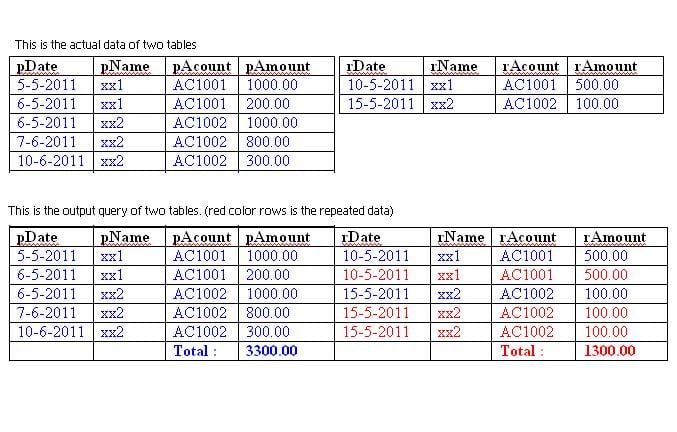
I created one database like credit card statement. Purchases all in one table. Debited all in another one table.
I am trying to link two tables using with inner join. But its repeating the data depending on purchases record count.

Table1 = Purchases
Table2 = Received

SELECT * FROM Purchases INNER JOIN Received ON Purcheses.pAcount = Received.rAcount

I am using crystal report 9. Now the out put is coming like this (pls chk the attachment)
I dont want to show the red color rows data

Anyone can help me. thank you
Prasad
Attachments data.JPG 71.54KB
Prasadbabu
Newbie Poster
5 posts since Aug 2011
Reputation Points: 10
Solved Threads: 0
 

You can't really just "exclude" the data in red the way you show by using a join between the tables. There's no way to join the tables that will result in that.

You can sort of approximate it by using something like this:

select 
pDate as sortDate, 
pDate , 
pName , 
pAcount , 
pAmount ,
NULL as rDate , 
NULL as rName , 
NULL as rAcount , 
NULL as rAmount 
from Purchases
UNION
select 
rDate as sortDate , 
NULL as pDate, 
NULL as pName , 
NULL as pAcount , 
NULL as pAmount ,
rDate , 
rName , 
rAcount , 
rAmount 
from received
order by sortDate


It will give you something that looks like this (sorry for the formatting): sortDate pDate pName pAcount pAmount rDate rName rAcount rAmount
2011-05-05 2011-05-05 xx1 AC1001 1000.00 NULL NULL NULL NULL
2011-05-06 2011-05-06 xx1 AC1001 200.00 NULL NULL NULL NULL
2011-05-06 2011-05-06 xx2 AC1002 1000.00 NULL NULL NULL NULL
2011-05-10 NULL NULL NULL NULL 2011-05-10 xx1 AC1001 500.00
2011-05-15 NULL NULL NULL NULL 2011-05-15 xx2 AC1002 100.00
2011-06-07 2011-06-07 xx2 AC1002 800.00 NULL NULL NULL NULL
2011-06-10 2011-06-10 xx2 AC1002 300.00 NULL NULL NULL NULL

Then, in Crystal, just hide the "sortDate" column and you'll get fairly close to what you're looking for. You can, of course, play with the sort clause in the SQL statement if you want all the account data together, then use Crystal for grouping/totalling.

Hope this helps. Good luck!

BitBlt
Master Poster
711 posts since Feb 2011
Reputation Points: 367
Solved Threads: 109
 

Thank you very much, It is working fine. But one little error is coming

that is

in pAmount field data showing correctly only. but rAmount field data showing some symbols.

pls chk the attachment

Thank you
Prasad

Attachments data2.JPG 93.45KB
Prasadbabu
Newbie Poster
5 posts since Aug 2011
Reputation Points: 10
Solved Threads: 0
 

Can't really help with that. All I can suggest is to check the data types on your table, then check and see what Crystal is doing for formatting.

BitBlt
Master Poster
711 posts since Feb 2011
Reputation Points: 367
Solved Threads: 109
 

Yes sir I solved the problem. instead of UNION I used UNION ALL. then it was coming.
Once again Thank you very much. Now its working fine.

Prasadbabu
Newbie Poster
5 posts since Aug 2011
Reputation Points: 10
Solved Threads: 0
 

This question has already been solved

Post: Markdown Syntax: Formatting Help
You