I am trying to make a tool that can allow me to join text...
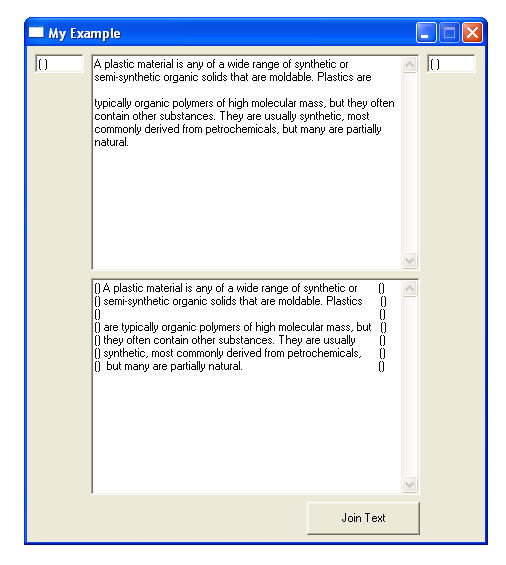
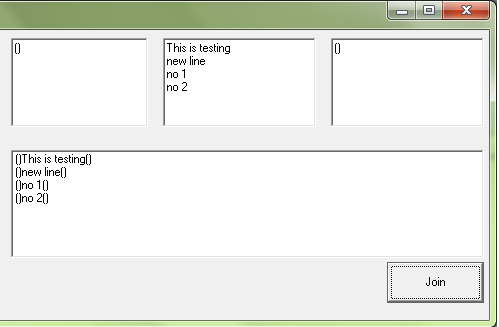
For example, my project have four listboxes like my example:
[One] [Two] [Three] <== these are thre list boxes or three
text boxes with multiline option, which the job is to make
something like this [One Two Three] after joining the texts.
The final job is suppose to be place it in the listbox four.
Please take a look my attachment for better understanding...
Thanks in advance
2
Contributors
15
Replies
15 Hours
Discussion Span
1 Year Ago
Last Updated
16
Views
Question Answered
Related Article:How to view copy cut text in vb6 or registry
is a solved Visual Basic 4 / 5 / 6 discussion thread by razamughal67 that has 3 replies, was last updated 1 year ago and has been tagged with the keywords: 1.
I assume you use listbox for all controls :
You can use '&' ampersand sign to concatenate all items with same index for every listbox.
See this following code :
Private Sub Command1_Click()
For i = 0 To List1.ListCount - 1
List4.AddItem List1.List(i) & List2.List(i) & List3.List(i) ' add items in list 1,2,3 to list 4
Next i
End Sub
Thank you so much Jx_Man :-)
Now that i see the code working, i was wondering if there was a way i can switch
from Listboxes to Textboxes so i can just copy and paste the text in Listbox 1,2,3.
God bless you JX, thank you for your help and support.
Jx_Man, your code works perfect, but if i try with multiple
lines of text, i only get one line of text, i think there is
a breaking point in the text, and that is why i get only one
line of joined text in Listbox4.
Hey! JX is working ^_^ it does work, but i have to add
the same amount of symbols as the text in order for the
coding to work, the only thing is that i will have to find
a way to add the symbols and the text when the project is compile.
i don't know how to explain, let me see if i can. okay, right now
i can easily add the symbols and the text to the project cuz is not
compile jet, but once is complile into an executable, there will be
no way i can add these symbols and text, unless i add some extra boxes
to add the text to Listbox 1, 2, and 3.
Okay since you need to copy-paste text in textbox 2, then i rewrite this code.
I assume you have 3 textboxes and 1 listbox to join all text.
Try this :
Private Sub Command2_Click()
Dim myParas As Variant
Dim i As Integer
myParas = Split(Text2, vbNewLine)
Dim a() As String
a = Split(Text2, vbNewLine)
For i = 0 To UBound(myParas)
List1.AddItem Text1.Text & a(i) & Text3.Text
Next
End Sub
I think am gonna be alright, this is what i have so far...
I end up adding the fallowing to the project:
a textbox so i can add the main text to Listbox 2
then to Listbox 1 i added a buttom to add what ever amount of text
i need acording to how many lines of text i have in listbox 2, for
this i added one line of code to that buttom so i can count how many
lines of text is in listbox2 = in a label1 and did the same for listbox 3
a little complicate, but there i go :-) i also added a code to the Textbox
that send the text to Listbox2, cuz i needed to breake the multilines of text
from that textbox to be send to Listbox 2.
Oh wait! i was not aware of this :-)
Thank you! let me try and see how it works!
Thank you again
Okay. Try it and give a feedback.
If you already managed it then post your code and mark this thread as solved.
It will help another member who has same problem like you. :)
Thank you.
My code is complex :-) i think that i am the only one that
may understand it :-) but i will post the code here, and if
there is somebody out there that can make it better that will
be very nice, but for now i am happy atleast with this coding. :-)
Thank you for your help JX.
Ooops! i tried to upload the code with everything :-)
But i forgot i can't :-) okay i will post the code and
then the controls needed.
Private Sub Command1_Click()
For i = 0 To List1.ListCount - 1
List4.AddItem List1.List(i) & List2.List(i) & List3.List(i)
Next i
End Sub
Private Sub Command4_Click()
List4.Clear
Dim strLine() As String
Dim i As Integer
strLine() = Split(Text3.Text, vbCrLf)
For i = 0 To UBound(strLine)
List2.AddItem strLine(i)
Next
Label3.Caption = CStr(List2.ListCount)
End Sub
Private Sub Command5_Click()
Dim i As Long
Open App.Path & "\" & "Ok.txt" For Output As #23
For i = 0 To List4.ListCount - 1
Print #23, List4.List(i)
Next i
Close #23
End Sub
Private Sub Form_Load()
Me.Icon = Nothing
End Sub
Private Sub Command2_Click()
List1.AddItem Text1
Label1.Caption = CStr(List1.ListCount)
List3.AddItem Text2
Label2.Caption = CStr(List3.ListCount)
End Sub
Ooops! i tried to upload the code with everything :-)
But i forgot i can't :-) okay i will post the code and
then the controls needed.
Private Sub Command1_Click()
For i = 0 To List1.ListCount - 1
List4.AddItem List1.List(i) & List2.List(i) & List3.List(i)
Next i
End Sub
Private Sub Command4_Click()
List4.Clear
Dim strLine() As String
Dim i As Integer
strLine() = Split(Text3.Text, vbCrLf)
For i = 0 To UBound(strLine)
List2.AddItem strLine(i)
Next
Label3.Caption = CStr(List2.ListCount)
End Sub
Private Sub Command5_Click()
Dim i As Long
Open App.Path & "\" & "Ok.txt" For Output As #23
For i = 0 To List4.ListCount - 1
Print #23, List4.List(i)
Next i
Close #23
End Sub
Private Sub Form_Load()
Me.Icon = Nothing
End Sub
Private Sub Command2_Click()
List1.AddItem Text1
Label1.Caption = CStr(List1.ListCount)
List3.AddItem Text2
Label2.Caption = CStr(List3.ListCount)
End Sub
Noooo! Thank You! JX :-)
I've been trying to make this project for a long time now :-)
But finally i took some of my time and thanks to you i nown have
what i needed to save my final joined text to .txt, .reg, batch,
and much more formats. and yeah, thank you daniweb :-)