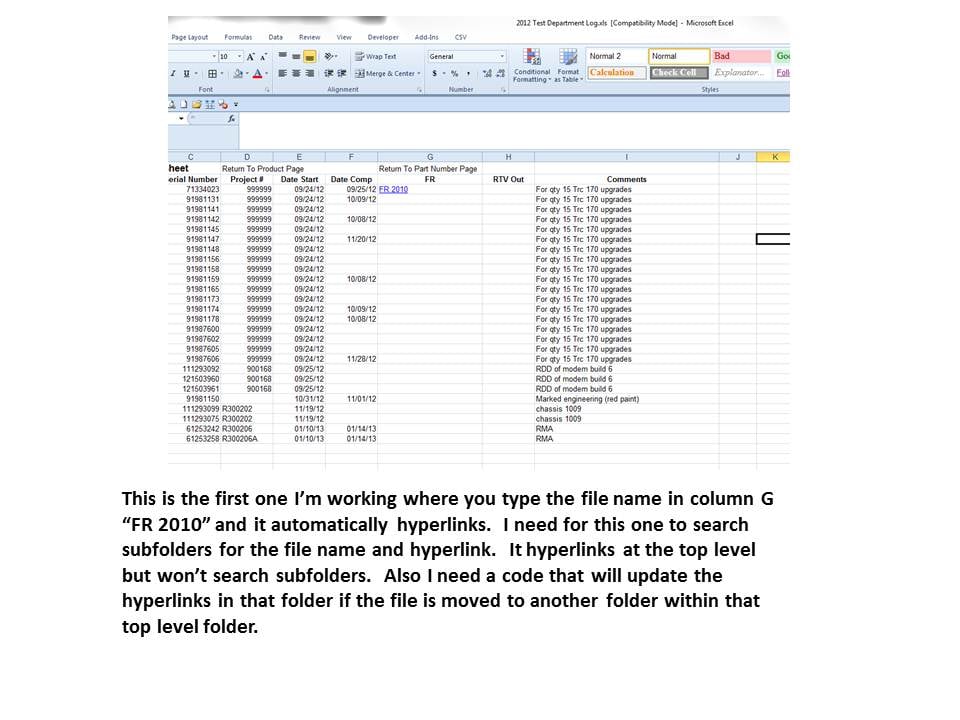
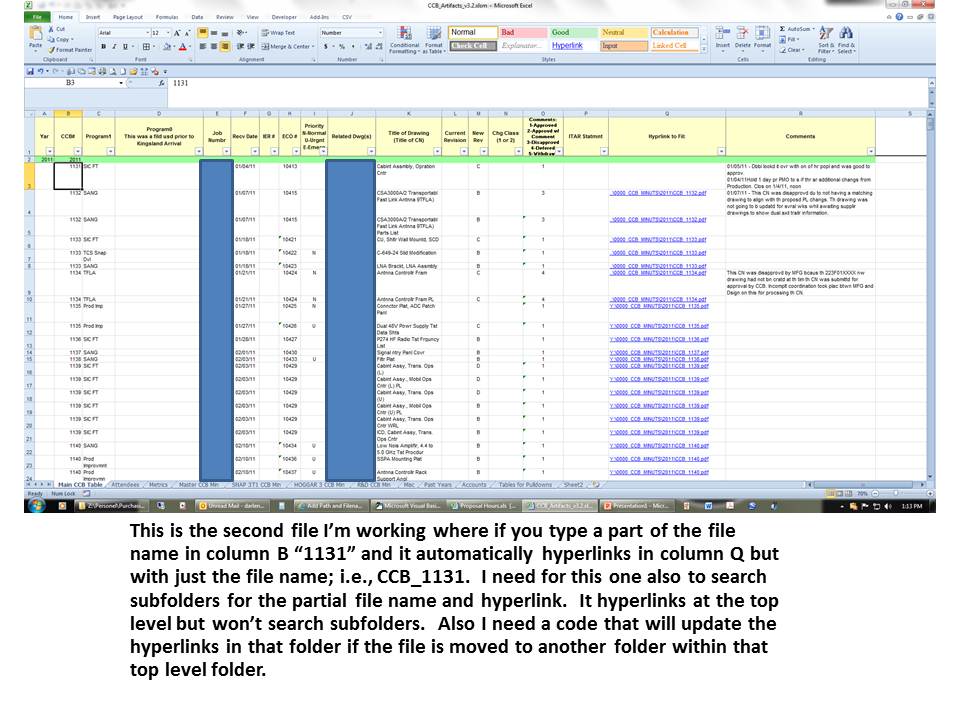
So in a way it's searching the folder Y:\0000_CCB_MINUTS\ and it's subfolders, find the file name then hyperlink to that file within the subfolder.
Here's a little function that will take the filename and the root folder and find the file and return the full path of the file including the filename.
Public Function GetFullPath(ByVal Filename As String, ByVal RootFolder As String) As String
GetFullPath = Directory.GetFiles(RootFolder, Filename, SearchOption.AllDirectories)(0)
End Function
I know it's only one command, but having it in a function like this makes your code less cluttered. call it like this GetFullPath(File Name, Root Folder)
Once you have this string your MakeHyperLinkfunction can parse it to make a hyperlink.
Not sure if this could be done, but if that file is moved the hyperlink is redirected to that file. Is that possible also?
I'm working on it but need some help and clarification.
I'm not 100% sure but it sounds like you'd have to set up a File System Watcher
If you have more questions about that it would probably be worth it to start a new post, as that will be a whole new discussion.
Hope all this helps
tinstaafl
Nearly a Posting Virtuoso
1,312 posts since Jun 2010
Reputation Points: 341
Solved Threads: 226
Skill Endorsements: 14
Instead of this:
'Set InRange = Range("Q3").SpecialCells(xlCellTypeLastC ell)
'check to see if folder has trailing \
If Right(ToFolder, 1) <> "\" Then
Filename = ToFolder & "\"
Else
Filename = ToFolder
End If
and this:
InSheet.Hyperlinks.Add Anchor:=rng, Address:= _
Filename & rng.Text & WithExt, TextToDisplay:=rng.Text
Use this:
InSheet.Hyperlinks.Add Anchor:=rng, Address:= _
GetFullPath(rng.text & WithExt,ToFolder), TextToDisplay:=rng.Text
Public Function GetFullPath(ByVal Filename As String, ByVal RootFolder As String) As String
GetFullPath = Directory.GetFiles(RootFolder, Filename, SearchOption.AllDirectories)(0)
End Function
Just a note about this function, it doesn't check if the file isn't found. You could end up with a hyperlink to nothing, but if the file is there it will return the path of the first occurence of the file.
tinstaafl
Nearly a Posting Virtuoso
1,312 posts since Jun 2010
Reputation Points: 341
Solved Threads: 226
Skill Endorsements: 14
Filename in that function is actually a SearhPattern you can use standard wildcard symbols(*,?) in the string. The function as it sits will return the first filepath that it finds. If you want more flexibility and return more than one filepath some changes need to be made:
Public Function GetFullPath(ByVal Filename As String, ByVal RootFolder As String) As String()
GetFullPath = Directory.GetFiles(RootFolder, Filename, SearchOption.AllDirectories)
End Function
Then to add the links something like this might work:
For Each Pth as String in GetFullPath(rng.text & WithExt,ToFolder)
InSheet.Hyperlinks.Add Anchor:=rng, Address:= _Pth
, TextToDisplay:=rng.Text
Next
tinstaafl
Nearly a Posting Virtuoso
1,312 posts since Jun 2010
Reputation Points: 341
Solved Threads: 226
Skill Endorsements: 14
Basically pass it into a structure first, then check how many members the structure receives. GetFullPath will return with 0 members if the search fails.
Dim SearchRsult As List(Of String) = GetFullPath(rng.text & WithExt,ToFolder).ToList
If Not(SearchResult = 0) Then
For Each Pth as String in SearchResult
InSheet.Hyperlinks.Add Anchor:=rng, Address:= _Pth
, TextToDisplay:=rng.Text
Next
End If
tinstaafl
Nearly a Posting Virtuoso
1,312 posts since Jun 2010
Reputation Points: 341
Solved Threads: 226
Skill Endorsements: 14
It looks like your trying to use a sub as a function. What exactly are you trying to do in RecursiveFolder? It looks like you're trying to get a count of the number of '.doc' files with 'FR' in the file name.
tinstaafl
Nearly a Posting Virtuoso
1,312 posts since Jun 2010
Reputation Points: 341
Solved Threads: 226
Skill Endorsements: 14
try this for the filename, o_strFileName = strPath(strPath.Length-1).
What I need to do is when I type the file name in a cell, i.e., "FR 2011", it searches for the file in a directory and in subfolders for the file name and hyperlink to that file as the name is typed in
doesn't the function I gave you work?
tinstaafl
Nearly a Posting Virtuoso
1,312 posts since Jun 2010
Reputation Points: 341
Solved Threads: 226
Skill Endorsements: 14
I'm so sorry, I'm beginning to understand a little better now. Are you using VBA(VB inside Excel)? If so can you put up a screen shot of the worksheet. I think some of the code I gave you was wrong for VBA. In regards to the last code you put up, try this o_strFileName = strPath(lngIndex-1) Then index is 0 based so the last element will always be 1 less than the number of elements.
Also what version of Office are you coding for? I have 2003 and it has a FileSearch object which will do what you want.
tinstaafl
Nearly a Posting Virtuoso
1,312 posts since Jun 2010
Reputation Points: 341
Solved Threads: 226
Skill Endorsements: 14
I think my problem is I don't know where to put o_strFileName = strPath(lngIndex-1)
it should be fine where it is it just needs the '-1' put in.
I have 2010 Excel and FileSearch doesn't work.
How are you trying to access FileSearch? it is part of Office 2010. It will simplify your code tremendously.
tinstaafl
Nearly a Posting Virtuoso
1,312 posts since Jun 2010
Reputation Points: 341
Solved Threads: 226
Skill Endorsements: 14
I got office 2010 installed and worked on some code for you. First off in the vba menu bar go to Tools and choose References. Look for Microsoft Scripting Runtime and make sure it's checked, then click OK. This will allow Intellisense to see the properties and methods of the FileSystemObject making it much easier to work with. Here's the code I came up with:
in Sheet1
'This starts the search routine
Private Sub Worksheet_Change(ByVal Target As Range)
'Change this to the column where the input is coming from
If Target.Column = 1 Then
Set TargetCell = Target
MakeHyperlinks
End If
End Sub
In Module1
'Global variables
Public SearchFolder As String
Public fs As New FileSystemObject
Public f As Folder
Public Hyprlinks As Range
Public AllFiles As files
Public fil As File
Public TargetCell As Range
Public Counter As Integer
Sub MakeHyperlinks()
'Root folder for searching, set it to what you need
SearchFolder = "c:\Test2"
Counter = 1
'Change the "B" to match the column you want the hyperlinks to go into
Set Hyprlinks = Columns("B")
Set TopFolder = fs.GetFolder(SearchFolder)
'Start the recursive search
Call SearchSubFolders(TopFolder)
End Sub
Sub SearchSubFolders(ByVal f1 As Folder)
Dim Subs As Folders
'Search all the files in this folder
Call AddHyperlinks(f1)
Set Subs = f1.SubFolders
For Each flder In Subs
'For each subfolder call this routine again
Call SearchSubFolders(flder)
Next
End Sub
Sub AddHyperlinks(ByVal f2 As Folder)
For Each fil In f2.files
'If the string matches add the hyperlink
If InStr(1, fil.Name, TargetCell.Text) > 0 Then
Worksheets(1).Hyperlinks.Add Anchor:=Hyprlinks.Cells(Counter), Address:=fil.Path
'Increment to the next cell
Counter = Counter + 1
End If
Next
End Sub
tinstaafl
Nearly a Posting Virtuoso
1,312 posts since Jun 2010
Reputation Points: 341
Solved Threads: 226
Skill Endorsements: 14