Hello,
Here is the scenario :
I have the follwoing sales return from in my software:
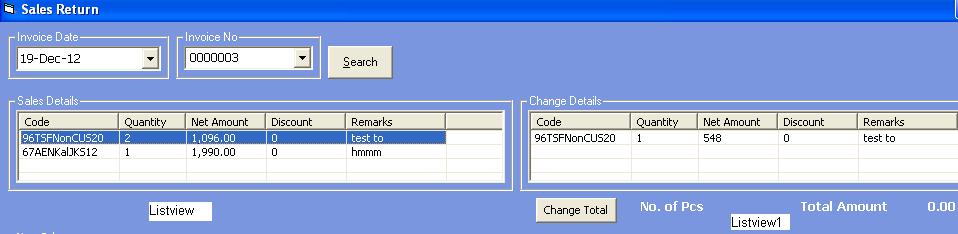
In the from I have tow listview control, the left is Listview and the right is Listview1. I have the following code in procedure :
Dim xsprice As String
Dim xsprice1 As String
Dim xsquantity As String
Dim xcode As String
Dim xprofit As String
Dim xprofit1 As String
Dim xtotalonhand As String
Dim xtotalreturn As String
Dim xdiscount As String
Dim xsinvno As String
Dim xsinvdt As String
Dim xremark As String
Dim xreturnprice As String
Dim lvwItem As ListItem
Dim mylist As Integer
Dim cn As ADODB.Connection
Dim rs As ADODB.Recordset
Dim rs1 As ADODB.Recordset
With ListView
For Each lvwItem In ListView.ListItems
lvwItem.SubItems(1) = xsquantity
'lvwItem.SubItems(2) = xsprice
Next lvwItem
With ListView1
For Each lvwItem In ListView1.ListItems
lvwItem.Text = xcode
lvwItem.SubItems(1) = xtotalreturn
lvwItem.SubItems(2) = xreturnprice
Next lvwItem
Set cn = New ADODB.Connection
cn.ConnectionString = "Provider=Microsoft.Jet.OLEDB.4.0;Data Source=" & App.Path & "\main.mdb;Persist Security Info=False"
cn.Open
Set rs = New ADODB.Recordset
rs.Open ("SELECT * FROM tblstock WHERE code = '" & xcode & "'"), con, adOpenDynamic, adLockOptimistic
xtotalonhand = rs!on_hand
rs!on_hand = Val(xtotalreturn) + Val(xtotalonhand)
rs1.Open ("SELECT * FROM tblsales WHERE code = '" & xcode & "'"), con, adOpenDynamic, adLockOptimistic
xprofit = rs1!profit
xprofit1 = (Val(xprofit) / Val(xsquantity)) * (Val(xsquantity) - Val(xtotalreturn))
xsprice = rs1!sprice
xsprice1 = Val(xsprice) - Val(xreturnprice)
rs1!profit = xprofit1
rs1!sprice = xsprice1
rs1.Update
rs.Update
End With
End With
I have two tables in my Access database, tblstock and tblsales. what I am trying to do here is, if a customer return a certain purchased product of a certain invoice no.the two tables will be updated e.g. in tblstock the on_hand field will be added with the pcs of product returend and in tblsales. two fields, sprice and profit will be calculated as per the string.
Now when I run the code, I have a type mismatch error in the follwing line :
For Each lvwItem In ListView.ListItems
My question is, Is my coding is right and why the error is coming ?
Plz respond. Thanks in advance
4
Contributors
52
Replies
1 Month
Discussion Span
3 Months Ago
Last Updated
85
Views
Question Answered
Related Article:insert data in data grid vb 6.0 view from text box
is a Visual Basic 4 / 5 / 6 discussion thread by udaraps that has 4 replies, was last updated 7 months ago and has been tagged with the keywords: boxes, data, grid, text, vb6.0.
The problem is because you are referring to only the first coloumn - ListItems only returns the first. For any other coloumns after that you will need to call the SubItem as well...
With ListView
For Each lvwItem In ListView.ListItems(1).ListSubItems
lvwItem.SubItems(1) = xsquantity
'lvwItem.SubItems(2) = xsprice
Next lvwItem
With ListView1
For Each lvwItem In ListView1.ListItems(1).ListSubItems
lvwItem.Text = xcode
lvwItem.SubItems(1) = xtotalreturn
lvwItem.SubItems(2) = xreturnprice
Next lvwItem
but still having the same "Type Mismatch" error in the line
For Each lvwItem In ListView.ListItems(1).ListSubItems
sorry, didn't get the code clearly. where should I use it ? after line 1 ? should I stick with the line 2 ? what value should I use in "empty value" ?? another thing I am not adding any value in the listview, just trying to pick up the data from listview and listview1. what will be here :
It says to add the value of xsquantity to coloumn 2 and so on. I am not sure anymore what you require. To answer your original question, the answer as above.
Sorry, I did not get my question clear to you. What I want here is to put data back such as quantity, sale price and accordingly profit, to my database from the Listview1 according to the product code which is in the column 1 of listview1. did you remember that you give me this idea of declearing variable answering one of my question (update stock data) in this forum. Here I try to do the same thing, first declearing variable like xcode, xsprice etc, trying to put data from the listview and listview1 into those variables and calculate and update my database.
Am I going the wrong way ??
if that is your goal then yes your code is backwards. your variables(xcode,xsprice, etc.) should be on the left side of the '=' and the subitems(?).text on the right side of the '='. By the same token it looks like you've repeated that mistake further on in your code. the database variables should be on the left side, if you want to transfer the amounts to the database.
Your declaring of variables etc is perfect. As tinstaafl pointed out, you had your logic the wrong way around. If you want to get to an answer of 2, you will be using 1+1 = 2. If you want the answer to 1+1, you will have 1+1 = 2
Hope this clarifies it a bit for you. This is the problem when users just copy code over and they do not understand exactly what it does. :)
yes I admit it, as a new coder I just want to copy and do the work. Thanks for mentioning. I will correct the code. But the thing is, picking data from the listview, was that correct as per the vb code I tried ??
No, you were trying to add values to the listview. To grab values from your listview, do the following -
For Each lvwItem In ListView1.ListItems(1).ListSubItems
xcode = lvwItem.Text
xtotalreturn = lvwItem.SubItems(1)
xreturnprice = lvwItem.SubItems(2)
Next lvwItem
yes I admit it, as a new coder I just want to copy and do the work
We were all there once upon a time. :) As long as you learn from what you are copying over, you will be on the right track. ;)
One of the best things to learn, is about debugging your code with the VS debugger. With it you can step through the code line by line and examine exactly what values your variables are getting. Probably one of the best learning tools you can master.
Thanks for the advice and codes. I will try my level best. Although I know it is offtopic but tinstaafi what is VS debugger ? How can I start and use it ?
With ListView
'set lvwitem = listview.ListItems.Add(,,"",,)''""
For Each lvwItem In ListView.ListItems
xsquantity = lvwItem.SubItems(1)
'lvwItem.SubItems(2) = xsprice
Next lvwItem
With ListView1
For Each lvwItem In ListView1.ListItems(1).ListSubItems
xcode = lvwItem.Text
xtotalreturn = lvwItem.SubItems(1)
xreturnprice = lvwItem.SubItems(2)
Next lvwItem
have the above code now, still got the type mismatch error in the following line
For Each lvwItem In ListView.ListItems
i have tried it this way also, same result
For Each lvwItem In ListView.ListItems (1).ListSubItems
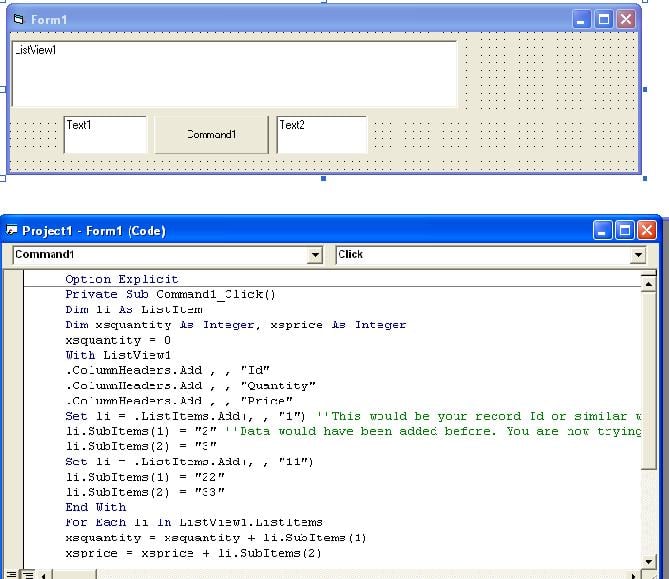
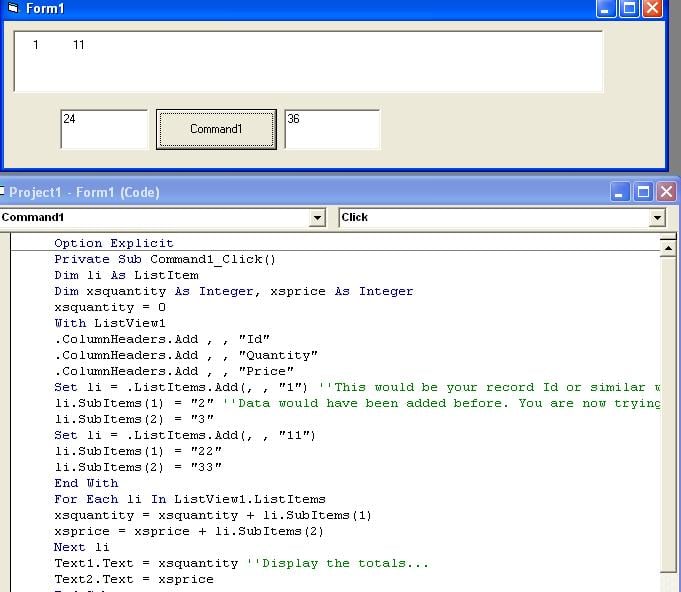
I have re-written your code to the following and tested it. Works fine...
Dim li As ListItem
Dim xsquantity As Integer, xsprice As Integer
xsquantity = 0
With ListView1
.ColumnHeaders.Add , , "Id"
.ColumnHeaders.Add , , "Quantity"
.ColumnHeaders.Add , , "Price"
Set li = .ListItems.Add(, , "1") ''This would be your record Id or similar when data was loaded...
li.SubItems(1) = "2" ''Data would have been added before. You are now trying to return that data and calculate all totals...
li.SubItems(2) = "3"
Set li = .ListItems.Add(, , "11")
li.SubItems(1) = "22"
li.SubItems(2) = "33"
End With
For Each li In ListView1.ListItems
xsquantity = xsquantity + li.SubItems(1)
xsprice = xsprice + li.SubItems(2)
Next li
Text1.Text = xsquantity ''Display the totals...
Text2.Text = xsprice
thanks andreret for trying out the code. But I think you missed out the thing that I want. I do not want to add item in the listview or listview1. I am trying to do some calculation on the basis of the datas that already in the listview and listview1 and put back the calculation result to my database. Please read my first post again.
I have two tables in my Access database, tblstock and tblsales. what I am trying to do here is, if a customer return a certain purchased product of a certain invoice no.the two tables will be updated e.g. in tblstock the on_hand field will be added with the pcs of product returend and in tblsales. two fields, sprice and profit will be calculated as per the string.
this is from my first post for your referrence. This whole calculation will be done as per the product code in the existing listview1 code column. I think I can make it clear.
:) Which is exactly what I gave you... In place of Text2.Text you need to add the code that will save the data to your database using the totals of xsquantity and xsprice.