In this tutorial you will learn how to create a simple menu using Flash, while the menu items themselves will be imported from an XML file called menu.xml.
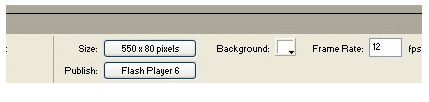
1. Start by creating a new flash document which can be called anything you like as long as the size is set to 550 x 80 px and the frame rate to 24fps in the property panel as shown below. If you can’t see this, click anywhere on the editing area and press CTRL+F3.
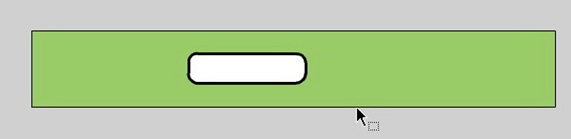
2. Next, create a rounded rectangle sized 135 x 40.6px but of any radius, the one shown below is 10 px.
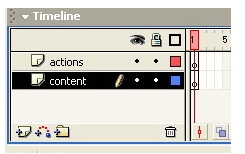
3. Now make two layers, the first being ‘actions’ and the second ‘content’ as shown, and then put the rounded rectangle into the contents layer.
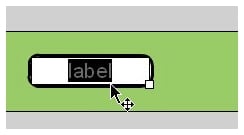
4. Select the text tool and insert text with a label of ‘label’.
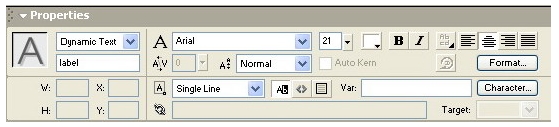
5. Set the properties of this text label so that it looks similar to the illustration. The Dynamic Text setting is used so you the label can be changed at runtime.
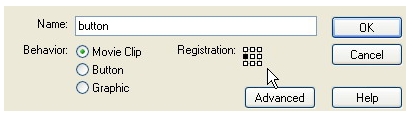
6. Select both text and rectangle, then press F8. You will see the following window, set the properties similar to this and give it an instance name of “old”.
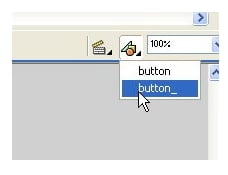
7. Convert this to a symbol by pressing F8 and setting name to ‘button_’ while giving it an instance name “label” and now select “button” as shown.
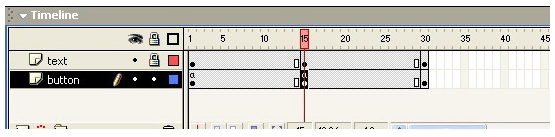
8. Add two layers, one “text” and another “button” and then put text into the text layer and your button in the button layer. Convert text to a movie clip by pressing F8 and name it as text. Set the instance name to “label” and add the key frames as shown, selecting key frame 1 from the button layer and pressing F9. Add action script stop(); and then do same with layer 15.
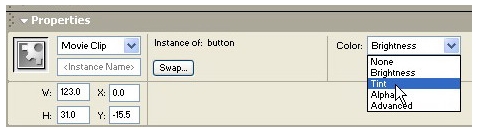
9. Now select key frame 15 and then select the rectangle. Set the Color property to Tint, and choose whatever color you want but with an alpha percent of 50%. You will find this option at the right hand side of the color picker when collapsed.
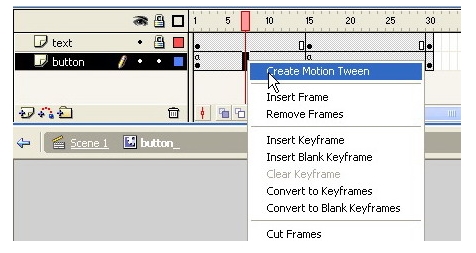
10. Repeat step 9, but with the text label. 11. Next, you need to add some ‘motion tween’ by right clicking between the keyframe ‘1 and 15’ and ‘15 and 30’ of both layers one by one and selecting Create Motion Tween.
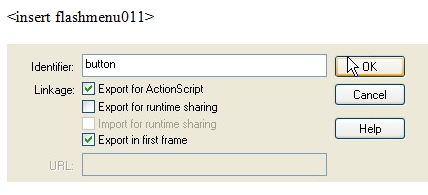
12. Open the Library window by pressing F11 and then right click on the ‘button_’ item. Select linkage and then set properties as given below, checking the export for ActionScript and export in first frame boxes. This helps you to access this object during runtime dynamically.
13. In the directory where you have saved this flash document, create an xml file as follows…
<xml width="80" horizontal="true">

  <menu>
  <name>Cover</name>
  <link>http://www.geocities.com/coolvish91</link>
  <target>_self</target>

  </menu>

  <menu>
  <name>Introduction</name>
  <link>http://www.geocities.com</link>
  <target>fr1</target>
  </menu>

  <menu>
  <name>Formatting</name>
  <link>http://www.yahoo.com</link>
  <target>_self</target>

  </menu>

  <menu>
  <name>Tables</name>
  <link>http://www.msn.com</link>
  <target>_blank</target>
  </menu>

  <menu>
  <name>Frames</name>
  <link>http://www.adobe.com</link>
  <target>_parent</target>
  </menu>

  <menu>
  <name>Forms</name>
  <link>http://www.microsoft.com</link>
  <target>_parent</target>

  </menu>
  </xml>
14. Now go back to scene one and in the actions layer first keyframe press F9 to open the action panel and then insert the following code:
/*
       SIMPLE FLASH-XML MENU
       VISHESH YADAV
       12/05/2005
  */

  fscommand("allowscale", "false");

  function xmlLoaded(loaded) {
       if (loaded) {
            now._visible = false;
            xmlNode = xmlData.firstChild;
            total = xmlNode.childNodes.length;
            name = [];
            link = [];
            Target = [];
            mcWidth = xmlNode.attributes.width;
            mcHori = xmlNode.attributes.horizontal;
            for (i=0; i<total; i++) {
                name[i] = xmlNode.childNodes[i].childNodes[0].firstChild.nodeValue;
                link[i] = xmlNode.childNodes[i].childNodes[1].firstChild.nodeValue;
                Target[i] = xmlNode.childNodes[i].childNodes[2].firstChild.nodeValue;
                _root.createEmptyMovieClip("_button", i);
                _root._button.attachMovie("button", button+i, i);
            }
            // end of for
       } else {
            now._visible = true;
            now._width = _root._width-20
            now._height=(1/7.74)*now._width
       }
       // end if
  }
  // End of the function
  now._visible = false;
  xmlData = new XML();
  xmlData.ignoreWhite = true;
  xmlData.load("menu.xml");
  xmlData.onLoad = xmlLoaded;
15. Staying in scene 1, select ‘button_’ and then press F9 to open the action panel again and insert the following code:
onClipEvent (load) {
    deep = _parent.getDepth();
    getWidth = _parent._parent._parent.mcWidth;
    getHori = _parent._parent._parent.mcHori;
    if (getHori == "true") {
        this._width = getWidth;
        this._height = 0.300000*getWidth;
        this._x = 10+deep*(this._width+5);
        this._y = 17;
    } else {
        this._width = getWidth;
        this._height = 0.300000*getWidth;
        this._x = 10;
        this._y = 20+deep*(this._height+5);
    }
    getLink = _parent._parent._parent.link[deep];
    getlabel = _parent._parent._parent.name[deep];
    getTarget = _parent._parent._parent.Target[deep];
    this.label.label.text = getlabel;
}
on (release) {
    getURL(getLink, getTarget);
}
on (rollOver) {
    this.gotoAndPlay(2);
}
on (rollOut) {
    this.gotoAndPlay(11);
}
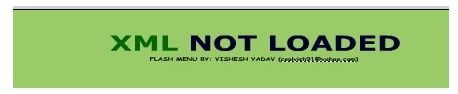
16. You can now delete the button if you like and it is stored in the library, available for use anytime. However, you should insert a movie clip which will be shown if your XML file is not found, with an instance name of ‘now’ – it should look something like this:
17. Finally, press CTRL+Enter and you should see your finished Flash menu output.