954,593 Members — Technology Publication meets Social Media
Username:
Password:
Lost login information?
Have something to say? Contribute New Article Reply to this Article

Trying to run mysql script through phpMyAdmin

I have a Yahoo website that uses phpMyAdmin. I've been given the directive "Please run the script mysql_fix_privilege_tables that should be included in your MySQL server distribution to solve this problem!" I do not know how to run this script (or any script) through phpMyAdmin. I've been looking online and one bit of advice was to click the SQL query window icon and type the following:

mysql mysql -u username -p password < mysql_fix_privilege_tables.sql


where username is my user name and password is my password. mysql is listed twice intentionally here because both the command and the name of the database is mysql, or at least that's what the online advice said. I get the "You have an error in your SQL syntax..." error. Does anyone know how to do this and what I did wrong?

Thanks.

VernonDozier
Posting Expert
5,527 posts since Jan 2008
Reputation Points: 2,633
Solved Threads: 711
 

I think your command is in wrong order. Following works for me

mysql -u username  DB_NAME < mysql_fix_privilege_tables.sql -p

Once I execute command I'm asked for password which I type in and job is done.

peter_budo
Code tags enforcer
Moderator
15,436 posts since Dec 2004
Reputation Points: 2,806
Solved Threads: 902
 

I think your command is in wrong order. Following works for me

mysql -u username  DB_NAME < mysql_fix_privilege_tables.sql -p

Once I execute command I'm asked for password which I type in and job is done.


Did you do this through phpMyAdmin or at a command line? I can do it at a command line on my home machine, but I can't get a command line on the web server at Yahoo. I'm stuck going through phpMyAdmin on Yahoo. At the command line on my home machine, it treats that first "mysql" as "find mysql.exe and execute it". Once you are in phpMyAdmin, I don't think it has the same meaning and I think you are no longer supposed to specify the program name (mysql), just like when you type "mysql" at the command line, once you get the "mysql" prompt, you don't type "mysql" anymore. If you were able to do it through phpMyAdmin, can you tell me where you typed that line please?

VernonDozier
Posting Expert
5,527 posts since Jan 2008
Reputation Points: 2,633
Solved Threads: 711
 

Yeah you right, only console. Stupid of me...
If you able to log in yahoos' phpMyAdmin there is somewhere option to import or create table out of existing sql file. I gone check on my hosting, give me few minutes...

peter_budo
Code tags enforcer
Moderator
15,436 posts since Dec 2004
Reputation Points: 2,806
Solved Threads: 902
 

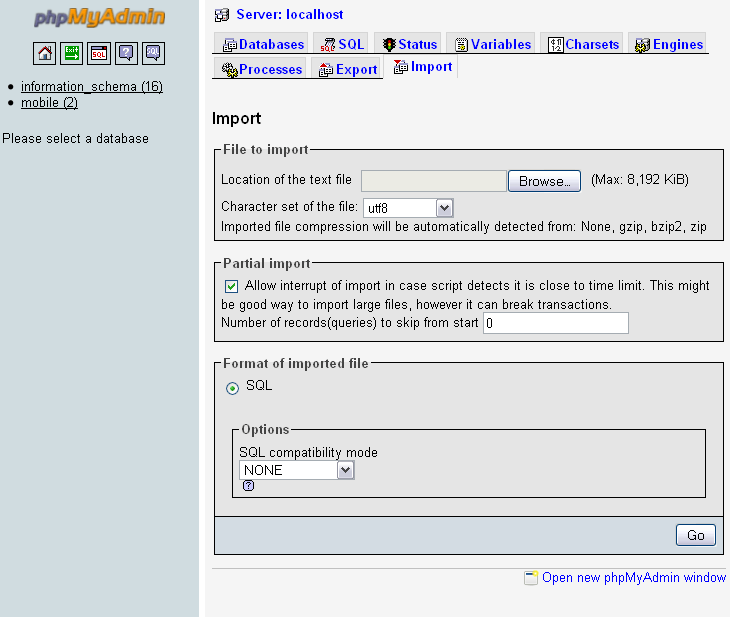
Yes there is import option for text file that you can use for SQL file import. Please see attached image. Sometimes it may kick off with error message about different type of DB used but that can be solved by editing sql file.

Attachments phpMyAdmin.gif 22.27KB
peter_budo
Code tags enforcer
Moderator
15,436 posts since Dec 2004
Reputation Points: 2,806
Solved Threads: 902
 
Yes there is import option for text file that you can use for SQL file import. Please see attached image. Sometimes it may kick off with error message about different type of DB used but that can be solved by editing sql file.

That worked. Thank you!

VernonDozier
Posting Expert
5,527 posts since Jan 2008
Reputation Points: 2,633
Solved Threads: 711
 

May i know what file to import through the phpMyAdmin?

jim272
Newbie Poster
1 post since Dec 2008
Reputation Points: 10
Solved Threads: 0
 

Can someone answer this one? I'm kind of in a jam. Do you copy the code snippet from above into a file named "mysql_fix_privilege_tables.sql" Any help would be great.

CableGuy2
Newbie Poster
2 posts since Dec 2008
Reputation Points: 10
Solved Threads: 0
 
Can someone answer this one? I'm kind of in a jam. Do you copy the code snippet from above into a file named "mysql_fix_privilege_tables.sql" Any help would be great.


Can you please explain what your trying to do?

peter_budo
Code tags enforcer
Moderator
15,436 posts since Dec 2004
Reputation Points: 2,806
Solved Threads: 902
 
Can you please explain what your trying to do?

I've recently upgrading my phpAdmin on Yahoo Web Hosting and am getting a message on the bottom that says my PHP MySQL of 3.5 does not match my MySQL 4.1.14 which may cause unpredictable behavior.

With that said when I click on the privledges tab it says I need to run this mysql fix privledges table.sql to fix my tables.

I am a noob at mysql and am not sure how to run scripts I don't have access too. Sounds like the person above me had a similar situation.

Any ideas?

CableGuy2
Newbie Poster
2 posts since Dec 2008
Reputation Points: 10
Solved Threads: 0
 

I'm having the same issue with my Yahoo hosting. When I click privileges in phpMyAdmin, I get the following error:

Warning: Your privilege table structure seems to be older than this MySQL version!
Please run the script mysql_fix_privilege_tables that should be included in your MySQL server distribution to solve this problem!

I have no idea how to run the so-called mysql_fix_privilege_tables script. Any help would be greatly appreciated.

Thanks!

bhall7
Newbie Poster
1 post since Feb 2009
Reputation Points: 10
Solved Threads: 0
 

i'm having the same issues T^T

can somebody tell me how to run mysql_fix_privilege_tables? where can i find the script?

charvie
Newbie Poster
24 posts since May 2008
Reputation Points: 10
Solved Threads: 0
 

In my windows system it's in e:\Program Files\MySQL\MySQL Server 5.1\share\mysql_fix_privilege_tables.sql and on my linux system in /usr/bin/mysql_fix_privilege_tables

smantscheff
Nearly a Posting Virtuoso
1,233 posts since Oct 2010
Reputation Points: 300
Solved Threads: 254
 

Has anyone on Yahoo tried running the "Repair database" command in the Webhosting Control Panel > Create & Update > MySQL Database area?

bbman
Junior Poster
182 posts since May 2010
Reputation Points: 22
Solved Threads: 10
 

This question has already been solved

Post: Markdown Syntax: Formatting Help
You