We're a community of 1076K IT Pros here for help, advice, solutions, professional growth and fun. Join us!
1,075,725 Members — Technology Publication meets Social Media
Username:
Password:
Lost login information?
Start New Discussion Reply to this Discussion

Modify table (JavaScript)

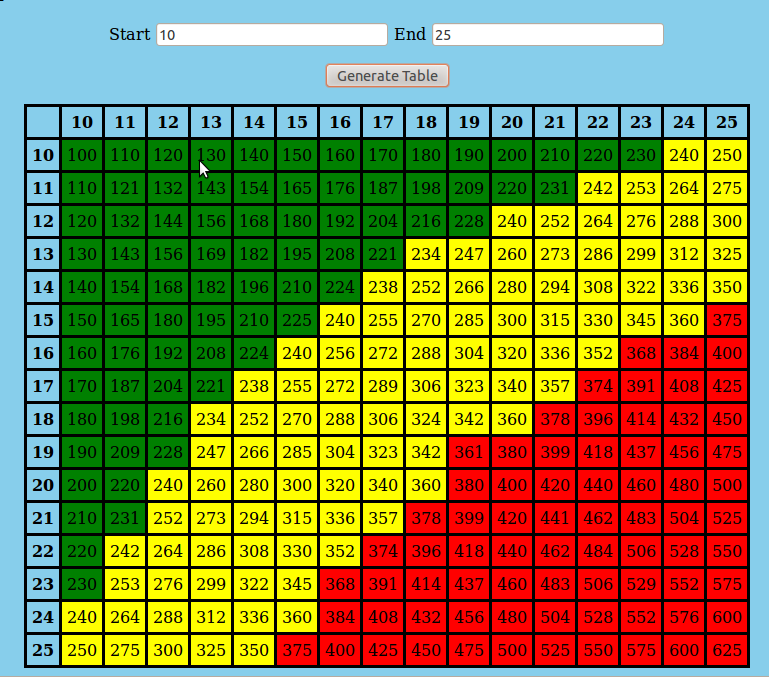
I'm trying to get the colors to show on my table. I'm not sure how to even start. I was told to make 3 different css classes and work with that, but still not understanding how to do it.

Table on the left is the example. Table on the right is the one I created.
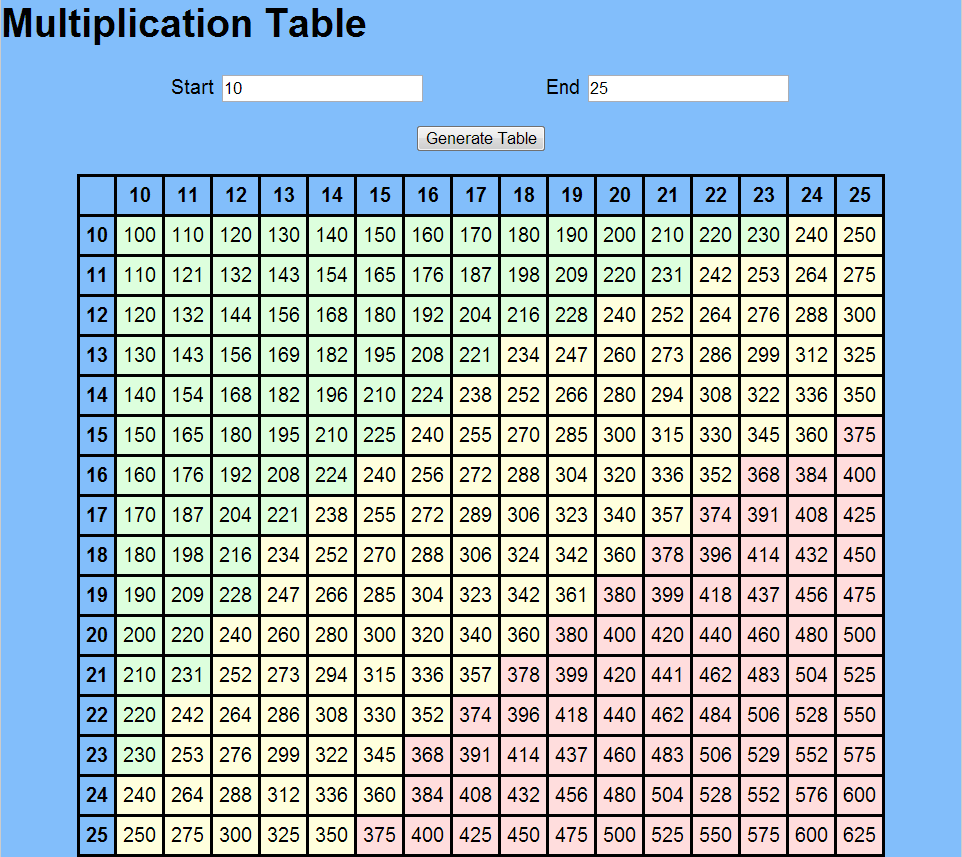
TableMyTable1

Attachments Table.png 71.15KB MyTable1.png 77.61KB
4
Contributors
23
Replies
5 Days
Discussion Span
5 Months Ago
Last Updated
25
Views
Question
Answered
default_098
Newbie Poster
13 posts since Nov 2012
Reputation Points: 0
Solved Threads: 0
Skill Endorsements: 0

I don't know what you want to dictate what element gets what color. But if you create three different CSS styles you can change the class of a td element:

document.getElementById("234").className = "green_box";

GliderPilot
Posting Whiz in Training
239 posts since Sep 2006
Reputation Points: 34
Solved Threads: 42
Skill Endorsements: 12

Here is an example of CSS code you would use:

.green_box {background-color:green}
.yellow_box {background-color:yellow}
.red_box {background-color:red}

Assign each cell a unique ID and assign it a class using JavaScript. Or just manually assign the cells the class they should be styled with.

JorgeM
Industrious Poster
4,002 posts since Dec 2011
Reputation Points: 294
Solved Threads: 543
Skill Endorsements: 115

This is what I have in my style.css. I created the .high,.middle,.low classes but how do I add them to the main class to display the colors on the table. The user can enter any numbers in start and end, so the colors have to show no matter what the input is.

body {
    background-color: #87CEEB;
}

table, th, td {
    border-style: solid;
    border-color: black;
    padding: 5px;
}
table {
    margin-right: auto;
    margin-left: auto;
    border-collapse: collapse;
}

.high {
    background-color: green;
}

.middle {
    background-color: yellow;
}

.low {
    background-color: red;
}
default_098
Newbie Poster
13 posts since Nov 2012
Reputation Points: 0
Solved Threads: 0
Skill Endorsements: 0

What's your code to create the table cells?

In that code you should add the css class to the cells.

AleMonteiro
Master Poster
752 posts since Aug 2010
Reputation Points: 129
Solved Threads: 140
Skill Endorsements: 23

You just need to add <td class="high">378</td>, <td class="low">234</td> etc...

GliderPilot
Posting Whiz in Training
239 posts since Sep 2006
Reputation Points: 34
Solved Threads: 42
Skill Endorsements: 12

I tred '<td class="high">378</td> and I get the whole table to be green and the whole table has the result 378. Am I placing it in the right place. Below is my loop where I get my results on the table.

for (var i = start; i <= end; i++) {
                    MultTbl += '<tr>';
                    MultTbl += '<th>' + i + '</th>';
                    for (var j = 0; j < last; j++) {
                        MultTbl += '<td>' + (i * (start + j)) + '</td>';
                    }
                    MultTbl += '</tr>';

                }
default_098
Newbie Poster
13 posts since Nov 2012
Reputation Points: 0
Solved Threads: 0
Skill Endorsements: 0

Try something like this:

for (var i = start; i <= end; i++) {
                    MultTbl += '<tr>';
                    MultTbl += '<th>' + i + '</th>';
                    for (var j = 0; j < last; j++) {
                        var val = (i * (start + j));
                        MultTbl += '<td class="' + getValueCss(val) + '">' + val + '</td>';
                    }
                    MultTbl += '</tr>';

                }

// Recieves a value and return the css class name
function getValueCss(val) {
    // do something and return some css
    return 'some css name'
}
AleMonteiro
Master Poster
752 posts since Aug 2010
Reputation Points: 129
Solved Threads: 140
Skill Endorsements: 23

That only changed the whole table to green when using the class name high with the correct numbers on the table.

default_098
Newbie Poster
13 posts since Nov 2012
Reputation Points: 0
Solved Threads: 0
Skill Endorsements: 0

If the function getValueCss always returns 'high', then all cells will be green. In that function you need to code the algorithm that will decide the color.

AleMonteiro
Master Poster
752 posts since Aug 2010
Reputation Points: 129
Solved Threads: 140
Skill Endorsements: 23

I got it to show how all the colors, but that is only for 10 and 25. How can I get it to where if I put any number the code should generate the table and set the class of each cell to indicate the relative size of the value. So about a third of the table should have 3 colors. Below is the code that worked for 10 and 25.

About a third of the table should be each color.

function getValueCss(val) {
                    if (val <= 231)
                        return 'high'
                    else if (234 <= val && val <= 360)
                        return 'middle'
                    else
                        return 'low'
                }
default_098
Newbie Poster
13 posts since Nov 2012
Reputation Points: 0
Solved Threads: 0
Skill Endorsements: 0

How about

// @val current cell value
// @max last cell value
function getValueCss(val, max) {

    var d = Math.floor( max / 3 );

    if ( val < d ) {
        return 'low';
    }
    else if ( val < (d*2) ) {
        return 'middle';
    }
    else {
        return 'high';
    }
}
AleMonteiro
Master Poster
752 posts since Aug 2010
Reputation Points: 129
Solved Threads: 140
Skill Endorsements: 23

I tried that and it turned the whole table to red. Where did you get max becuase I don't have any var max. Below are my variables that I have declared for this table.

var start = parseInt(get('start').value);
var end = parseInt(get('end').value);
var last = end - start + 1;
var MultTbl = '<table>'
var val = (i * (start + j));
default_098
Newbie Poster
13 posts since Nov 2012
Reputation Points: 0
Solved Threads: 0
Skill Endorsements: 0

max = end * last

AleMonteiro
Master Poster
752 posts since Aug 2010
Reputation Points: 129
Solved Threads: 140
Skill Endorsements: 23

Thank you for your help.

default_098
Newbie Poster
13 posts since Nov 2012
Reputation Points: 0
Solved Threads: 0
Skill Endorsements: 0

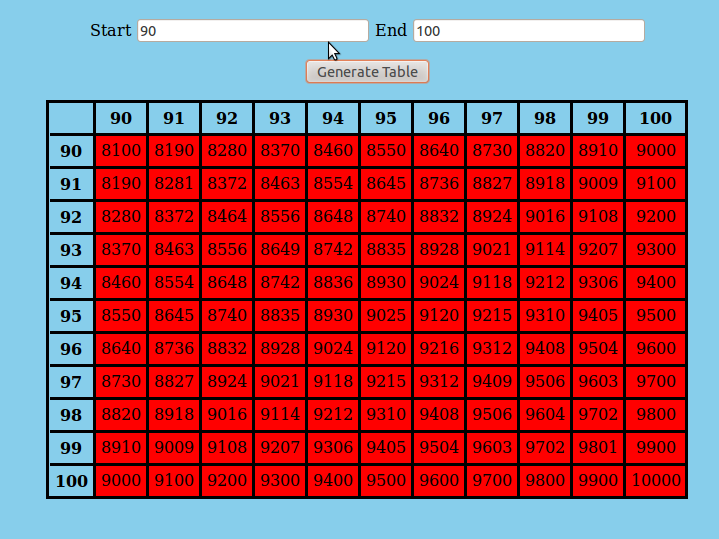
I got everything right so when I showed the instructor he had me try start: 100 and end 110. It colored the whole table red, is there something I'm missing?

default_098
Newbie Poster
13 posts since Nov 2012
Reputation Points: 0
Solved Threads: 0
Skill Endorsements: 0

I think the math is a little off there... try this:

//Get our start, end and total number of numbers
var start = parseInt(get('start').value);
var end = parseInt(get('end').value);
var total = end - start;
var val = (i * (start + j));


function getValueCss(val, start, total) {

  //Find out what our two dividers are
  var d = Math.floor( total / 3);
  var low_d = start + d;
  var high_d = low_d + d;

    if ( val <= low_d ) {
        return 'low';
    }
    else if ( val > low_d && val <= high_d) {
        return 'middle';
    }
    else {
        return 'high';
    }
}
GliderPilot
Posting Whiz in Training
239 posts since Sep 2006
Reputation Points: 34
Solved Threads: 42
Skill Endorsements: 12

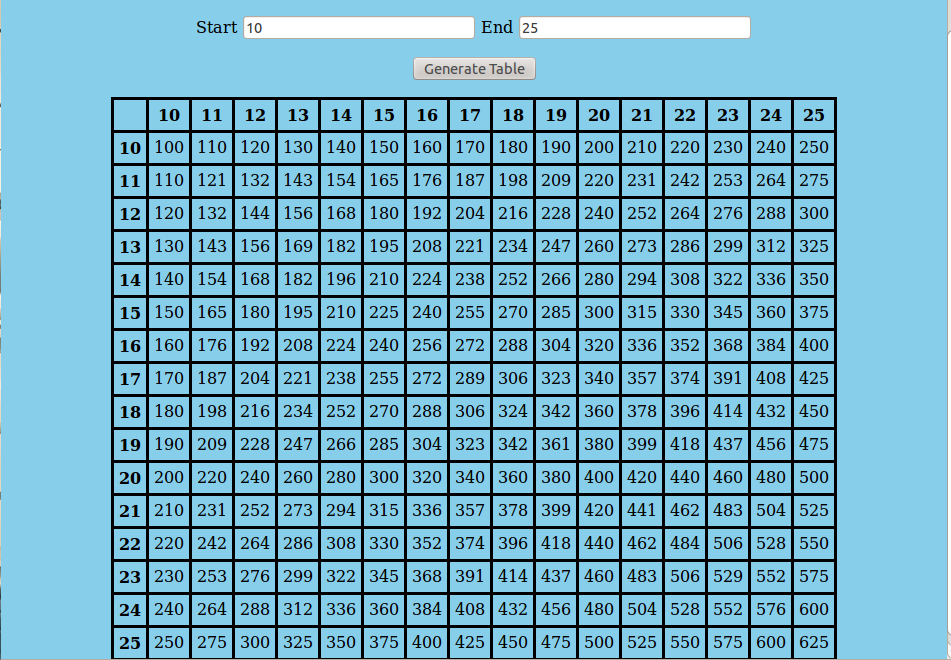
That only colored the whole table green. It worked fine with that math I had there is something thing I'm missing in function getValueCss. It changes to red when I enter numbers like 50 & 60, 100 & 110. It will work if I enter 50 & 100. Table1Table2

Attachments Table1.png 80.09KB Table2.png 43.92KB
default_098
Newbie Poster
13 posts since Nov 2012
Reputation Points: 0
Solved Threads: 0
Skill Endorsements: 0

Can you post the final code you have?

GliderPilot
Posting Whiz in Training
239 posts since Sep 2006
Reputation Points: 34
Solved Threads: 42
Skill Endorsements: 12
<!DOCTYPE html>
<html>
    <title>Multiplication Table</title>
    <head>
        <link href="style.css" rel="StyleSheet" type="text/css"/>
        <h2>Multiplication Table</h2>
        <script>
            function get(ID) {
                return document.getElementById(ID);
            }

            function MultiplicationTable() {
                var start = parseInt(get('start').value);
                var end = parseInt(get('end').value);
                var last = end - start + 1;
                var MultTbl = '<table>'

                if (start > end) {
                    alert("Invalid Data");
                    return;
                }
                for (var i = " "; i <= end; i++) {
                    MultTbl += '<th>' + i + '</th>'
                    for (var i = start; i <= end; i++) {
                        MultTbl += '<th>' + i + '</th>';
                    }
                }
                for (var i = start; i <= end; i++) {
                    MultTbl += '<tr>';
                    MultTbl += '<th>' + i + '</th>';
                    for (var j = 0; j < last; j++) {
                        var val = (i * (start + j));

                        MultTbl += '<td class="' + getValueCss(val) + '">' + val + '</td>';
                    }
                    MultTbl += '</tr>';
                }

                function getValueCss(val, max) {
                    max = end * end;
                    var d = (max / 3);
                    if (val < d)
                        return 'high'
                    else if (val < (d * 2))
                        return 'middle'
                    else 
                        return 'low'
                }

                MultTbl += '</table>';
                get('MultTbl').innerHTML = MultTbl;
            }
        </script>
    </head>
    <body>
        <form>
            <p align="center">
                Start
                <input type="text" id="start"/>
                End
                <input type="text" id="end"/>
            </p>
            <p align="center">
                <button type="button" onclick="MultiplicationTable()">
                    Generate Table
                </button>
            </p>
        </form>
        <div
        id = "MultTbl">
        </div>
    </body>
</html>

** Below is my stylesheet**

body {
    background-color: #87CEEB;
}

table, th, td {
    border-style: solid;
    border-color: black;
    text-align: center;
    padding: 5px;
}
table {
    margin-right: auto;
    margin-left: auto;
    border-collapse: collapse;
}

.high {
    background-color: green;
}

.middle {
    background-color: yellow;
}

.low {
    background-color: red;
}
default_098
Newbie Poster
13 posts since Nov 2012
Reputation Points: 0
Solved Threads: 0
Skill Endorsements: 0

This question has already been solved: Start a new discussion instead

Post: Markdown Syntax: Formatting Help
 
You
 
© 2013 DaniWeb® LLC
Page rendered in 0.1449 seconds using 2.83MB