954,162 Members — Technology Publication meets Social Media
Username:
Password:
Lost login information?
Have something to say? Contribute New Article Reply to this Article

tomcat eclipse jsp problem

Hi,
I am trying to setup a tomcat server in eclipse galileo java ee to test a simple JSP page. I have problem, but no solution to it. So, if i want to see http://localhost:8080/Project/WEB-INF/Hello.jsp , it gives me error page

HTTP Status 404 - /Project/WEB-INF/Hello.jsp

I have tried to change server location (default server location was "use workspace metadata") , so if I put option "use Tomcat installation", it gives me Tomcat default page on http://localhost:8080 ,
but for Hello. jsp it gives me same error. Last option "use custom location" isn't even available.
Can someone please help me if you have succedeed to resolve it?
I have tried other related problems, but they were solved in other version of Eclipse where this problem is solved by uncheking box
"Run modules directly from the workspace". I don't see this option here, so I am stuck.:(

Thanks.

Capra
Newbie Poster
6 posts since Sep 2009
Reputation Points: 10
Solved Threads: 0
 

General folder-file structure of project under Tomcat isTOMCAT_DIRECTORYwebappsPROJECT_NAME*.jsp
*.img
*.css
WEB-INFweb.xml
classes*.java or copiled *.class

libAny libraries required like ConnectorJ(database connector) etc.


Have look at this materials

peter_budo
Code tags enforcer
Moderator
15,433 posts since Dec 2004
Reputation Points: 2,806
Solved Threads: 901
 

Hello,
thanks for your reply. :)
I have read your link. I followed carefully instructions by link and by book Professional Apache Tomcat 6
(Vivek Chopra,Sing Li,Jeff Genender) and many other tutorilas on the web. But I still didn't solve it. :(

Any ideas?

Capra
Newbie Poster
6 posts since Sep 2009
Reputation Points: 10
Solved Threads: 0
 

Please package your project in ZIP/RAR and attach to next reply and we will have look at it (you need to be in advanced reply mode to see "Manage Attachments" button so first press "Go Advanced")

peter_budo
Code tags enforcer
Moderator
15,433 posts since Dec 2004
Reputation Points: 2,806
Solved Threads: 901
 

Thanks.:)
I think this is ok. If I forgot something, please tell me.

Attachments de.vogella_.wtp_.filecounter_.zip (5.32KB) Servers.zip (13.84KB)
Capra
Newbie Poster
6 posts since Sep 2009
Reputation Points: 10
Solved Threads: 0
 

None of the attached packages has folder structure of project. We need to see stuff that is in TOMCAT_DIRECTORY/webapps/YOUR_PROJECT.
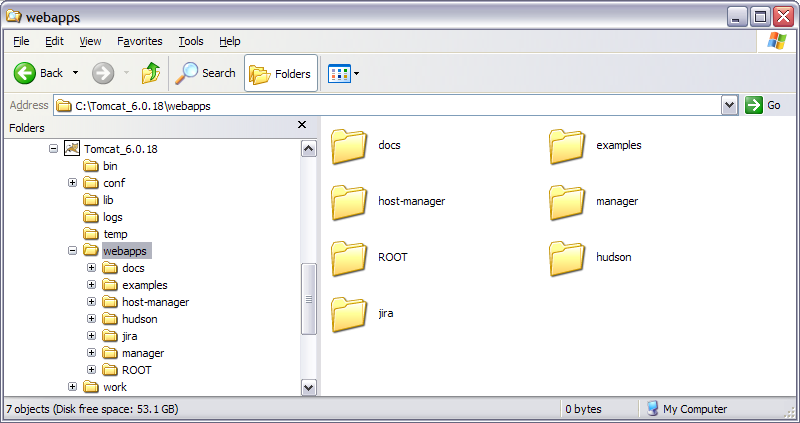
For example at this point I have following files in my webapps

webapps.png so if we discussed "hudson" I would package that folder and attach it. In your scenario it is anything what is listed in your "Project" directory (that is the place where you started to write your code from what I see in your post localhost:8080/Project/WEB-INF/Hello.jsp)

Attachments webapps.png 53.16KB
peter_budo
Code tags enforcer
Moderator
15,433 posts since Dec 2004
Reputation Points: 2,806
Solved Threads: 901
 

Hi,
sorry for wrong packages .

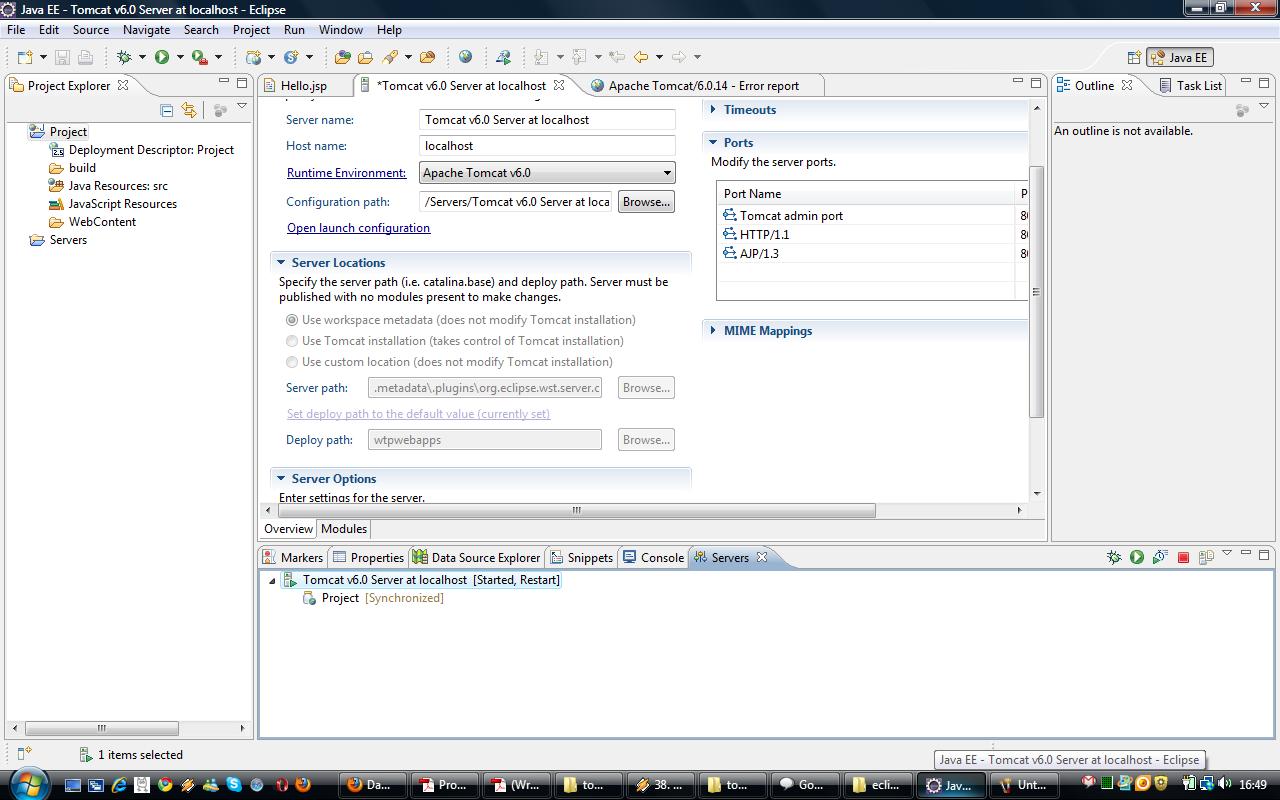
When I use Eclipse IDE Galileo, in Overview page I see that deploy path is set on default to TOMCAT_DIRECTORY/wtpwebapps directory, as you can see in picture I have attached. Maybe that is also problem because it is created there. With this, I can't see
http://localhost:8080/Project/WEB-INF/Hello.jsp or http://localhost:8080 .

I then changed to option use " Use Tomcat configuration", and set it to TOMCAT_DIRECTORY/webapps. Now, the Project folder is in webapps like you told me. I am sending you that Project folder in zip.
With this change, I can see http://localhost:8080 ( there is Tomcat default web page ) , but not http://localhost:8080/Project/WEB-INF/Hello.jsp .

I hope now it is ok.
But if I don't solve this,
can you recommend then what Eclipse IDE version ,
Tomcat version, Java version etc. I should install to avoid this problem, and try to write some code :) .

Thanks.

Attachments tomcat.jpg 131.49KB Project.zip (1.46KB)
Capra
Newbie Poster
6 posts since Sep 2009
Reputation Points: 10
Solved Threads: 0
 

If you able to see something on localhost:8080 then you will see Tomcat Manager option on left, which you need to click on. Login pop-up will show and you need to provide username and password for tomcat (if you do not know this, you can found these data in TOMCAT_DIRECTORY/conf/tomcat-users.xml). After this you are provided with list of projects in your webapps directory. This still wouldn't work as you do not have your JSP file in correct location and is it having wrong name for welcome-file.

Simple corrections:move Hello.jsp from WEB-INF folder level up to Project
make following change to web.xml inside WEB-INF folder (you can either comment out the lines as I did or just simple delete them)
<?xml version="1.0" encoding="UTF-8"?>
<web-app xmlns:xsi="http://www.w3.org/2001/XMLSchema-instance" xmlns="http://java.sun.com/xml/ns/javaee" xmlns:web="http://java.sun.com/xml/ns/javaee/web-app_2_5.xsd" xsi:schemaLocation="http://java.sun.com/xml/ns/javaee http://java.sun.com/xml/ns/javaee/web-app_2_5.xsd" id="WebApp_ID" version="2.5">
<display-name>Project</display-name>
<welcome-file-list>
<!-- <welcome-file>index.html</welcome-file> -->
<!-- <welcome-file>index.htm</welcome-file> -->
<welcome-file>Hello.jsp</welcome-file>
<!-- <welcome-file>default.html</welcome-file> -->
<!-- <welcome-file>default.htm</welcome-file> -->
<!-- <welcome-file>default.jsp</welcome-file> -->
</welcome-file-list>
</web-app>

peter_budo
Code tags enforcer
Moderator
15,433 posts since Dec 2004
Reputation Points: 2,806
Solved Threads: 901
 

Hi,
thank you very much.
it has solved my problem :)
Sorry for incovinience.

Capra
Newbie Poster
6 posts since Sep 2009
Reputation Points: 10
Solved Threads: 0
 

No problem. Beside already linked Tomcat official website Head First - Servlets and JSP and Tomcat Definitive Guide are good resources to have look at

PS: Can you please mark thread as solved? Just click on "Mark as Solved" bellow last reply. (Small measurement so some "bright" person wouldn't jump on it and try to answer after 1-2 years). Thanx

peter_budo
Code tags enforcer
Moderator
15,433 posts since Dec 2004
Reputation Points: 2,806
Solved Threads: 901
 

This article has been dead for over three months

Post: Markdown Syntax: Formatting Help
You
View similar articles that have also been tagged: