954,597 Members — Technology Publication meets Social Media
Username:
Password:
Lost login information?
Have something to say? Contribute New Article Reply to this Article

3 columns? but how?

This is the code from my main.template.php:

<div class="', ($var % 2 == 0 ? 'index_left':'index_right') ,'">
      <div class="content_box">
        <h2>', $category['title'] ,'</h2>';
		foreach ($main['files'][$category['id']] as $file) {
			echo '
        <div class="file file_index">
          <div class="icon">
            <a href="', $file['url'] ,'"><img src="', $file['image'] ,'" width="', $settings['image_width'] ,'" height="', $settings['image_height'] ,'" alt="', $file['title'] ,'" /></a>
          </div>
          <div class="desc">
            <p class="link"><a href="', $file['url'] ,'">', $file['title'] ,'</a></p>';
			if ($settings['stars_index'] == 1) {
				echo '
            <p><img src="', $settings['siteurl'] ,'/images/stars', $file['stars'] ,'.gif" width="67" height="15" title="', $file['rating'] ,'" alt="', $file['rating'] ,'" /></p>';
			} // if
			echo '
            <p>', $file['description'] ,'</p>
            <p class="played">(', $lang['played_times'] ,': ', $file['played'] ,')</p>
          </div>
        </div>';
		} // foreach
		echo '
        <div class="txt_right">
          <a href="', $category['url'] ,'">', $lang['more_in_category'] ,' ', $category['title'] ,' &gt;</a>
        </div>
      </div>
    </div>';
		if ($var % 2 == 1) {
			echo '
    <div class="clear"></div>';
		} // if
	} // foreach
	echo '
  </div>';

} // end function


This is the code from the CSS file:

/* index page 2 columns */
.index_left {
	float: left;
	width: 407px;
}
.index_right {
	float: right;
	width: 407px;
}


Now the page has 2 columns, and I want it with 3 columns. How can I do that? Any help is welcome.
attism
Newbie Poster
11 posts since Dec 2010
Reputation Points: 7
Solved Threads: 0
 

i'm just gonna describe the whole idea of having 3 columns in a page.
first of all we need two div tags. then we give them the float attribute.
like this:

<div class="left-col" style="float:left;width:20%;">this is the contents of our left most column.</div>

<div class="right-wrapper" style="float:right;width:80%;"> ... </div>

so far we've got only 2 columns. for having the 3rd one we're gonna need 2 other DIVs placed inside the "right-wrapper".
we just do it like this:

<div class="left-col" style="float:left;width:20%;">this is the contents of our leftmost column.</div>

<div class="right-wrapper" style="float:right;width:80%;">
<div class="middle-col" style="float:left;width:60%;">this is the middle column.</div>
<div class="right-col" style="float:right;width:20%;">and this is the right and 3rd column.</div>
</div>

just like that we've got all 3 columns we needed.

2hamed
Newbie Poster
7 posts since Dec 2010
Reputation Points: 11
Solved Threads: 0
 

Thank you for your help, but this is not what I want. I want to modify this code on 3 columns. If you see it's a single DIV with 2 classes (which are the two columns), made in CSS. This DIV is changing, because it's made for game categories on my main page. The categories are divided in two columns. But I would like 3.

attism
Newbie Poster
11 posts since Dec 2010
Reputation Points: 7
Solved Threads: 0
 

sorry. I can't help you about that if I don't see the result of this code. if you could give a link to a page which you made using this code that's whole different matter.

2hamed
Newbie Poster
7 posts since Dec 2010
Reputation Points: 11
Solved Threads: 0
 

http://cooljatek.tarhely.biz/

Tha categories you see on the index page. Ex. "Akció, Egyéb, Lövöldözős" etc.

attism
Newbie Poster
11 posts since Dec 2010
Reputation Points: 7
Solved Threads: 0
 

ok... here is your modified code:

';
	if($var%3==1) echo '<div class="right_container">';
    echo '<div class="';
	switch($var%3){
		case 0:
		echo 'index_left';
		break;
		case 1:
		echo 'index_mid';
		break;
		case 2:
		echo 'index_right';
		break;
	}
    echo '">
      <div class="content_box">
        <h2>', $category['title'] ,'</h2>';
		foreach ($main['files'][$category['id']] as $file) {
			echo '
        <div class="file file_index">
          <div class="icon">
            <a href="', $file['url'] ,'"><img src="', $file['image'] ,'" width="', $settings['image_width'] ,'" height="', $settings['image_height'] ,'" alt="', $file['title'] ,'" /></a>
          </div>
          <div class="desc">
            <p class="link"><a href="', $file['url'] ,'">', $file['title'] ,'</a></p>';
			if ($settings['stars_index'] == 1) {
				echo '
            <p><img src="', $settings['siteurl'] ,'/images/stars', $file['stars'] ,'.gif" width="67" height="15" title="', $file['rating'] ,'" alt="', $file['rating'] ,'" /></p>';
			} // if
			echo '
            <p>', $file['description'] ,'</p>
            <p class="played">(', $lang['played_times'] ,': ', $file['played'] ,')</p>
          </div>
        </div>';
		} // foreach
		echo '
        <div class="txt_right">
          <a href="', $category['url'] ,'">', $lang['more_in_category'] ,' ', $category['title'] ,' &gt;</a>
        </div>
      </div>
    </div>';
    
		if ($var % 3 == 2) {
			echo '</div>';
			echo '
    <div class="clear"></div>';
		} // if
	} // foreach
	echo '
  </div>';

} // end function


and the css code would be like this:

/* index page 2 columns */
.right_container{
float:right;
}
      .index_left {

      float: left;

      width: 275px;
      overflow:scroll;

      }

      .index_right {

      float: right;

      width: 275px;

      overflow:scroll;

      }
.index_mid{
float:left;
width:275px;
overflow:scroll;
}


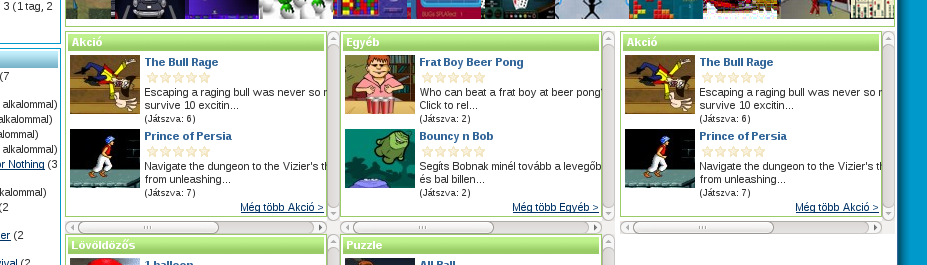
I attached a screen shot of what I got. you can tweak the style to make it the way you want.

Attachments screenshot5.png 103.11KB
2hamed
Newbie Poster
7 posts since Dec 2010
Reputation Points: 11
Solved Threads: 0
 

It's perfect :D Just what I was dreaming about. Thank you very very very much :D

attism
Newbie Poster
11 posts since Dec 2010
Reputation Points: 7
Solved Threads: 0
 

This article has been dead for over three months

Post: Markdown Syntax: Formatting Help
You
View similar articles that have also been tagged: