We're a community of 1077K IT Pros here for help, advice, solutions, professional growth and fun. Join us!
1,076,174 Members — Technology Publication meets Social Media
Username:
Password:
Lost login information?
Start New Discussion Reply to this Discussion

Button does not work

product_preview.php

<h2><center>Product Preview</center></h2>
<p> <form method = "post" action = "product_edit.php" >
<p> <input name="tambah_produk" type="button" value="Tambah Produk" /> </p>
</form>
<table border="1" cellpadding="2">
<tr>
	<td>No </td>
    <td>Nama Produk</td>
    <td>Harga</td>
    <td>Tgl Masuk</td>
    <td>Aksi </td>
</tr>
	<?php 
	include ("includes/koneksi.php");
	
	$i = 1;
	$output = mysql_query("SELECT * FROM produk") or die(mysql_error());
	while($data = mysql_fetch_array($output)){
	?>

		<tr>
        	<td><?php echo $i."</br>";?>
    		<td><?php echo $data['nama_produk']."</br>";?></td>
            <td><?php echo $data['harga']."</br>";?></td>
            <td><?php echo $data['tgl_masuk']."</br>";?></td>
			<td>
	             <a href="./product_edit.php?id=<?php echo $data['id_produk'];?>&mode=edit">Edit</a>  
             <a href="./product_edit.php?id=<?php echo $data['id_kategori'];?>&mode=delete">Delete</a>
             </td>            	
        </tr>    

	
	<?php
	$i++;	
	}

	?>

I wonder why the button does not work. If I press the "Tambah Produk button" nothing happen. It suppose to bring me to product_edit.php page.

5
Contributors
33
Replies
1 Week
Discussion Span
1 Year Ago
Last Updated
34
Views
davy_yg
Master Poster
730 posts since May 2011
Reputation Points: 10
Solved Threads: 1
Skill Endorsements: 2

you need to add some sort of onclick function or event to your button.

<script type="text/javascript">
	function redirect(url) {
		window.location = url;
	}
</script>
<h2><center>Product Preview</center></h2>
<p> <form method ="post" action ="product_edit.php" >
<p> <input name="tambah_produk" type="button" value="Tambah Produk" onclick='redirect("product_edit.php")' /> </p>
</form>
ddymacek
Posting Whiz
324 posts since Jun 2010
Reputation Points: 38
Solved Threads: 68
Skill Endorsements: 0

or as a much simpler method you just need to change your input type from "button" to "submit"

ajbest
Light Poster
45 posts since Apr 2010
Reputation Points: 12
Solved Threads: 8
Skill Endorsements: 0

ddymacek was right, and you can also do it like so..

<input type="button" value="Edit" onClick="location = './product_edit.php?id=<?=$data['id_produk']?>&mode=edit'">
veedeoo
Master Poster
735 posts since Oct 2011
Reputation Points: 298
Solved Threads: 130
Skill Endorsements: 13

Thanks I change it to submit.

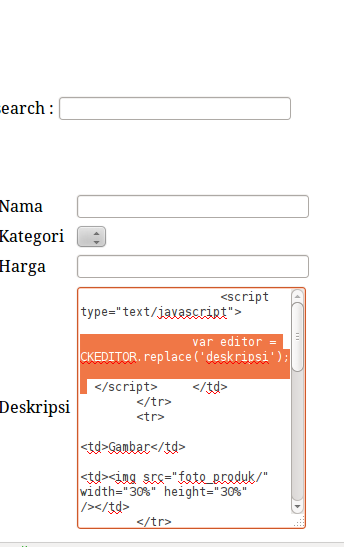
After I press the button, it carries me to the next page:

product_edit.php

// ENTER NEW DATA

if (empty($_REQUEST['id']))
{
$nama = '';
$kategori = '';
$harga = '';
$deskripsi = '';
}


$nama = isset($_POST['nama']) ? $_POST['nama'] : '';	  
$kategori = isset($_POST['kategori']) ? $_POST['kategori'] : '';
$harga = isset($_POST['harga']) ? $_POST['harga'] : '';	  
$gambar = isset($_POST['gambar']) ? $_POST['gambar'] : '';	  

// AFTER I PRESS THE SAVE BUTTON

if (isset($_REQUEST['save'])){
		$nama = $_REQUEST['nama'];
		$kategori = $_REQUEST['kategori'];
		$harga = $_REQUEST['harga'];
		$gambar = $_REQUEST['gambar'];
		
		if (empty($_REQUEST['id'])){
			$result = mysql_query("INSERT INTO produk(nama_produk, harga, gambar) VALUES('".$nama."','".$kategori."','".$gambar."')");
			}
		else{
			$result = mysql_query("UPDATE produk SET nama_produk='".$nama_produk."', harga='".$harga."', deskripsi='".$deskripsi."', gambar='".$gambar."' WHERE id=".$_REQUEST['id']);
		$result = mysql_query($sqlstr) or die(mysql_error());
		
		//Jika mode edit, maka tidak akan dikirimkan konfirmasi kepada subscriber
		//if (empty($_REQUEST['id']))	kirimEmail($idKategori, $judul, $news);
		$confirmation = ($result) ? "Data telah tersimpan." : "Gagal menyimpan data.";	
		}
	}

?>
        
<h2><center>Product Preview</center></h2>
<p></p>

<?php 

$result = mysql_query("SELECT * FROM produk AS p, kategori AS k WHERE id_produk='".mysql_real_escape_string($_REQUEST['id'])."'AND p.id_kategori = k.id_kategori") or die(mysql_error());
$data = mysql_fetch_array($result);


?>

<form method = "POST" enctype="multipart/formdata" action = "<?php $_SERVER['PHP_SELF']; ?>"> 
<table border="0" cellpadding="2">

        <tr>
        	<td>Nama</td>
        	<td><input name="nama" type="text" value = <?php echo $data['nama_produk']; ?> size="20" />
        </tr>
        <tr>
        	<td>Kategori</td>
         	<td><select name="kategori"><option value=<?php echo $data['nama_kategori']; ?> selected><?php echo $data['nama_kategori']; ?></option>
             			<?php 		
						
							$resultCOMBO = mysql_query("SELECT nama_kategori FROM kategori") or die(mysql_error());			while($dataCOMBO = mysql_fetch_array($resultCOMBO)){
							         echo "<option value={$dataCOMBO['nama_kategori']}>{$dataCOMBO['nama_kategori']}</option>";	
						}?>	
                </select>              
            </td>

       </tr>
        <tr>
        	<td>Harga</td>
            <td><input name="harga" type="text" value = <?php echo $data['harga']; ?>></td>
        </tr>
        <tr>
        	<td>Deskripsi</td>
            <td><textarea name="deskripsi" cols="30" rows="15" value = <?php echo $data['deskripsi']; ?></textarea>
            <script type="text/javascript">
					var editor = CKEDITOR.replace('deskripsi');
			</script>	
            
            </td>
        </tr>
        <tr>
        	<td>Gambar</td>
			<td><img src="foto_produk/<?php echo $data['gambar'];?>" width="30%" height="30%" /></td>            
        </tr>	
		<tr>
        	<td>Ganti Gambar</td>
            <td>
            <input name="uploaded_file" type="file" value="Browse" /></td>
            </form>
        </tr>	
        <tr>
        	<td></td>
            <td><br /><center><input name="save" type="button" value="Simpan" /></center></td>
        </tr>
	</tr>

Notice: Undefined index: id in C:\xampp\htdocs\Masterlink\cgoods\product_edit.php on line 103

Nama [ size="20"
Kategori [NokiaSony EricssonMotorolaLGBlackberrySamsungAir Freshener
Harga [__________________]
Deskripsi [ <script type="text/javascript">
var editor = CKEDITOR.replace('deskripsi');
</script>

</td>
</tr>
<tr>
<td>Gambar</td>
<td><img src="foto_produk/" width="30%" height="30%" /></td>
</tr>
<tr>
<td>Ganti Gambar</td>
<td>
<input name="uploaded_file" type="file" value="Browse" /></td>
</form>
</tr>
<tr>
<td></td>
<td><br /><center><input name="save" type="button" value="Simpan" /></center></td>
</tr>
</tr>


<p> </p>
</body>
</html> ]


On description is fulled with stuffs also, name others are left blank. I wish all of them to be left blank since I want to enter a new product data. How to do so?

davy_yg
Master Poster
730 posts since May 2011
Reputation Points: 10
Solved Threads: 1
Skill Endorsements: 2

does the form with element id exists? Mixing html and php makes it messy
check if form have element with name id

Stefano Mtangoo
Senior Poster
3,731 posts since Jun 2007
Reputation Points: 462
Solved Threads: 396
Skill Endorsements: 0

@davy_yg;

On your product_edit.php, this ./product_edit.php?id=<?=$data?>&mode=edit, should be extracted since that you are using $_REQUEST. This is the reason why you are not getting the 'id'.

Although I cannot see it on your codes, maybe my eyes are just really tired. However, I would try handling the "mode" first, because that is the one that brought you to the product_edit.php. So it should be something like this

if ($_REQUEST[mode]=='edit'){
extract ($_REQUEST);
//do something


echo $_REQUEST['id'];//will give us the valid id from the previous page.

}

That's the only way I could see where we can make sense out of 'id', after it has been extracted.

veedeoo
Master Poster
735 posts since Oct 2011
Reputation Points: 298
Solved Threads: 130
Skill Endorsements: 13

Well, it works well if I press edit in product_preview.php page, it shows me all the previous data that needs to be edited. It just does not work when I press enter the new data (tambah product) button in product_preview.php page.

It shows me few errors:

Notice: Undefined index: id in C:\xampp\htdocs\Masterlink\cgoods\product_edit.php on line 111

Line 111 is:

$result = mysql_query("SELECT * FROM produk AS p, kategori AS k WHERE id_produk='".mysql_real_escape_string($_REQUEST['id'])."'AND p.id_kategori = k.id_kategori") or die(mysql_error());
davy_yg
Master Poster
730 posts since May 2011
Reputation Points: 10
Solved Threads: 1
Skill Endorsements: 2

why on earth you people use REQUEST? Use explicitly POST or GET

Stefano Mtangoo
Senior Poster
3,731 posts since Jun 2007
Reputation Points: 462
Solved Threads: 396
Skill Endorsements: 0

@evstevemd,

I don't use $_RESQUEST in anyways NOT EVEN as a last resort.."People" should exclude me :) at all cost..

I am just trying to respond based on the codes that were already written and presented that's all. Besides, it is the programmers choice which function to use, otherwise if he is asking for security advice, then it would be the perfect time to discuss what are the consequences of using $_REQUEST shall bring.

veedeoo
Master Poster
735 posts since Oct 2011
Reputation Points: 298
Solved Threads: 130
Skill Endorsements: 13

I can simply replace all the $_REQUEST with $_GET right for security reason ?

Then, how the code suppose to work, supposing I replace all the $_REQUEST with $_GET since I saw few errors after I press the save button in my previous codes.

----

well, I still receiving the same errors after I replace $_REQUEST with $_GET.

My form is filled with stuff, not a clear form that are ready to be filled with new information.

Nama      [ size="20" 
Kategori  [NokiaSony EricssonMotorolaLGBlackberrySamsungAir Freshener 
Harga     [__________________] 
Deskripsi [ <script type="text/javascript">
           var editor = CKEDITOR.replace('deskripsi'); 
           </script> 

           </td>
           </tr>
           <tr>
           <td>Gambar</td>
           <td><img src="foto_produk/" width="30%" height="30%" /></td> 
           </tr> 
           <tr>
           <td>Ganti Gambar</td>
           <td>
           <input name="uploaded_file" type="file" value="Browse" /></td>
           </form>
           </tr> 
           <tr>
           <td></td>
           <td><br /><center><input name="save" type="button" value="Simpan" /></center></td>
           </tr>
           </tr>

           <p> </p>
           </body>
           </html>
davy_yg
Master Poster
730 posts since May 2011
Reputation Points: 10
Solved Threads: 1
Skill Endorsements: 2

@evstevemd,

I don't use $_RESQUEST in anyways NOT EVEN as a last resort.."People" should exclude me :) at all cost..

I am just trying to respond based on the codes that were already written and presented that's all. Besides, it is the programmers choice which function to use, otherwise if he is asking for security advice, then it would be the perfect time to discuss what are the consequences of using $_REQUEST shall bring.

;)

Stefano Mtangoo
Senior Poster
3,731 posts since Jun 2007
Reputation Points: 462
Solved Threads: 396
Skill Endorsements: 0

I can simply replace all the $_REQUEST with $_GET right for security reason ?

Then, how the code suppose to work, supposing I replace all the $_REQUEST with $_GET

Now that I know you use get, can you post the query string?

Stefano Mtangoo
Senior Poster
3,731 posts since Jun 2007
Reputation Points: 462
Solved Threads: 396
Skill Endorsements: 0
if(!empty($_GET['id']))
	{
	$result = mysql_query("SELECT * FROM produk AS p, kategori AS k WHERE id_produk='".mysql_real_escape_string($_GET['id'])."'AND 			    p.id_kategori = k.id_kategori") or die(mysql_error());
    $data = mysql_fetch_array($result);
    }
else
	{
	$data['nama_produk'] = '';
	$data['nama_kategori'] = '';
	$data['harga'] = '';
	//$data['deskripsi'] = '';
	$data['gambar'] = '';
	}

I add some codes to my previous codes, now it does not work for description. I mean if I set it to nothing. then, I see bunch of codes in my description field again (the ckeditor does not work), otherwise, I might see:

Notice: Undefined index: deskripsi in C:\xampp\htdocs\Masterlink\cgoods\product_edit.php on line 153

also for gambar (translate: picture) I see [x]. I don't know what's better, maybe I should just see the upload picture & browse button not the picture [x].

davy_yg
Master Poster
730 posts since May 2011
Reputation Points: 10
Solved Threads: 1
Skill Endorsements: 2

Where is the query string? I mean url at browser something like http://daniweb.com/?forum=17&&post=388122&&page=2

Stefano Mtangoo
Senior Poster
3,731 posts since Jun 2007
Reputation Points: 462
Solved Threads: 396
Skill Endorsements: 0

it's local. so I have not upload it online yet.

in my browser it would be:

http://localhost/Masterlink/cgoods/product_edit.php

davy_yg
Master Poster
730 posts since May 2011
Reputation Points: 10
Solved Threads: 1
Skill Endorsements: 2

To some people who maybe wondering why, evstevemd:D suggested to use $_POST or $_GET. I totally agree with him 1000%, please experiment with simple codes below save it as formtest.php run it on your xampp. Warning! this if($_POST) maybe improper in php.

<?php
if($_POST){
## extract ($_REQUEST); ## should use this if more data are coming from the form
$name = $_REQUEST['name'];
$last = $_REQUEST['last'];
echo "$name <br/>";
echo "$last <br/>";
}

elseif($_GET){
extract ($_REQUEST);
$name = $_REQUEST['name'];
$last = $_REQUEST['last'];	
echo "$name <br/>";
echo "$last <br/>";	
}
else{?>
<!-- to demonstrate why $_REQUEST is something to avoid, try changing the method to post, and see what will happen -->
<form method="get" action="formtest.php" />
<input type="text" name = "name" value="enter name here"/>
<br/>
<input type="text" name = "last" value="enter last name here" />
<input type="submit" value="test">
</form>

<?}?>

For the second part, try changing the form method to "post". This example should give us the idea why not use it for applications other than simple non-critical data. Better yet remove the method making it like this method="", and see what will happen again.

veedeoo
Master Poster
735 posts since Oct 2011
Reputation Points: 298
Solved Threads: 130
Skill Endorsements: 13

it's local. so I have not upload it online yet.

in my browser it would be:

http://localhost/Masterlink/cgoods/product_edit.php

There is no query string and hence the GET array will be empty!

Stefano Mtangoo
Senior Poster
3,731 posts since Jun 2007
Reputation Points: 462
Solved Threads: 396
Skill Endorsements: 0

Well, it's okay to be empty. It works already with few query strings for editting information. This one is simply to enter new information. Therefore it will run the following condition:

else
	{
	$data['nama_produk'] = '';
	$data['nama_kategori'] = '';
	$data['harga'] = '';
	//$data['deskripsi'] = '';
	$data['gambar'] = '';
	}

and still some errors for deskripsi (translate: description).

Notice: Undefined index: deskripsi in C:\xampp\htdocs\Masterlink\cgoods\product_edit.php on line 153

davy_yg
Master Poster
730 posts since May 2011
Reputation Points: 10
Solved Threads: 1
Skill Endorsements: 2

can you post the whole file?

Stefano Mtangoo
Senior Poster
3,731 posts since Jun 2007
Reputation Points: 462
Solved Threads: 396
Skill Endorsements: 0

This article has been dead for over three months: Start a new discussion instead

Post: Markdown Syntax: Formatting Help
 
You
 
 
© 2013 DaniWeb® LLC
Page rendered in 0.1411 seconds using 2.77MB