We're a community of 1077K IT Pros here for help, advice, solutions, professional growth and fun. Join us!
1,076,524 Members — Technology Publication meets Social Media
Username:
Password:
Lost login information?
Start New Discussion Reply to this Discussion

Blob data from mysql database wont display. image with x icon only appear.

Hello,
It is my first time to post here.
I have been spending many hours trying to figure out how to get imagedata from my MYSQL database.

I have tried these following codes but it wont work for me.

view.php

<html>
<head>
</head>
<body>
</body>
 <?php
include "dbconn.php";
$sql = "SELECT img_id FROM images";
$result = mysql_query($sql) or die("Invalid query: " . mysql_error());
while($row = mysql_fetch_assoc($result)){
echo "Image : ".$row['img_id'];
echo "<br/>";
print "<img src='getpicture.php?image_id=$row[img_id]' />";
echo "<br/><hr/>";
}
mysql_close();
?>
</html>

getpicture.php

 <?php
// connect to the database
include "dbconn.php";
if(isset($_GET['image_id']) && is_numeric($_GET['image_id'])) {
$id = $_GET['image_id'];
$sql = "SELECT content FROM images WHERE img_id='$id'";
$result = mysql_query($sql);
header("Content-Type: image/jpeg");
while($row = mysql_fetch_array($result)){
echo $row['content'];
}
}

else{
    echo 'Please use a real id number';
}
mysql_close();
?> 
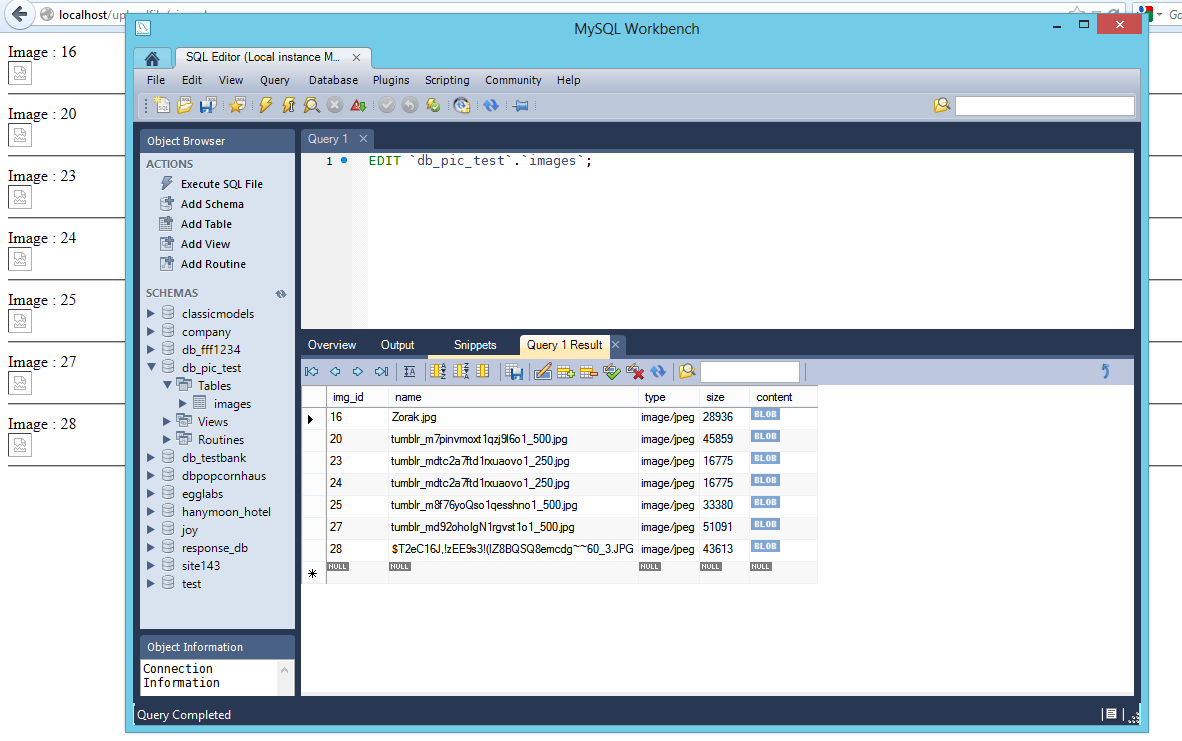
aaa
I would really appreciate your help...
Thanks in advance!

Attachments aaa.png 81.57KB
5
Contributors
4
Replies
4 Hours
Discussion Span
5 Months Ago
Last Updated
6
Views
ghersese
Newbie Poster
1 post since Dec 2012
Reputation Points: 0
Solved Threads: 0
Skill Endorsements: 0

How do you store that image ?

jkon
Posting Whiz
383 posts since Jan 2009
Reputation Points: 124
Solved Threads: 63
Skill Endorsements: 4

If you open the getpicture.php file directly, passing a valid ID, what is shown in the browser? If it just shows a broken image symbol, or nothing at all, try removing the header("Content-Type: image/jpeg"); line and look at it again. Are the any errors visible? Or anything out of the ordinary?

Since the contents of the getpicture.php file are supposed to be shown as an image, echoing a text message for errors doesn't make much sense either. I would suggest finding an error image, and if there is a problem with showing the real image, show that one instead.

Consider something like this:

<?php
// Turn of error reporting, as it doesn't really do any
// good in this situation. It may be a good idea, though, to
// enable error logging to a file, so you can still catch errors
// that happen in the code.
ini_set("display_errors", false);

/**
 * Shows an error image and exits the script.
 * @param string $imageName The name of the image file to show.
 */
function showError($imageName="error") {
    $imageFile = "images/{$imageName}.jpg"
    header("Content-Type: image/jpeg");
    header("Content-Length: " . filesize($imageFile));
    readfile($imageFile);
    exit;
}

// connect to the database
include "dbconn.php";
if(isset($_GET['image_id']) && is_numeric($_GET['image_id'])) {
    $id = $_GET['image_id'];

    // Since you store the type with the image, you may as
    // well use it.
    $sql = "SELECT content, type 
            FROM images 
            WHERE img_id={$id}";
    $result = mysql_query($sql);

    if ($result) {
        $row = mysql_fetch_assoc($result);
        header("Content-Type: " . $row["type"]);
        header("Content-Length: " . strlen($row["content"]));
        echo $row['content'];
        exit;
    }
    else {
        // Show an error image indicating SQL failure.
        showError("sqlerror");
    }
}
else{
    // Show an error image indicating invalid input.
    showError("inputerror");
}

Notice that this code fetches and uses the mime type stored with the image, instead of just using the JPEG content type. It also passes the Content-Length header, which is always a good idea when outputting binary data.

The while loop you used when processing the SQL results is also gone. You're only ever going to want to process a single row, so why use a loop?

And alwasy try to exit() the code after sending file data. You don't want to accidentally corrupt the image with some trailing spaces or something.

Atli
Posting Pro
585 posts since May 2007
Reputation Points: 119
Solved Threads: 80
Skill Endorsements: 6

Also, as an afterthought. It's usually not a great idea to store binary data inside the database. Relational databases aren't especially well suited for that type of data; they are meant more for (relatively) small pieces of well formatted data.

Storing the actual image files on the hard drive of the server, and just storing the file paths in the database, usually gives you far better results. This is true both for performance and code complexity. (It's far simpler to show an image from a file than from inside a database.)

So unless you've got a great reason for storing it inside the database, you should really reconsider that decision.

Atli
Posting Pro
585 posts since May 2007
Reputation Points: 119
Solved Threads: 80
Skill Endorsements: 6

Hi,

Can you please show us your upload processor script. How does the script filter the extensions? for example

    list(, , $thisImagetype, ) = getimagesize($_FILES['image']['tmp_name']);

if ($thisImatetype == 3){
    $type="png"; 
}elseif ($thisImagetype == 2){
    $type="jpeg";
}elseif ($thisImagetype == 1){
    $type="gif";
}
veedeoo
Master Poster
735 posts since Oct 2011
Reputation Points: 298
Solved Threads: 130
Skill Endorsements: 13

This article has been dead for over three months: Start a new discussion instead

Post: Markdown Syntax: Formatting Help
 
You
View similar articles that have also been tagged:
 
© 2013 DaniWeb® LLC
Page rendered in 0.0776 seconds using 2.69MB