@PriteshP23
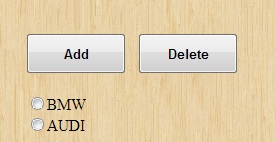
Objective is to manage radio button Dynamically. One should be able to add/delete radio button by ADD and DELETE button in form.
I mean it's good that you post image how you it to look like but where is the code?
You have to post a code of what you have done so far to see what you did.
LastMitch
Industrious Poster
4,165 posts since Mar 2012
Reputation Points: 132
Solved Threads: 334
Skill Endorsements: 45
Like LM states - show your code. If you're stuck, here's a few pointers. You can convert php array to json format like this:
<?php
$json = json_encode(array("bmw","mercedes","mini","land rover"));
?>
So all you have to do is get the data from the DB in a suitable format (array).
Your form is presumably something like this:
<form>
<div id="radio"></div>
<button id="btnadd">Add</button>
<button id="btndel" disabled="disabled">Delete</button>
</form>
I'd use jQuery for this, so just before your </body> tag, place this:
<script src="//ajax.googleapis.com/ajax/libs/jquery/1.9.0/jquery.min.js"></script>
Then under that you can do something like:
<script>
var json = <?php echo $json;?>;
//rest of code
</script>
You need to code for 2 events - the btnadd and the btndel .click
Have a little play with it and come back with some effort.
diafol
Keep Smiling
10,654 posts since Oct 2006
Reputation Points: 1,628
Solved Threads: 1,510
Skill Endorsements: 57
<INPUT type="button" value="Add" onclick="add(document.forms[0].element.value)"/>
What results did you get when you onclick=add()?
LastMitch
Industrious Poster
4,165 posts since Mar 2012
Reputation Points: 132
Solved Threads: 334
Skill Endorsements: 45
If possible, Please let me know it by one example. I do not know JSON. Thanking you so much in advanced.
Try researching it. Google. Try coding it. If you get stuck, ask in the javascript forum.
diafol
Keep Smiling
10,654 posts since Oct 2006
Reputation Points: 1,628
Solved Threads: 1,510
Skill Endorsements: 57
You could do something like this:
<?php
$json = json_encode(array("bmw","mercedes","mini","land rover"));
?>
<form>
<div id="radio"></div>
<button id="btnadd">Add</button>
<button id="btndel" disabled="disabled">Delete</button>
</form>
<script src="//ajax.googleapis.com/ajax/libs/jquery/1.9.0/jquery.min.js"></script>
<script>
var json = <?php echo $json;?>;
var num = json.length;
var displayed = 0;
$('#btnadd').click(function(e){
e.preventDefault();
addItem();
});
$('#btndel').click(function(e){
e.preventDefault();
delItem();
});
function addItem(){
$('#radio').append('<input type="radio" name="cars" value="' + json[displayed] + '" checked="checked" /><label class="rad">' + json[displayed] + '</label>');
displayed++;
if($('#btndel').attr('disabled')) $('#btndel').removeAttr("disabled");
if(displayed == num) $('#btnadd').attr('disabled','disabled');
}
function delItem(){
$('#radio input').last().remove();
$('#radio label').last().remove();
displayed--;
if($('#btnadd').attr('disabled')) $('#btnadd').removeAttr("disabled");
if(displayed == 0)$('#btndel').attr('disabled','disabled');
}
</script>
diafol
Keep Smiling
10,654 posts since Oct 2006
Reputation Points: 1,628
Solved Threads: 1,510
Skill Endorsements: 57
diafol
Keep Smiling
10,654 posts since Oct 2006
Reputation Points: 1,628
Solved Threads: 1,510
Skill Endorsements: 57
I have three forms on same page
I thought you have 1 form with 3 radio button option?
LastMitch
Industrious Poster
4,165 posts since Mar 2012
Reputation Points: 132
Solved Threads: 334
Skill Endorsements: 45
It is user form. In my project, user can add/edit/delete radio button items on the form.
Why??
ANyway, you need to save it server-side (or to a cookie) for it to show on page refresh. You can either save it to SESSION, DB or cookie, or even XML or JSON. Your choice.
You also need to decide whether you want ajax to update after each addition and deletion. or a one-off save at the end. Loads of ways to do this.
diafol
Keep Smiling
10,654 posts since Oct 2006
Reputation Points: 1,628
Solved Threads: 1,510
Skill Endorsements: 57
from what I can see, the code should work to add elements - doesn't it?
I'm afraid I don't have the time to create an update script. Have you created one that we could look at?
diafol
Keep Smiling
10,654 posts since Oct 2006
Reputation Points: 1,628
Solved Threads: 1,510
Skill Endorsements: 57
OK, so research ajax saving (jQuery makes it easy - loads of tuorials out there). In a nutshell you can use $.post or $.ajax to pass data to a php file which updates the DB and then get the php to pass a msg back to js to say whether it was successful or not.
diafol
Keep Smiling
10,654 posts since Oct 2006
Reputation Points: 1,628
Solved Threads: 1,510
Skill Endorsements: 57