We're a community of 1076K IT Pros here for help, advice, solutions, professional growth and fun. Join us!
1,075,965 Members — Technology Publication meets Social Media
Username:
Password:
Lost login information?
Start New Discussion Reply to this Discussion

Javascript works in .html page but not in .php page. Please help!

Hi there,

Hope someone can help me on this. I really need help.

I have a javascript for a rotating image, whereby a total of 10 images will change automatically in every 3 seconds. It works well in a .html page, however it doesn't work in a .php page. In a .php page, only the first image appears, then it is stagnant, the rest of the images do not appear.

Can anyone please advise if the following script has any issue whereby it will not be executed properly when it's in a .php page? or, what's the reason that it couldn't work in a .php page?

Any advice is very much appreciated. Thank you so much.

My script is as below:

<script type="text/javascript">
img1 = new Image(); img1.src = "images/f95ce056343b3dbdb6606096b2123494_ybx7.png";
img2 = new Image(); img2.src = "images/6c714872e4c66a789b21e88fd90f6f03.png";
img3 = new Image(); img3.src = "images/0b2db57ccbd11c6c7a52cc10ad9aa950.png";
img4 = new Image(); img4.src = "images/9f932a67ed4a1c3dd83948b8b7afb052.png";
img5 = new Image(); img5.src = "images/d6085b0ae37acce9f85899a0fb66879f.png";
img6 = new Image(); img6.src = "images/c865d6c72544cb2590ef922c02f1b9eb.png";
img7 = new Image(); img7.src = "images/7b8e0e999dc94fe436e86b4dedfcb8ed.png";
img8 = new Image(); img8.src = "images/c5c25bc26aced3da5e5595734ca1d35d.png";
img9 = new Image(); img9.src = "images/9dd72de17f11cd33f4e9a197ddaaf417.png";
img10 = new Image(); img10.src = "images/cb69f5ea9146d20b6f52bad0e2a5c179.png";
// add as many images as you want
var howManyPics = 10; //set this to the number of pictures you have
var delay = 3; // set this to the number of seconds between each picture
//don't touch anything below here
var pic = 1;
function changePic(){
pic = (pic==howManyPics)?1:pic+1;
document.images['img'].src = eval('img'+pic+'.src');
}
</script>
</head>
<body onload="setInterval('changePic()', delay*1000);">
<img name="img" src="images/f95ce056343b3dbdb6606096b2123494_ybx7.png">
7
Contributors
10
Replies
6 Days
Discussion Span
2 Months Ago
Last Updated
56
Views
Question
Answered
matildacheng
Newbie Poster
4 posts since Feb 2013
Reputation Points: 0
Solved Threads: 0
Skill Endorsements: 0

Its not the problem of .php or .html. I think you had done mistake in your code, use firebug in firefox it will show you error... gud luck

YASHASHYA
Newbie Poster
9 posts since Dec 2011
Reputation Points: 10
Solved Threads: 1
Skill Endorsements: 0

Hi Yashashya,

Thanks a lot for your advice.

I quickly used firefox to check if there is any error but none is shown.

The question arised because I inserted the same code at two of my pages - one is at Home page (php page), and another one at Contact page (html page). The rotating image function is working fine at the Contact page, i.e. images are changing automatically every 3 seconds. However, for Home page, only the first image is shown and the rest of the images do not appear at all.

You may go to http://www.cisspr.com to view the rotating image. At both "Home" (on top of the page - the first image of "We perform testing for electromagnetic fields from cellular & broadcast tower) and "Contact" pages (at the bottom of the page).

Really appreciate your help.

matildacheng
Newbie Poster
4 posts since Feb 2013
Reputation Points: 0
Solved Threads: 0
Skill Endorsements: 0

I'm not very good at javascript, but I tried to test the pages with Opera. It shows a number of errors that just have to do with the CSS, both in Home and Contact. But in Home there are some additional errors (according to Opera):

console.warn
duplicate in.js loaded, any parameters will be ignored

[15-02-2013 10:05:52] CSS - http://platform.twitter.com/widgets/follow_button.html?screen_name=Cisspr&show_count=true&count=horizontal&show_screen_name=false

[15-02-2013 10:05:52] CSS - https://plusone.google.com//apps-static//ss/brandbadge/ver=1tzo0eds5a4xn/am=!6N-easiUf2SpPBxFYA/bf=ABY/r=O/rs=AItRSTMphkmASbbaVAg_WlYg-fAD4LeytA

There are lots of those about Twitter and Google. Also I noted that with Firefox the loading of the page never seems to end. I hope this will be a clue for you to find the error.

johslind
Newbie Poster
6 posts since Jun 2010
Reputation Points: 10
Solved Threads: 2
Skill Endorsements: 0

@matildacheng--

If you are still having issues between the HTML page and PHP code, keep in mind that when you call the PHP page from a browser, the web server returns HTML code, not PHP. So, you can easily connect to both pages, and in your browser, right click and view source. Check to see what the difference is. Its likely to be a syntax error on the php page.

JorgeM
Industrious Poster
4,017 posts since Dec 2011
Reputation Points: 294
Solved Threads: 546
Skill Endorsements: 115

@Matildacheng

In addition to what JorgeM said above you can try running the pages in Google Chrome and right click on the slideshow and go down to "Inspect element" it will show you any activity that is going on in the page, then on the bar that shows up go over to console and it will show you all errors on the page.

And as a sidenote there is a really good jquery slideshow tutorial Here, the creator of the page is currently redecorating the page so its a bit wonky at the moment, but you can still read through the tutorial.

GraficRegret
Junior Poster
176 posts since Nov 2012
Reputation Points: 0
Solved Threads: 2
Skill Endorsements: 0

This problem is not because of extension.
As discussed above use "Inspect element" of google chrome to see problem.

Also you can use debug mode of IE i.e.,by opening it in IE and press "F12" and then you can see if there is any javascript error.Select Script tag there and check.

IIM
Practically a Master Poster
636 posts since Jun 2011
Reputation Points: 127
Solved Threads: 136
Skill Endorsements: 7

Well you seem to have changed ext to html.

There were no errors that I could see on the home page - BUT first load took an extremely long time.

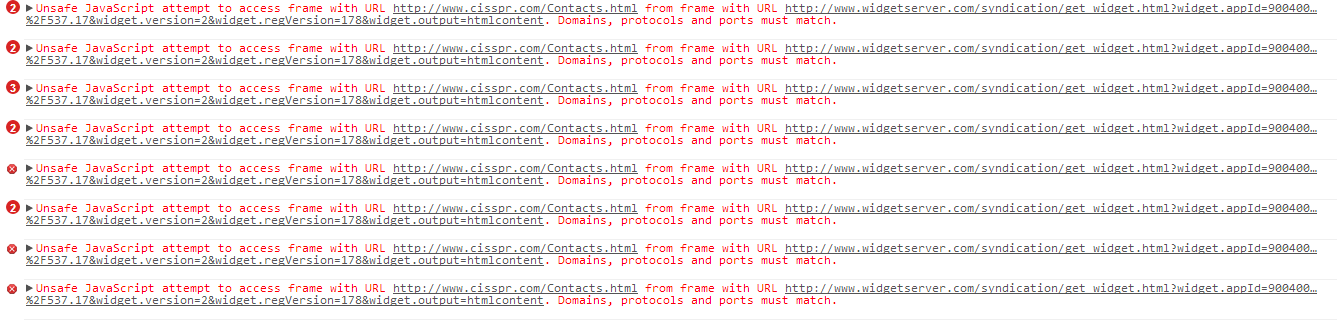
THe contacts page was strewn with errors from the widget box:

cisspr1

Screenshot from CHrome INpsector (console). Click on the image in the attachments section below to see full size image.

Attachments cisspr1.png 57.39KB
diafol
Keep Smiling
Moderator
10,647 posts since Oct 2006
Reputation Points: 1,628
Solved Threads: 1,509
Skill Endorsements: 57

Thank you very much to all of you for your help. I followed the advice to remove some problematic plugins at my page which caused the long loading time. The rotating images are now working at my homepage.

Once again, thank you so much and really appreciate all of you for your replies.

matildacheng
Newbie Poster
4 posts since Feb 2013
Reputation Points: 0
Solved Threads: 0
Skill Endorsements: 0

Ok, thread solved? If so, press the 'Mark Question Solved' below.

diafol
Keep Smiling
Moderator
10,647 posts since Oct 2006
Reputation Points: 1,628
Solved Threads: 1,509
Skill Endorsements: 57

Yes, thread solved. I just pressed the 'Mark Question Solved'. Thank you to all again for the help. :)

matildacheng
Newbie Poster
4 posts since Feb 2013
Reputation Points: 0
Solved Threads: 0
Skill Endorsements: 0
Question Answered as of 2 Months Ago by diafol, johslind, IIM and 3 others

This question has already been solved: Start a new discussion instead

Post: Markdown Syntax: Formatting Help
 
You
View similar articles that have also been tagged:
 
© 2013 DaniWeb® LLC
Page rendered in 0.1158 seconds using 2.79MB