954,604 Members — Technology Publication meets Social Media
Username:
Password:
Lost login information?
Have something to say? Contribute New Article Reply to this Article

Wrapping text around odd-shaped image

Hi,

is there an easy way to wrap text around an odd-shaped image?

Please refer to attached image. I need text to float around the green image but the image isn't perfectly symmetrical.

Any tips would be much appreciated.

I've tried googling but have had no luck. Maybe I'm not googling the right search words.

It must be possible without being overly complex using css??
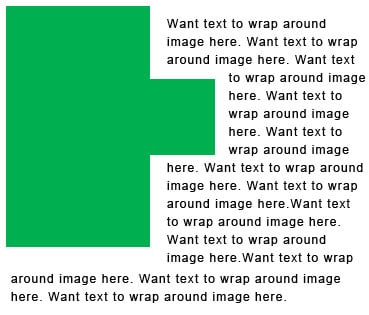
Attachments wrap_around.jpg 31.42KB
Persist01
Newbie Poster
15 posts since Jul 2007
Reputation Points: 10
Solved Threads: 0
 

No, because all images are really rectangles. The rest of that image is transparent. But the browser has no idea where the content is within the rectangular image.

I have some ideas:

1. Cut the image in two. But placement is tricky.

2. If the image is really solid green like that, you could make it with table components.

3. Put the text in a larger image containing both.

MidiMagic
Nearly a Senior Poster
3,319 posts since Jan 2007
Reputation Points: 730
Solved Threads: 182
 

Thanks for your suggestions MidiMagic.

I tried option 1. Placement was very tricky and eventually I gave up on this option.

Unfortunately the image is not solid green.

I had thought about option 3 but prefer to avoid this option.

I ended up using the image as a background and putting each line of text into a span with left padding. Not exactly pretty html but it gets the job done whilst keeping it to 1 image without text in the image.

Don't ask me about alt and title text for the background image though :)

If anyone is interested I also just found the following url which talks about slicing up the image for curving and wrapping the text around it... [URL="http://meyerweb.com/eric/css/edge/raggedfloat/demo.html"]

Persist01
Newbie Poster
15 posts since Jul 2007
Reputation Points: 10
Solved Threads: 0
 

You ought to check that span method on other browsers and screen resolutions. The text positioning might change drastically.

MidiMagic
Nearly a Senior Poster
3,319 posts since Jan 2007
Reputation Points: 730
Solved Threads: 182
 

This article has been dead for over three months

Post: Markdown Syntax: Formatting Help
You