954,598 Members — Technology Publication meets Social Media
Username:
Password:
Lost login information?
Have something to say? Contribute New Article Reply to this Article

How to get a text's font in an image using photoshop cs4

Hello
How can I know what font was used to add a text in an image when I open it in photoshop (no psd etc availabale, only a png file)... When open it has only 1 layer...

lordrt
Posting Whiz
385 posts since Jul 2010
Reputation Points: 30
Solved Threads: 33
 

Then you should identify only by typing the text with the same size on the same position and change the font from the drop down to know which one is suitable for that.

rajarajan07
Nearly a Posting Virtuoso
1,447 posts since May 2008
Reputation Points: 167
Solved Threads: 239
 

ok but it seems like a very long way to get the desired font as the list contains too many, is there no simpler way of doing this, like reverting back the png to its source?

lordrt
Posting Whiz
385 posts since Jul 2010
Reputation Points: 30
Solved Threads: 33
 

The only easy way if u cnt compare the fonts is 2 hv the psd file of it..

Graffixnerd
Newbie Poster
14 posts since May 2010
Reputation Points: 10
Solved Threads: 1
 

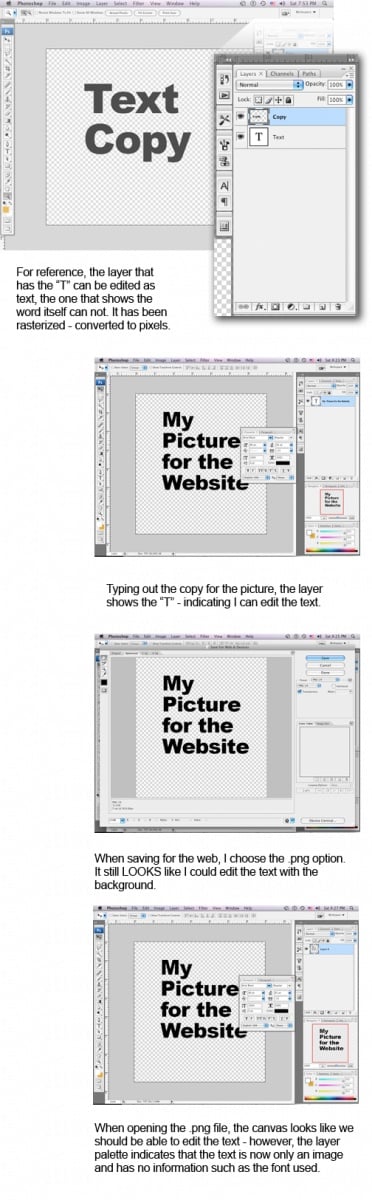
Unfortunately, no. Once the image is saved to a png file it no longer has the information on the font used. The image has been flattened and the text is no longer separate from the image. It has been rasterized, meaning the font outlines which are a vector/postscript have been interpreted into pixels to fit that file format.

The image attached shows the reason why when viewed in photoshop. And, no - you can not revert the png back to a psd and have all of the layers. You would need to have or save a copy of the file as the native psd file before it was flattened to a png.

Attachments pngInfo.jpg 155.64KB
macgurl70
Junior Poster
126 posts since Jul 2010
Reputation Points: 23
Solved Threads: 13
 

ok thx anyways for replying, was just hoping could somehow be able to revert the png back to psd and thus get the required layers and texts font

lordrt
Posting Whiz
385 posts since Jul 2010
Reputation Points: 30
Solved Threads: 33
 

just being curious, in cs5 as well no option of doing something like this??

lordrt
Posting Whiz
385 posts since Jul 2010
Reputation Points: 30
Solved Threads: 33
 

nope, it is still the same issue - the image has been flattened and loses the font information.

macgurl70
Junior Poster
126 posts since Jul 2010
Reputation Points: 23
Solved Threads: 13
 

oki then, thx again

lordrt
Posting Whiz
385 posts since Jul 2010
Reputation Points: 30
Solved Threads: 33
 

Definitely visit whatthefont.com/co.uk (can't remember)

benhowdle89
Junior Poster in Training
81 posts since Jun 2010
Reputation Points: 10
Solved Threads: 2
 

You could post your png here! including myself, there are MANY font experts here :)

MindSter
Junior Poster in Training
92 posts since Aug 2010
Reputation Points: 11
Solved Threads: 14
 

'Hello im a newbie hope to become valuable member'

davidweiss146
Newbie Poster
1 post since Sep 2010
Reputation Points: 10
Solved Threads: 0
 

This question has already been solved

Post: Markdown Syntax: Formatting Help
You
View similar articles that have also been tagged: