hello
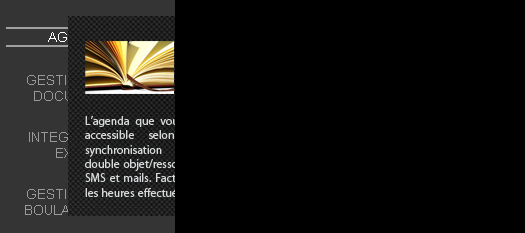
am currently facing a problem with the popup which appears when I hover on a link: (see 1st attachment) while it should have been as shown at design time (2nd attachment img)
For those familiar with drupal, the part which is shown in 1st attachment is from the left sidebar (which ends where the popup is clipped), while the black part will consist of content. But currently the popup itself is not completely shown and if I move it more to the right, it disappears completely (whereby it goes in the content section (right black part) but playing with its z-index does nothing for the popup
Here is the css which I've used, but may be I missed something...if anyone could help
reference code from http://www.dynamicdrive.com/style/csslibrary/item/css-popup-image-viewer/
.leftsidemenu {
width: 210px;
}
ul.leftmenucontent {
padding-left: 0;
text-align: center;
width: 210px;
}
ul.leftmenucontent li {
background-image: none;
margin: 0;
display: block;
padding-right: 45px;
margin: 22px 2px 22px 0; /*5px 2px 5px 0;*/
color: #999999;
font: 14px Arial, Helvetica, sans-serif;
}
ul.leftmenucontent li a {
display: block;
color: #999999;
font: 14px Arial, Helvetica, sans-serif;
text-decoration: none;
text-align: center;
position: relative;
}
ul.leftmenucontent li a:hover {
color: #ffffff;
border-top: 2px solid #9f9f9f;
border-bottom: 2px solid #9f9f9f;
display: block;
}
ul.leftmenucontent li a span {
position: absolute;
left: -1000px;
visibility: hidden;
text-decoration: none;
}
ul.leftmenucontent li a span img {
border-width: 0;
padding: 2px;
}
ul.leftmenucontent li a:hover span {
visibility: visible;
left: 60px;
text-decoration: none;
top: -15px;
}
Also just for info: my left sidebar is 210px, but the image in the popup is 250px, and I have to push it to the right by 210px to get the effect wanted, but in doing so it disappears completely, could this also be a problem, that is the image is going out of the sidebar?