954,593 Members — Technology Publication meets Social Media
Username:
Password:
Lost login information?
Have something to say? Contribute New Article Reply to this Article

Css Form Code: from scratch

Can anyone help me in good css (no images for backgrounds) for the following form:

<div class="moduletable"><h3>Login Form</h3>					
  <form  id="form-login" >
    <fieldset class="input">	
      <p id="form-login-username">	
        <label for="modlgn_username">User Name
        </label>	
        <input id="modlgn_username" type="text" name="username" class="inputbox"  size="18" />	
      </p>	
      <p id="form-login-password">	
        <label for="modlgn_passwd">Password
        </label>	
        <input id="modlgn_passwd" type="password" name="password" class="inputbox" size="18"  />	
      </p>	
      <p id="form-login-remember">	
        <label for="modlgn_remember">Remember Me
        </label>	
        <input id="modlgn_remember" type="checkbox" name="remember" class="inputbox" value="yes"/>	
      </p>	
      <input type="submit" name="Submit" class="button" value="Log in" />	
      <input type="hidden" name="option" value="com_users" />	
      <input type="hidden" name="task" value="user.login" />	
      <input type="hidden" name="return" value="aW5kZXgucGhwP0l0ZW1pZD0yMzM=" />	
      <input type="hidden" name="e4cc97c5b3e1284cbed34898fb41bd92" value="1" />	 
    </fieldset>	
    <ul>	
      <li>
      <a href="/users-component/password-reset">Forgot your password?</a>	
      </li>	
      <li>	
      <a href="/users-component/username-reminder">Forgot your username?</a>	
      </li>	
      <li>	
      <a href="/users-component/registration-form">	Create an account</a>	
      </li>	
    </ul>	
  </form>	
</div>
bishnoi
Newbie Poster
2 posts since Aug 2011
Reputation Points: 10
Solved Threads: 0
 

Just an example:

<style type="text/css" media="screen">
body { font: 14px/20px Arial, Verdana, sans-serif; }
h3 { font-weight: normal; margin: 0; padding: 0; font-size: 20px; }
label { font-weight: bold; display: block; }
input[type=text], input[type=password] { border: 1px solid black; padding: .2em; width: 465px; }
.button { padding: .2em .5em; float: right; }
fieldset { border: none; width: 465px; }
a { text-decoration: none; color: royalblue; display: block; padding: .2em; }
ul { list-style: none; margin: 0; padding: 0; }
li { display: block; float: left; margin: 5px 20px 5px 0; }
.createAccount { background-color: royalblue; color: white; padding: .2em .5em; }
</style>


On line 33 I added a class:

<a class="createAccount" href="/users-component/registration-form">Create an account</a>


You can change input[type=] adding a second class to username and password fields:

<input id="modlgn_username" type="text" name="username" class="inputbox text"  size="18" />

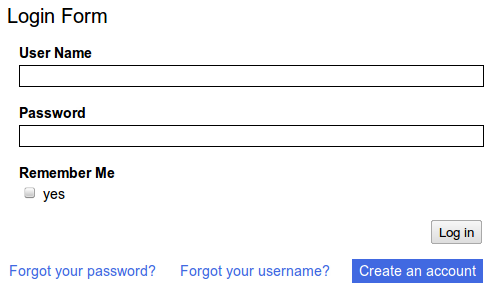
I attached a screenshot result. Bye and good work.

Attachments login.png 19.21KB
cereal
Master Poster
709 posts since Aug 2007
Reputation Points: 214
Solved Threads: 120
 

I will reply soon in detail. I think I need more work to do. cereal! Thanks for the pain you took for me.
#form-login id applied to main container
#form-login-username id applied to
#modlgn_username id applied to
#form-login-password id applied to


#modlgn_password id applied to
#form-login-remember id applied to


#modlgn_password id applied to
.button class applied to
.input class applied to


.inputbox class applied to

bishnoi
Newbie Poster
2 posts since Aug 2011
Reputation Points: 10
Solved Threads: 0
 

This article has been dead for over three months

Post: Markdown Syntax: Formatting Help
You
View similar articles that have also been tagged: