We're a community of 1077K IT Pros here for help, advice, solutions, professional growth and fun. Join us!
1,076,497 Members — Technology Publication meets Social Media
Username:
Password:
Lost login information?
Start New Discussion Reply to this Discussion

Wordpress page not working

Hi,

I'm having some trouble transfering a HTML website to Wordpress for a CMS.

The HTML page which I'm transfering has a table in which I presumed I could simply copy and paste into the HTML view of Wordpress's page publisher.

Inside the page publisher it looks great. You can see it in the attached screenshot.

HOWEVER,

When I publish the page, the table isn't appearing and other ellements are getting all jumpled up.

If I remove the HTML for the table, the page displays fine.

Also, I installed another theme to check if it was a publishing fault, but it displayed beautifully. So, this must be a HTML/CSS issue with the current code. Anyhow, you can see how the table is looking here. Not pretty!

Any help would be appreciated so much.
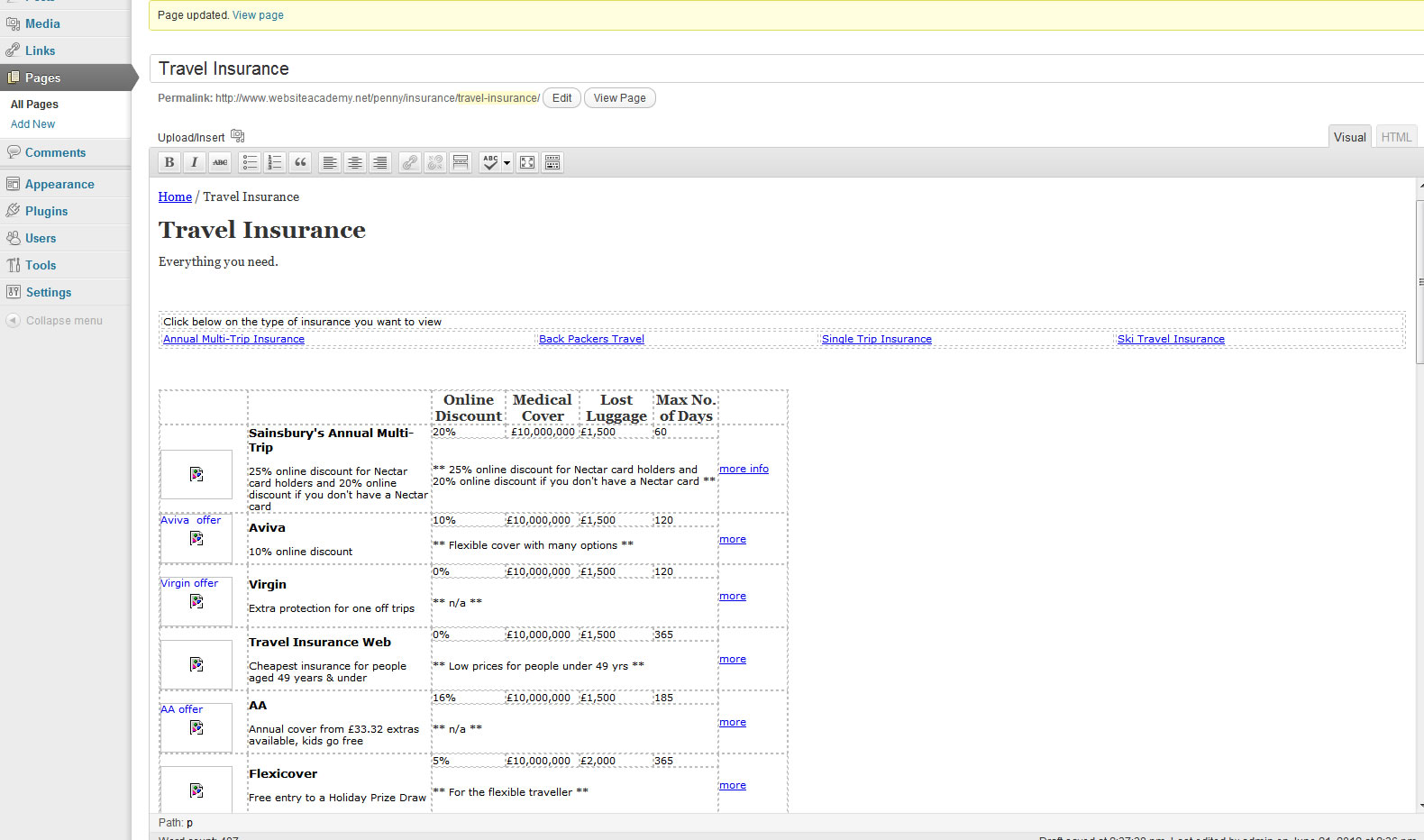
Attachments screenshot21.jpg 201.48KB
3
Contributors
8
Replies
5 Hours
Discussion Span
11 Months Ago
Last Updated
9
Views
Question
Answered
designer1993
Newbie Poster
7 posts since Jun 2012
Reputation Points: 0
Solved Threads: 0
Skill Endorsements: 0

Are you aware about the wordpress rules that you need to put your css in css file and add this info

/*
Theme Name:
Theme URI:
Description: A completely WordPress 3.0 compatible theme.
Author:
uRI: sion: 1.0
*/
iF YOU DON'T THAN THE CSS WILL NOT BE RECOGNIZED

dany12
Posting Whiz in Training
223 posts since Aug 2010
Reputation Points: 21
Solved Threads: 15
Skill Endorsements: 1

Thanks for your reply.
I've added that to my insurance.css file however the table still isn't appearing.

Any other suggestions? If you like I could give you login details to have a closer look.

/*
Theme Name:
Theme URI:
Description: A completely WordPress 3.0 compatible theme.
Author:
uRI: sion: 1.0
*/

designer1993
Newbie Poster
7 posts since Jun 2012
Reputation Points: 0
Solved Threads: 0
Skill Endorsements: 0

(1) you opend this but did not close it (was this intentional?)

<!-- including the following div preserves spacing on the left, even if no products are found: --><br />
            <!--
<div class="catMenu"></div>

(2) seing the banner is pushed all the way to the left forcing your content down I'm thinking it is being pulled in by a plugin but its position has not been set. If you are using a right float div for it, it has not be cleared.

(your top menu does not seem to be correct but from what I can tell just glancing at it I don't think it's issue is relevent to the table your working with)

Also in your CSS check your background-image url paths
background-image: url(../../www.compareandsave.com/

LIke I said I only glanced at it but those are just a few things I noticed. Oh and Danny12's CSS note is always a good pratice be it WordPress or other platform.

(2) seing the banner is pushed all the way to the left forcing your content down I'm thinking it is being pulled in by a plugin but its position has not been set. If you are using a right float div for it, it has not be cleared.

(your top menu does not seem to be correct but from what I can tell just glancing at it I don't think it's issue is relevent to the table your working with)

Also in your CSS check your background-image url paths
background-image: url(../../www.compareandsave.com/

LIke I said I only glanced at it but those are just a few things I noticed. Oh and Danny12's CSS note is always a good pratice be it WordPress or other platform.

RSFG
Newbie Poster
3 posts since May 2008
Reputation Points: 10
Solved Threads: 1
Skill Endorsements: 0

Hey I downloaded your page and opened it in DW - I was mistaken about your ad banner - sorry - didn't relaize that element was your right column. I removed the exlamation tag before your rate table(s) removed your style 1 and your banner other div's, stuck a float:left div around our left column, a float:right around your right column and gave your right column a width:250px and everything fell into place. It's a bandade fix but at least now you know what to work on.

RSFG
Newbie Poster
3 posts since May 2008
Reputation Points: 10
Solved Threads: 1
Skill Endorsements: 0

Ok I think taht wordpress have a stylesheet.css and you will have to put all your css there try this

dany12
Posting Whiz in Training
223 posts since Aug 2010
Reputation Points: 21
Solved Threads: 15
Skill Endorsements: 1

Thankyou all so much.

It turned out to be the comments not closing. Such a silly mistake! Just shows how valuable objective views are, sometimes you need someone else to spot the obvious :)

Thanks again.

designer1993
Newbie Poster
7 posts since Jun 2012
Reputation Points: 0
Solved Threads: 0
Skill Endorsements: 0

looks good - so it turned out to be a closing issue after all - don't you just hate it when something obvious and simple takes hours to find. Happens to all of us developers more often than many of us are willing to admit. Happens to me anyway and I have been soing this sence the 90's.

RSFG
Newbie Poster
3 posts since May 2008
Reputation Points: 10
Solved Threads: 1
Skill Endorsements: 0

don't you just hate it when something obvious and simple takes hours to find

Definitely agree with you there.

Once again, thanks everyone.

designer1993
Newbie Poster
7 posts since Jun 2012
Reputation Points: 0
Solved Threads: 0
Skill Endorsements: 0
Question Answered as of 11 Months Ago by RSFG and dany12

This question has already been solved: Start a new discussion instead

Post: Markdown Syntax: Formatting Help
 
You
View similar articles that have also been tagged:
 
© 2013 DaniWeb® LLC
Page rendered in 0.0903 seconds using 2.69MB