Hi all thanks for reading,
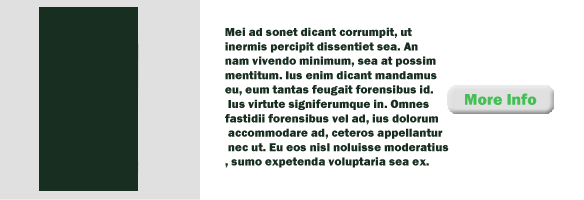
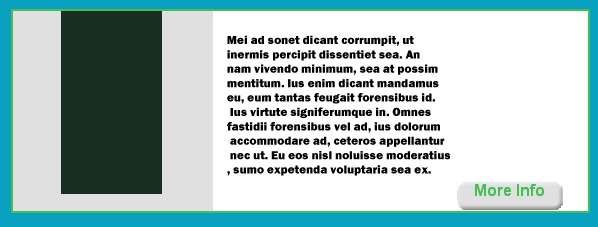
i am having trouble getting my link button postioned in the correct place and the image. how i want it to look can be seen in fig-1 and what i am getting can be seen in fig-2. the relevant code i am using is as follows
code on page
div id="body"><div class="body_img"><img src="xxxxxx/xxxxx/xxxxxxxxxx.png" /></div>
                   <div class="body_text"><h1>xxxxx</h1><br />
                   <h3>xxxxxxxxxxxxxxxxxxxxxxxxxx<br />
                   <br />
                   xxxxxxxxxxxxxxx<br />
                   <br />
                   xxxxxxxxxxxxxxxxx</h3></div>
                   <div class="body_link"><ul>
                                            <li><a href="index.xhtml" class="panel_link">More Info</a></li>
                                          </ul></div>
   </div>
code from external css
#body{
    overflow : hidden;
    height:200px;
    zoom : 1;
    border : solid #45bf55;
    border-width : 2px;
    background-color : #FFF;
}

.body_text h1{
    font-family : Arial, Helvetica, sans-serif;
    font-size : 16pt;
    font-weight : bolder;
    color : #45bf55;
    padding-top : 25px;
    margin : 0;
}

.body_text h3{
    font-family : Arial, Helvetica, sans-serif;
    font-size : 12pt;
    font-weight : bolder;
    color : #45bf55;
    margin : 0;

}

.body_img{
    float : left;
    width : 200px;
    height : 200px;
    background-color : #e0e0e0;
    text-align : center;
    display : table-cell;
    vertical-align : middle;
    margin-right : 25px;
}

.body_link{
    float : right;
    margin-right : 25px;
}

.body_link li{
    list-style-type : none;
    margin : 0;
    margin-left : 0;
    background : url(../xxxxxxx/xxxxxxxxxx/xxxxxxxxxpng) no-repeat;
    width : 107px;
    height : 30px;
    text-align : center;
}
any help with this would be much appriciated.