We're a community of 1.1M IT Pros here for help, advice, solutions, professional growth and fun. Join us!
1,080,437 Members — Technology Publication meets Social Media
Username:
Password:
Lost login information?
Start New Discussion Reply to this Discussion

How to make my website load faster

Can anyone tell me what is making my website load so slowly? My url is www.beatlesongprofiles.com. I would really appreciate some insight into this issue. What can I do to make this site load faster? Thanks!

8
Contributors
8
Replies
1 Day
Discussion Span
4 Months Ago
Last Updated
10
Views
suavedesign
Junior Poster in Training
97 posts since Dec 2010
Reputation Points: 10
Solved Threads: 0
Skill Endorsements: 0

same problem here with my website (shoppingmonk) please help me out from these

ShoppingMonk
Light Poster
29 posts since Nov 2012
Reputation Points: -6
Solved Threads: 1
Skill Endorsements: 0
<M/>
Senior Poster
3,609 posts since Apr 2012
Reputation Points: 64
Solved Threads: 81
Skill Endorsements: 95

It seems to load quickly enough for me, however if you are to have issues then it is likely to be either because you are loading a large number of audio files or that you have a long running script.

Your website doesn't appear to have any backend content to be loaded, and it is a simple static design so there is no need for it to load considerable number of images.

Check your scripts, check that nothing is taking a long time to load. If this doesn't resolve the issue then you could try removing the sound tracks from the first page, and letting the user click on the album cover and listen individually.

If all of this fails, then it could always be a network issue on either the server end or your end?

AHarrisGsy
Posting Pro
535 posts since Nov 2011
Reputation Points: 55
Solved Threads: 45
Skill Endorsements: 15

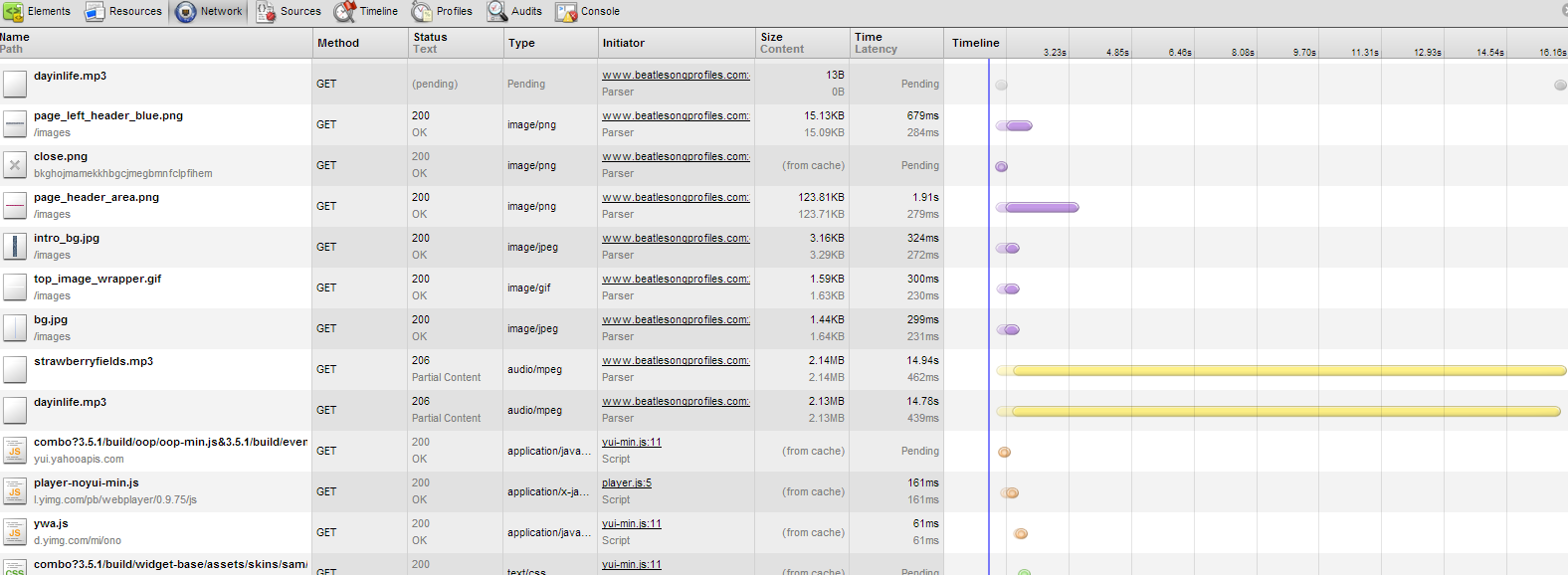
Have a look at the dev tools in your browser to see how long your scripts and assets take to load. Here's a snpashot of Chrome's findings:

beatles

Attachments beatles.png 121.51KB
diafol
Keep Smiling
Moderator
10,838 posts since Oct 2006
Reputation Points: 1,675
Solved Threads: 1,534
Skill Endorsements: 61

I'd suggest you run some tests on your site. I typically use this online tester: http://www.webpagetest.org/.

The results provide good information about potential issues with your page.

JorgeM
Industrious Poster
4,164 posts since Dec 2011
Reputation Points: 297
Solved Threads: 567
Skill Endorsements: 119

From the chrome analysis, it looks like you've got quite a few mp3s trying to load. That's gonna kill you. A bog-standard shared hosting account is going to struggle with that.

Why do you need so many loaded resources? You could use a jukebox effect, ie hold filenames in js and only load the audio, once a link was clicked?

If having all these resources available at the same time is essential to your page, I think something's wrong. You'd only play one song at a time anyway, so you really don't need to have that many controls/resources loaded.

You may be able to dynamically create the player as well as load the song on image click.

diafol
Keep Smiling
Moderator
10,838 posts since Oct 2006
Reputation Points: 1,675
Solved Threads: 1,534
Skill Endorsements: 61

Diafol-
Thanks for your response. Which tool in my browser shows how long my scripts take to load?
Also, do you have a link to a jukebox effect sample? It sounds like a good idea, and I want to see how to do it.
Thanks!

suavedesign
Junior Poster in Training
97 posts since Dec 2010
Reputation Points: 10
Solved Threads: 0
Skill Endorsements: 0

Opera: Ctrl+Shft+I
IE: F12

pritaeas
Posting Prodigy
Moderator
9,538 posts since Jul 2006
Reputation Points: 1,194
Solved Threads: 1,494
Skill Endorsements: 98

This article has been dead for over three months: Start a new discussion instead

Post: Markdown Syntax: Formatting Help
 
You
 
© 2013 DaniWeb® LLC
Page generated in 0.0775 seconds using 2.66MB