We're a community of 1077K IT Pros here for help, advice, solutions, professional growth and fun. Join us!
1,076,254 Members — Technology Publication meets Social Media
Username:
Password:
Lost login information?
Start New Discussion Reply to this Discussion

visited links not changing colour

HI all, not long ago I posted something about a similar issue http://www.daniweb.com/web-development/web-design-html-and-css/threads/447728/change-the-colour-of-visited-link-with-avisited
but this time it is slightly different. Ok, so here's the offending page http://antobbo.webspace.virginmedia.com/various_tests/links/faqTest.html

When you click on the question, the answer will slide down. Now, the links will always point to #, but I still need them to change colour when clicked on, and take the visited colour. From previous post I have learned that the fact that links point to # might be a problem, how do I get around it please?
The links have this styles in this order:

/*STYLED LINKS*/
a.linkStyle:link{
    color:#2a00ff;
}
a.linkStyle:visited{
    color:#ff00ae;
}
a.linkStyle:hover{
    color:#333333;
}
a.linkStyle:active{
    color:#2a00ff;
} 
/*STYLED LINKS*/

Here's the full relevant code:

HTML:

<!-- START OF MAIN CONTENT -->
            <div id="content">
                <div id="theContent">
                    <h1>Frequently asked faqs</h1>
                    <p class="faq"><a href="#" class="linkStyle">Question n1</a></p>
                    <p class="answ">
                    This is the answ to the 1st FAQ faq that has been clicked to show how the answ would display. This is 
                    the answ to the FAQ faq that has been clicked to show how the answ would display.
                    </p>
                    <p class="faq"><a href="#" class="linkStyle">Question2?</a></p>
                    <p class="answ">This is the answ to the 2st FAQ faq that has been clicked to show how the answ would display. This is 
                    the answ to the FAQ faq that has been clicked to show how the answ would display.
                    </p>
                    <p class="faq"><a href="#" class="linkStyle">Question3?</a></p>
                    <p class="answ">This is the answ to the 3rd FAQ faq that has been clicked to show how the answ would display. This is 
                    the answ to the FAQ faq that has been clicked to show how the answ would display.</p>
                    <p class="faq"><a href="#" class="linkStyle">Question4?</a></p>
                    <p class="answ">This is the answ to the 4th FAQ faq that has been clicked to show how the answ would display. This is 
                    the answ to the FAQ faq that has been clicked to show how the answ would display.</p>

                </div>


            </div><!-- end of content-->          
            <!-- END OF MAIN CONTENT -->

CSS:

...
/* faqS AND answS BOX */
#content #theContent p.answ{
    display:none;
    margin:3px 0 6px 0;
}
#content #theContent p.faq{
    margin:0;
    line-height:1.857142857142857em;
}

...
3
Contributors
5
Replies
1 Day
Discussion Span
2 Months Ago
Last Updated
31
Views
Violet_82
Master Poster
796 posts since Jan 2010
Reputation Points: 10
Solved Threads: 1
Skill Endorsements: 1

hey Violet_82
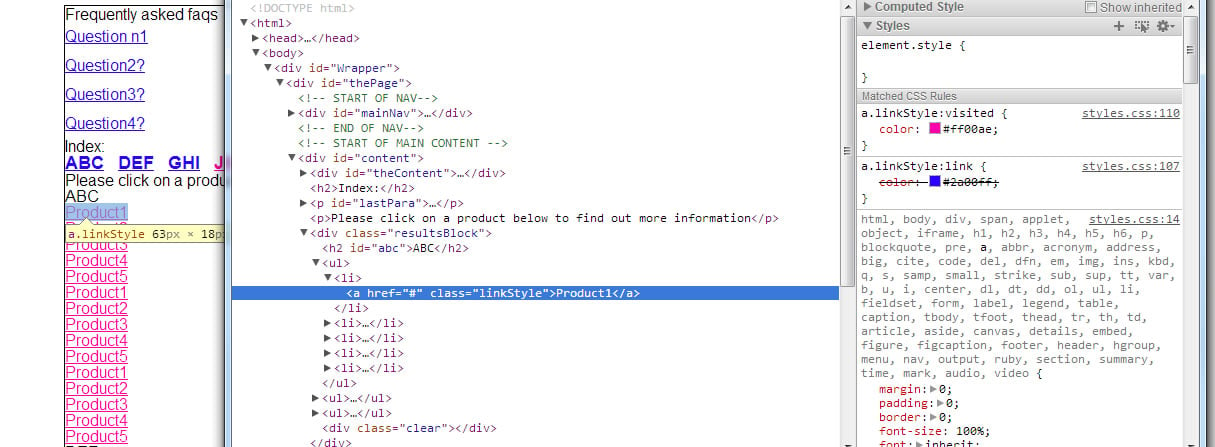
I'm seeing it the right way (I think.. :) ) please take a look ate the print screen.
Violet_82_screen1
I you still have this problem, please change this:

a.linkStyle:link{

to this

a.linkStyle {

you don't really kneed the ":link" (I never use it and don't think that is a very logical "tag" to use)
cheers

Attachments Violet_82_screen.jpg 136.26KB
migcosta
Junior Poster
112 posts since May 2006
Reputation Points: 41
Solved Threads: 6
Skill Endorsements: 0

From previous post I have learned that the fact that links point to # might be a problem, how do I get around it please?

What do you mean by a problem? Sorry, I still dont understand what you are actually trying to accomplish.

JorgeM
Industrious Poster
4,021 posts since Dec 2011
Reputation Points: 297
Solved Threads: 548
Skill Endorsements: 115

hey Violet_82,
you need to use different hashtags for that:

<p class="faq"><a href="#question1" class="linkStyle">Question n1</a></p>
<p class="answ" name="question1">
This is the answ to the 1st FAQ faq that has been clicked to show how the answ would display. This is
the answ to the FAQ faq that has been clicked to show how the answ would display.</p>

<p class="faq"><a href="#question2" class="linkStyle">Question2?</a></p>
<p class="answ" name="question2">
This is the answ to the 1st FAQ faq that has been clicked to show how the answ would display. This is
the answ to the FAQ faq that has been clicked to show how the answ would display.</p>

don't forget the name on the <p>.. this way external linking will point to the correct point
take a look at this:
http://www.boogiejack.com/html/html-anchor-tag.html

cheers

migcosta
Junior Poster
112 posts since May 2006
Reputation Points: 41
Solved Threads: 6
Skill Endorsements: 0

Sorry, maybe I wasn't clear.
@JorgeM: The questions shold ideally change colour when clicked on them and take the visited link colour as detailed in the css. At the moment they don't, they retain their original colour.
@migcosta, thanks for that, I wasn't aware this was the right way to do it. I have amended it now http://antobbo.webspace.virginmedia.com/various_tests/links/faqTest.html but I still have the same problem, in that, as described above, the colour of the clicked on question, doesn't change to a visited link. It should change from 2a00ff to ff00ae. How do I achieve that

Violet_82
Master Poster
796 posts since Jan 2010
Reputation Points: 10
Solved Threads: 1
Skill Endorsements: 1

@migcosta, in response to your suggestion about changing
a.linkStyle:link{
to this
a.linkStyle {
I am not sure that will work, my understanding is that the :link is needed, see this
http://www.w3schools.com/css/css_pseudo_classes.asp although they don't say anything about it here:
http://www.w3.org/TR/css3-selectors/#the-link-pseudo-classes-link-and-visited
ANy idea?
thanks

Violet_82
Master Poster
796 posts since Jan 2010
Reputation Points: 10
Solved Threads: 1
Skill Endorsements: 1

Post: Markdown Syntax: Formatting Help
 
You
 
© 2013 DaniWeb® LLC
Page rendered in 0.0772 seconds using 2.71MB