954,064 Members — Technology Publication meets Social Media
Username:
Password:
Lost login information?
Have something to say? Contribute New Article Reply to this Article

Call to Tech Support

Call to technical support:

Caller: Hi, our printer is not working.
Customer Service: What is wrong with it?
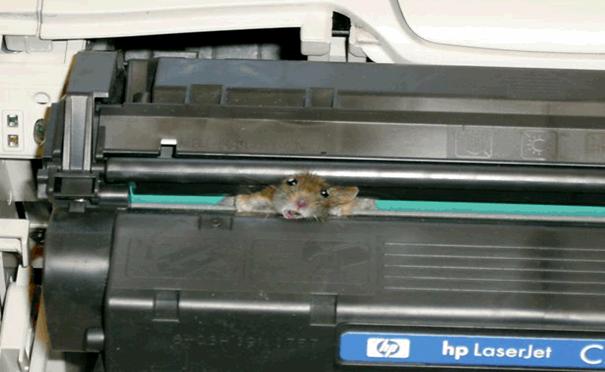
Caller: Mouse is jammed.
Customer Service: Mouse? And how it is related to printer?
Caller: Mmmm.. Wait, I will send a picture


Now take a look at the attached file and tell me it didn't make you laugh
Attachments 1058812uhvow9.jpg 30.76KB
goldeagle2005
Finkus Stinkalotus
Team Colleague
1,500 posts since Jun 2005
Reputation Points: 67
Solved Threads: 45
 

LOL.. wow man, where did you get hold of this pic.

Hey wait...dont tell me its your printer..:D

~s.o.s~
Failure as a human
Administrator
11,938 posts since Jun 2006
Reputation Points: 3,281
Solved Threads: 732
 

Naah, it's not my printer. Some poor schmuck using his printer as a rat trap, I suppose

goldeagle2005
Finkus Stinkalotus
Team Colleague
1,500 posts since Jun 2005
Reputation Points: 67
Solved Threads: 45
 

well, a lot of application manuals tell you something like "click with the mouse on the printer to print".
Someone's bound to take that literally :)

jwenting
duckman
Team Colleague
8,392 posts since Nov 2004
Reputation Points: 1,662
Solved Threads: 337
 

I remember getting that picture emailed to me, and enjoyed it immensly. The printer was probably nice and warm so the mouse tryed to make a nest inside it...

John A
Vampirical Lurker
Team Colleague
7,630 posts since Apr 2006
Reputation Points: 2,240
Solved Threads: 339
 

my friend had a cat living in his computer - no im not joking
it was one of those huge old hp servers (prosignia?) the ones that are like crates cos they have like 12 drive bays

anyway.. this cat managed to get in through a hole (where one of the backup PSUs had been removed) and anyway one day he wondered why the hell his network wastnt working and this cat had chewed throug hthe ribbon cables

jbennet
Moderator
Moderator
18,523 posts since Apr 2005
Reputation Points: 1,820
Solved Threads: 599
 
well, a lot of application manuals tell you something like "click with the mouse on the printer to print". Someone's bound to take that literally :)


They said 'ON' the printer, right? Not 'IN' the printer. hehehehe:mrgreen:

goldeagle2005
Finkus Stinkalotus
Team Colleague
1,500 posts since Jun 2005
Reputation Points: 67
Solved Threads: 45
 

Here in the English countryside, we get insects known as 'thrips' during harvesting time. The things are tiny, 1mm or so, little black specs.

Trouble is they are so small that they get everywhere, including inside the LCD screens of our laptops, and desktops for that matter. Damn annoying when you don't suffer from dead pixels bu live ones instead, that wander all over the darn screen.

They die quickly enough, but then it depends where they die and where they stick...

happygeek
Freelance Word Punk
Administrator
27,457 posts since Mar 2006
Reputation Points: 1,457
Solved Threads: 54
 

ive never seen one but then again im a city boy

jbennet
Moderator
Moderator
18,523 posts since Apr 2005
Reputation Points: 1,820
Solved Threads: 599
 

I had never heard of them until I left the confines of Sarf Lunnon (South London for the uninitiated) for South Yorkshire.

Now I wish I had never heard of them.

The things are also called harvest bugs by some, and wrongly thunderbugs by others.

happygeek
Freelance Word Punk
Administrator
27,457 posts since Mar 2006
Reputation Points: 1,457
Solved Threads: 54
 

So what do you do if a bug gets caught in the LCD screen?

goldeagle2005
Finkus Stinkalotus
Team Colleague
1,500 posts since Jun 2005
Reputation Points: 67
Solved Threads: 45
 

Not a lot you can do. In most cases it drops to the bottom and rots away without leaving any trace. The things are miniscule after all.

I've not had any cause permanent damage as of yet.

happygeek
Freelance Word Punk
Administrator
27,457 posts since Mar 2006
Reputation Points: 1,457
Solved Threads: 54
 

Im glad you dont squish the darn thing. Talk about phosphor burn on an LCD.

(I'm sorry. real lame one there)

goldeagle2005
Finkus Stinkalotus
Team Colleague
1,500 posts since Jun 2005
Reputation Points: 67
Solved Threads: 45
 

Once a mouse went into my printer and bite everything and was trapped there and damn my printer was dead with that mouse. I hardly use my printer so I discovered that when rotten smell was coming out of it. It took me no time to throw that printer.

vishesh
Nearly a Posting Virtuoso
1,381 posts since Oct 2006
Reputation Points: 85
Solved Threads: 42
 

I still belive that the greatest damage to the hardware can be caused by "trial and error" method. (learned it a hard way)

Chaky
Postaholic
2,017 posts since May 2006
Reputation Points: 230
Solved Threads: 47
 

i learnt the hard way too

NEVER POWER UP A PSU THATS NOT ATTATCHED TO A MOTHERBOARD! -BOOOOOOOOM-

jbennet
Moderator
Moderator
18,523 posts since Apr 2005
Reputation Points: 1,820
Solved Threads: 599
 

And if you take out the BIOS chip, put it back the RIGHT way. Not the other -permanently dead mobo-

Chaky
Postaholic
2,017 posts since May 2006
Reputation Points: 230
Solved Threads: 47
 

yeah also NEVER when your wiring the mobo, get the P(whatver number) power connectors wrong -P1 must be Mobo!

jbennet
Moderator
Moderator
18,523 posts since Apr 2005
Reputation Points: 1,820
Solved Threads: 599
 

Me too. I remember when I forst got my Win98 computer. I used to access the Windows folder and never paid heed to the warning. When it said that a particular file is a system file and should not be deleted, I used to delete it to see what happens. End result? Rendered the system unbootable 6 times in the first month itself. But I sure as hell learned a lot....

goldeagle2005
Finkus Stinkalotus
Team Colleague
1,500 posts since Jun 2005
Reputation Points: 67
Solved Threads: 45
 

This article has been dead for over three months

Post: Markdown Syntax: Formatting Help
You