954,074 Members — Technology Publication meets Social Media
Username:
Password:
Lost login information?
Have something to say? Contribute New Article Reply to this Article

A Few Small Issues

I have a few small issues that I would love to get ironed out today or tomorrow, or some time in the near future.

1. MP3 Support
I understand that mp3 files aren't supported by default by audio players such as amaroK, but I followed a short tutorial at
http://winanga.wordpress.com/2006/03/18/amarok-mp3-support-in-ubuntu-dapper/
And put the terminal line in, which spit an error message back at me.

alex@alex-laptop:~$ sudo apt-get install gstreamer0.10-plugins-ugly libxine-extracodecs
Reading package lists... Done
Building dependency tree       
Reading state information... Done
Package gstreamer0.10-plugins-ugly is not available, but is referred to by another package.
This may mean that the package is missing, has been obsoleted, or
is only available from another source
E: Package gstreamer0.10-plugins-ugly has no installation candidate
alex@alex-laptop:~$


How can I install these plugins and get my mp3s to work again?

2. M4A and MP4 Support
I believe these types of files are also not supported. However, I remember reading somewhere about using these with some "faam" plug-in. Where/how can I get/install this plugin?

3. Synaptic Package ManagerSolved

4 (and final). Flash Plugin for Firefox
How do I install it, and why do the installers for all of these plugins fail when trying to install them? ie: Shockwave, etc.
Thanks for your time in reading this!
linux
Posting Shark
933 posts since Aug 2006
Reputation Points: 118
Solved Threads: 30
 

Ubuntu?

Go into settings -> system -> software sources
*enable all repos and refresh them*

Go into add/remove programs in the gnome menu and install the package "ubuntu restricted extras"

Then open up Synaptic and install the Gstreamer codecs.

Install flash through Synaptic. Its named something like "flashplugin-nonfree". Java is there too

This will enable the MS media player formats, mp3 etc.....

check this page out:

https://help.ubuntu.com/community/RestrictedFormats

DO NOT download LibdvdCSS in the USA. Its illegal.

jbennet
Moderator
Moderator
18,523 posts since Apr 2005
Reputation Points: 1,820
Solved Threads: 599
 

Hold on. The GStreamer plugins. Will those enable mp3 playback?

linux
Posting Shark
933 posts since Aug 2006
Reputation Points: 118
Solved Threads: 30
 

Update: I installed ubuntu-restricted-extras, but I still can't play mp3s in Amorak. What did I do wrong?

I understand why I can't play my m4as, which I'd love to get sorted out, but mp3 should work.

And also, by following the tutorial here:
https://help.ubuntu.com/community/PortableDevices/iPhone

I should be able to mount my iPod. However, I get this error when I try to mount it:

alex@alex-laptop:~$ sudo ipod-touch-mount
[sudo] password for alex:
Please add yourself to the fuse group, logout/in and try again.
alex@alex-laptop:~$
linux
Posting Shark
933 posts since Aug 2006
Reputation Points: 118
Solved Threads: 30
 

For mp3 playback, you need the gstreamer0.8-mad package installed. For AAC (m4a), you'll need gstreamer0.8-faad .

Installing Flash is very simple. Download the tar.gz file from Adobe's website. If you're using Firefox, copy libflashplayer.so to your Mozilla plugins directory. If not, there is an installation script. Just make sure you close your browser before beginning installation. If you want to install Flash system-wide, you'll also need to authenticate yourself as root (prefix the script command with 'sudo').

As for Shockwave, sorry, it isn't available for Linux. You can however install wine, run the Windows version of Firefox using it, and from there install Shockwave. You'll have to run the Windows version of Firefox every time you wish to use Shockwave, however.

John A
Vampirical Lurker
Team Colleague
7,630 posts since Apr 2006
Reputation Points: 2,240
Solved Threads: 339
 

you also want gstreamer-good, gstreamer-bad and gstreamer-ugly

jbennet
Moderator
Moderator
18,523 posts since Apr 2005
Reputation Points: 1,820
Solved Threads: 599
 

I installed EVERY gstreamer plug-in available from Synaptics. Should I reboot when I get home? Because after I installed them, I still couldn't play anything in Amarok.

Shit, maybe if I restart Amarok afterwards >.<

Hey, can you guys check the *NIX Software forum and check my post about iPod touch + Ubuntu 7.10? If you know anything regarding this, then please, please, PLEASE reply there. Thank you!

Anyways thanks for your mp3 / m4a help!

linux
Posting Shark
933 posts since Aug 2006
Reputation Points: 118
Solved Threads: 30
 

try playing them in th rythmbox music manager

jbennet
Moderator
Moderator
18,523 posts since Apr 2005
Reputation Points: 1,820
Solved Threads: 599
 

I can play them in Rythmbox, but I can't in Amarok, even after restarting it. Every time I try, it gives me an error saying "Amarok can't play this file" "INSTALL MP3 SUPPORT" etc.

linux
Posting Shark
933 posts since Aug 2006
Reputation Points: 118
Solved Threads: 30
 

wierd

jbennet
Moderator
Moderator
18,523 posts since Apr 2005
Reputation Points: 1,820
Solved Threads: 599
 

Do you know how I can fix it?

linux
Posting Shark
933 posts since Aug 2006
Reputation Points: 118
Solved Threads: 30
 

dunno, i never use armarok , i just use rythmbox and totem

jbennet
Moderator
Moderator
18,523 posts since Apr 2005
Reputation Points: 1,820
Solved Threads: 599
 

Damn. I can't use those to sync my iPod with.

How do I add myself to fuse though? It tells me to:

alex@alex-laptop:~$ sudo ipod-touch-mount
[sudo] password for alex:
Please add yourself to the fuse group, logout/in and try again.
alex@alex-laptop:~$
linux
Posting Shark
933 posts since Aug 2006
Reputation Points: 118
Solved Threads: 30
 

If you've installed all the necessary gstreamer plugins, then the problem is probably that Amarok isn't using gstreamer (I can't remember, but I don't think it uses gstreamer by default). In the settings window, there should be a configuration option that allows you to choose which sound engine you wish to use. Choosing gstreamer should fix the problem.

>How do I add myself to fuse though?
$ sudo usermod -G fuse alex

John A
Vampirical Lurker
Team Colleague
7,630 posts since Apr 2006
Reputation Points: 2,240
Solved Threads: 339
 

What the hell? gstreamer isn't shown in that window at all under Amarok!

linux
Posting Shark
933 posts since Aug 2006
Reputation Points: 118
Solved Threads: 30
 

Hmm. It's using xine right now, isn't it? Try installing libxine-extracodecs . That should at least get mp3 support working.

John A
Vampirical Lurker
Team Colleague
7,630 posts since Apr 2006
Reputation Points: 2,240
Solved Threads: 339
 

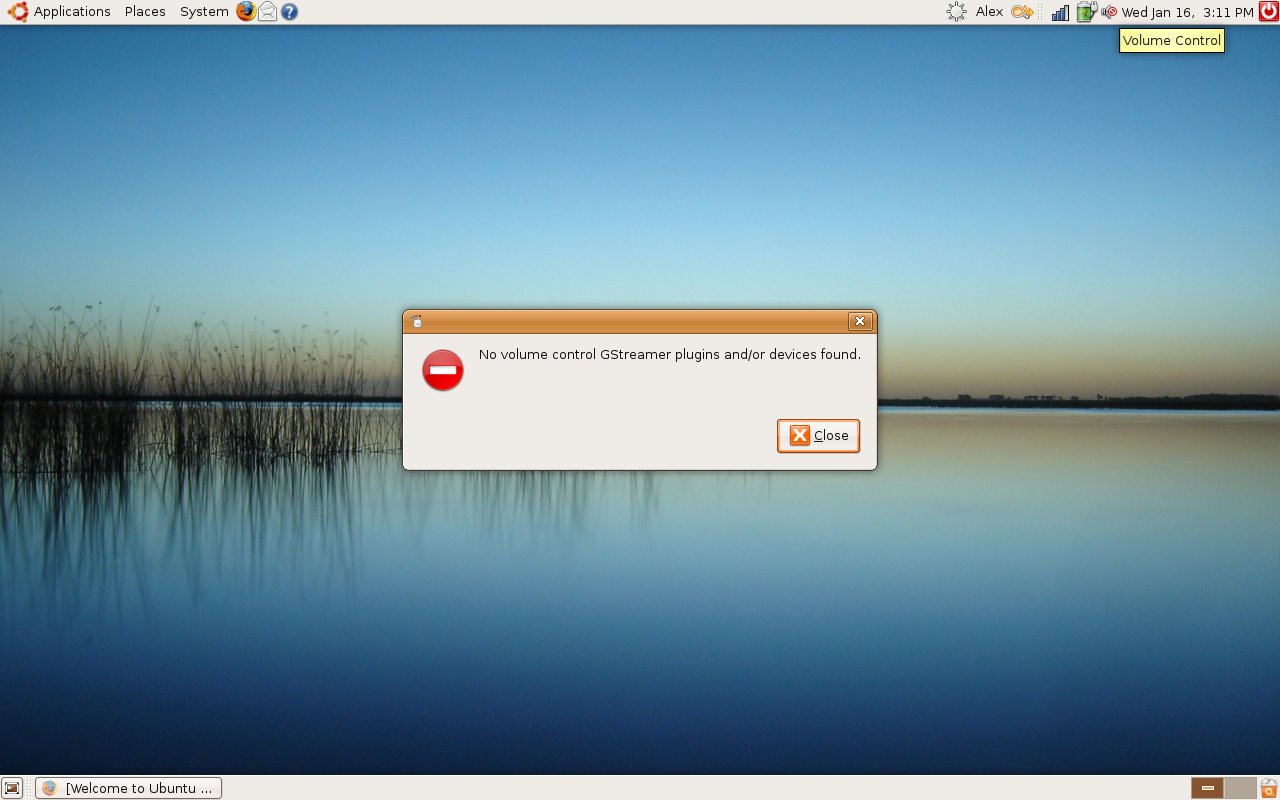
Oh great. Now my sound isn't working AT ALL. I rebooted last night (left it off all night) and then started it up right now, and this happened. I can't even play system sounds. Whenever I right click and try to open volume control, that window comes up. I used to be able to before this reboot.

And also, whenever I try to run a sudo command, it does nothing. For example, sudo apt-get install just brings me back to the prompt with alex@alex-laptop$.

What did I do wrong, and how can I fix it? Aaah.

Attachments Aah.jpg 88.75KB
linux
Posting Shark
933 posts since Aug 2006
Reputation Points: 118
Solved Threads: 30
 

GREAT. In Applications, it's missing Add/Remove Programs, and also, in System > Administration, it's missing like 20 icons.

And also sound support is gone, and my ability to use any command with "sudo" before it fails to run.

What did I do wrong? And how, PLEASE how, can I fix this as soon as possible?

Also: alex isn't added to the sudeoers list, apparently... Is this my problem?

linux
Posting Shark
933 posts since Aug 2006
Reputation Points: 118
Solved Threads: 30
 

>GREAT. In Applications, it's missing Add/Remove Programs, and also, in System >
>Administration, it's missing like 20 icons.

Your system sounds pretty far gone. Correcting the sudoers problem would be fairly straightforward, but that still wouldn't account for the missing applications or the strange responses from the terminal when running apt-get (if sudo was the problem, you would get a permission denied error when running "sudo apt-get").

Just wondering, could you post the output of the following command at the terminal:

$ cat /etc/sudoers
John A
Vampirical Lurker
Team Colleague
7,630 posts since Apr 2006
Reputation Points: 2,240
Solved Threads: 339
 

Alright, actually I fixed this all on my own! As a 15 year old kid with NO Linux knowledge, I feel pretty damn awesome right now.

My solution:

1. Booted up the Ubuntu 7.10 Live CD that I burned to install Linux. Everything booted up fine.
2. Applications->Accessories->Terminal
3. sudo visudo /media/disk/etc/sudoers
(where disk is the name of my harddisk with the Ubuntu install on it)
4. Added a new line underneath root with the same thing as root, only with alex instead of root.
5. Rebooted

Everything works! All of my applications are back, etc.
And to fix my sound:
http://linux.dsplabs.com.au/no-volume-control-gstreamer-plugins-and-or-devices-found-no-sound-or-voume-control-bug-on-ubuntu-p31/

Brilliant tutorial, easy to follow.
I'm back up, and all I need now is iPod touch syncing support, which I'll work out eventually, if not today, sometime in the near future.

Thank you, everyone, for your support and helpfulness. Every one of my questions here is finally solved.
Thanks!

linux
Posting Shark
933 posts since Aug 2006
Reputation Points: 118
Solved Threads: 30
 

This question has already been solved

Post: Markdown Syntax: Formatting Help
You
 
View similar articles that have also been tagged: