Hello all.
After passing for some days trying to configure ip forwarding under debian i've understood that there is some problem with them.
So now i'm looking for any stand-alone app, not a firewall to handle the port forwarding.
Would be glad for any information.
If you have some skill with iptables, you could pass by
http://ubuntuforums.org/showthread.php?t=1282215
and
http://forums.debian.net/viewtopic.php?f=10&t=45715
Thanks in advance.

jen140
0
Junior Poster
Recommended Answers
Jump to PostI don't understand the question. There aren't any problems with iptables, you can port forward with it.
Jump to PostI don't think any of the posts have clearly explained what you are trying to accomplish.
Internet->server(eth0)->server(eth1)->router->clients.
Router cant be the first to connect to the internet because it doesnt have the neden port.What is neden?
Server eth0: Dynamic Public IP
Server eth1: LAN Address space
Jump to PostIts going to show filtered if it didn't receive a closed response, so if the port forwarding was set up incorrectly it would show filtered as I suspect is the case here.
Obviously your machine doing the routing is debian linux. What OS is the machine you're trying to …
Jump to PostMachine 192.168.0.200 is also a debian machine, that runs a honeypot (nepenthes) on a variety of ports.
From lan i can easily connect to it using 139/135/21/etc(but i dont need internet connection there so it doesnt have gateway defined).Well that explains why your port forwarding doesn't …
All 14 Replies

sknake
1,622
Senior Poster
Featured Poster
I don't understand the question. There aren't any problems with iptables, you can port forward with it.
jen140
0
Junior Poster
If you have passed by any of the given links you would see that there is a problem(in my case).
Here is the list of what i tryied and the responses:
iptables -A tcp_packets -p TCP -s 0/0 --dport 139 -j ACCEPT
iptables -A udpincoming_packets -p UDP -s 0/0 --source-port 139 -j ACCEPT
iptables -t nat -A PREROUTING -p tcp -d 83.132.157.123 --dport 139 -j DNAT --to 192.168.0.200:139
//filtered
iptables -t nat -I PREROUTING -p tcp -i eth0 --dport 139 -j DNAT --to 192.168.0.200:139
//filtered
iptables -t nat -A PREROUTING -p tcp -i eth0 -d 83.132.157.123 --dport 139 -j DNAT --to 192.168.0.200:139
iptables -A FORWARD -p tcp -i eth0 -d 192.168.0.200 --dport 139 -j ACCEPT
//closed <- host down
iptables -t nat -A PREROUTING -p tcp -i eth0 --dport 139 -j DNAT --to 192.168.0.200:139
iptables -A FORWARD -p tcp -i eth0 -d 192.168.0.200 --dport 139 -j ACCEPT
//filtered
iptables -t nat -I PREROUTING -p tcp -i eth0 --dport 139 -j DNAT --to 192.168.0.200:139
iptables -A FORWARD -p tcp -i eth0 -d 83.132.157.123 --dport 139 -j ACCEPT
//filtered <- host down
iptables -t nat -I PREROUTING -p tcp -i eth0 --dport 139 -j DNAT --to 192.168.0.200:139
iptables -A FORWARD -p tcp -i eth0 --dport 139 -j ACCEPT
//filtered
As you see,none gives "open".
sknake
1,622
Senior Poster
Featured Poster
I don't think any of the posts have clearly explained what you are trying to accomplish.
Internet->server(eth0)->server(eth1)->router->clients.
Router cant be the first to connect to the internet because it doesnt have the neden port.
What is neden?
Server eth0: Dynamic Public IP
Server eth1: LAN Address space 192.168.0.1/255.255.255.0
SSH Machine: 192.168.0.200
Clients: 192.168.0.2 and 192.168.0.3.
How are your clients and server running on what appears to be the same address space/subnet even though they traverse a router? I don't think your network diagram is complete. I also saw you had 10.x address bindings on your server. Is this a result of bridged connections for internet sharing with your virtual machine?
jen140
0
Junior Poster
10.10.0.x is my vpn, that works fine.
all the clients (192.168.0.x) now have internet.
The machine where the connection should "enter" is the server.
All the connections made to it from the internet on port 135, should be redirected to the machine that has ip 192.168.0.200 on the same port.
sknake
1,622
Senior Poster
Featured Poster
Its going to show filtered if it didn't receive a closed response, so if the port forwarding was set up incorrectly it would show filtered as I suspect is the case here.
Obviously your machine doing the routing is debian linux. What OS is the machine you're trying to forward to? In your other posts you mention port :21 and now you're mentioning port 135. From what I can tell you're talking about TCP but you also refer to UDP:
iptables -A tcp_packets -p TCP -s 0/0 --dport 139 -j ACCEPT
iptables -A udpincoming_packets -p UDP -s 0/0 --source-port 139 -j ACCEPT
Plus you're appending rules to chains that you don't show are targeted in the pastes your posting here. What I see is a lot of incomplete information....
On your table doing the packeting switching/routing (iptables) post the output from:
root@svn:~# arp -a
root@svn:~# ifconfig -a
root@svn:~# iptables-save
root@svn:~# route -n
root@svn:~# cat /etc/network/interfaces
root@svn:~# sysctl net.ipv4
If the machine on 192.168.0.200 is Linux please provide the same output.
Edited
by sknake because:
n/a
jen140
0
Junior Poster
Sorry for providing diferent ports, but the ideia is to have a rule (2 or 3 lines code) with some port (for example 139) to easily set up port forwarding to any port.
Machine 192.168.0.200 is also a debian machine, that runs a honeypot (nepenthes) on a variety of ports.
From lan i can easily connect to it using 139/135/21/etc(but i dont need internet connection there so it doesnt have gateway defined).
The output of the commands you asked:
server:/home/jen140# arp -a
? (192.168.0.88) at 00:0c:29:4d:75:d6 [ether] on eth1
? (192.168.0.3) at 00:23:54:51:a3:b7 [ether] on eth1
a213-22-129-254.cpe.netcabo.pt (213.22.129.254) at 00:05:5f:ef:a4:01 [ether] on eth0
server:/home/jen140# ifconfig -a
eth0      Link encap:Ethernet  HWaddr 00:13:f7:cb:9a:0b
          inet addr:213.22.128.X  Bcast:213.22.129.255  Mask:255.255.254.0
          inet6 addr: fe80::213:f7ff:fecb:9a0b/64 Scope:Link
          UP BROADCAST RUNNING MULTICAST  MTU:1500  Metric:1
          RX packets:1050560 errors:0 dropped:0 overruns:0 frame:0
          TX packets:797253 errors:0 dropped:0 overruns:0 carrier:0
          collisions:0 txqueuelen:1000
          RX bytes:1172372697 (1.0 GiB)  TX bytes:249272821 (237.7 MiB)
          Interrupt:18 Base address:0xb000

eth1      Link encap:Ethernet  HWaddr 00:0e:2e:f2:2d:e3
          inet addr:192.168.0.1  Bcast:192.168.0.255  Mask:255.255.255.0
          inet6 addr: fe80::20e:2eff:fef2:2de3/64 Scope:Link
          UP BROADCAST RUNNING MULTICAST  MTU:1500  Metric:1
          RX packets:869657 errors:0 dropped:0 overruns:0 frame:0
          TX packets:1125051 errors:0 dropped:0 overruns:0 carrier:0
          collisions:0 txqueuelen:1000
          RX bytes:258204867 (246.2 MiB)  TX bytes:1178122158 (1.0 GiB)
          Interrupt:19 Base address:0xb400

eth2      Link encap:Ethernet  HWaddr 00:0c:76:c1:32:3f
          BROADCAST MULTICAST  MTU:1500  Metric:1
          RX packets:0 errors:0 dropped:0 overruns:0 frame:0
          TX packets:0 errors:0 dropped:0 overruns:0 carrier:0
          collisions:0 txqueuelen:1000
          RX bytes:0 (0.0 B)  TX bytes:0 (0.0 B)
          Interrupt:20 Base address:0xb800

lo        Link encap:Local Loopback
          inet addr:127.0.0.1  Mask:255.0.0.0
          inet6 addr: ::1/128 Scope:Host
          UP LOOPBACK RUNNING  MTU:16436  Metric:1
          RX packets:3608 errors:0 dropped:0 overruns:0 frame:0
          TX packets:3608 errors:0 dropped:0 overruns:0 carrier:0
          collisions:0 txqueuelen:0
          RX bytes:157737 (154.0 KiB)  TX bytes:157737 (154.0 KiB)

tun0      Link encap:UNSPEC  HWaddr 00-00-00-00-00-00-00-00-00-00-00-00-00-00-00-00
          inet addr:10.10.0.1  P-t-P:10.10.0.2  Mask:255.255.255.255
          UP POINTOPOINT RUNNING NOARP MULTICAST  MTU:1500  Metric:1
          RX packets:93280 errors:0 dropped:0 overruns:0 frame:0
          TX packets:93288 errors:0 dropped:0 overruns:0 carrier:0
          collisions:0 txqueuelen:100
          RX bytes:4488716 (4.2 MiB)  TX bytes:3768244 (3.5 MiB)

vboxnet0  Link encap:Ethernet  HWaddr 0a:00:27:00:00:00
          BROADCAST MULTICAST  MTU:1500  Metric:1
          RX packets:0 errors:0 dropped:0 overruns:0 frame:0
          TX packets:0 errors:0 dropped:0 overruns:0 carrier:0
          collisions:0 txqueuelen:1000
          RX bytes:0 (0.0 B)  TX bytes:0 (0.0 B)
server:/home/jen140# iptables-save
# Generated by iptables-save v1.4.5 on Sun Oct 11 19:31:11 2009
*nat
:PREROUTING ACCEPT [135806:7435880]
:POSTROUTING ACCEPT [1736:77699]
:OUTPUT ACCEPT [18860:1281505]
-A POSTROUTING -o eth0 -j MASQUERADE
COMMIT
# Completed on Sun Oct 11 19:31:11 2009
# Generated by iptables-save v1.4.5 on Sun Oct 11 19:31:11 2009
*filter
:INPUT ACCEPT [225895:22253800]
:FORWARD ACCEPT [1810663:1406118105]
:OUTPUT ACCEPT [228365:18349217]
COMMIT
# Completed on Sun Oct 11 19:31:11 2009
server:/home/jen140# route -n
Kernel IP routing table
Destination     Gateway         Genmask         Flags Metric Ref    Use Iface
10.10.0.2       0.0.0.0         255.255.255.255 UH    0      0        0 tun0
10.10.0.0       10.10.0.2       255.255.255.0   UG    0      0        0 tun0
192.168.0.0     0.0.0.0         255.255.255.0   U     0      0        0 eth1
213.22.128.0    0.0.0.0         255.255.254.0   U     0      0        0 eth0
0.0.0.0         213.22.129.254  0.0.0.0         UG    0      0        0 eth0
server:/home/jen140# cat /etc/network/interfaces
# This file describes the network interfaces available on your system
# and how to activate them. For more information, see interfaces(5).

# The loopback network interface
auto lo
iface lo inet loopback

# The primary network interface
allow-hotplug eth0
iface eth0 inet dhcp
server:/home/jen140# sysctl net.ipv4
net.ipv4.tcp_timestamps = 1
net.ipv4.tcp_window_scaling = 1
net.ipv4.tcp_sack = 1
net.ipv4.tcp_retrans_collapse = 1
net.ipv4.ip_default_ttl = 64
net.ipv4.ip_no_pmtu_disc = 0
net.ipv4.ip_nonlocal_bind = 0
net.ipv4.tcp_syn_retries = 5
net.ipv4.tcp_synack_retries = 5
net.ipv4.tcp_max_orphans = 32768
net.ipv4.tcp_max_tw_buckets = 180000
net.ipv4.ip_dynaddr = 0
net.ipv4.tcp_keepalive_time = 7200
net.ipv4.tcp_keepalive_probes = 9
net.ipv4.tcp_keepalive_intvl = 75
net.ipv4.tcp_retries1 = 3
net.ipv4.tcp_retries2 = 15
net.ipv4.tcp_fin_timeout = 60
net.ipv4.tcp_syncookies = 0
net.ipv4.tcp_tw_recycle = 0
net.ipv4.tcp_abort_on_overflow = 0
net.ipv4.tcp_stdurg = 0
net.ipv4.tcp_rfc1337 = 0
net.ipv4.tcp_max_syn_backlog = 1024
net.ipv4.ip_local_port_range = 32768    61000
net.ipv4.route.gc_thresh = 32768
net.ipv4.route.max_size = 524288
net.ipv4.route.gc_min_interval = 0
net.ipv4.route.gc_min_interval_ms = 500
net.ipv4.route.gc_timeout = 300
net.ipv4.route.gc_interval = 60
net.ipv4.route.redirect_load = 5
net.ipv4.route.redirect_number = 9
net.ipv4.route.redirect_silence = 5120
net.ipv4.route.error_cost = 250
net.ipv4.route.error_burst = 1250
net.ipv4.route.gc_elasticity = 8
net.ipv4.route.mtu_expires = 600
net.ipv4.route.min_pmtu = 552
net.ipv4.route.min_adv_mss = 256
net.ipv4.route.secret_interval = 600
net.ipv4.igmp_max_memberships = 20
net.ipv4.igmp_max_msf = 10
net.ipv4.inet_peer_threshold = 65664
net.ipv4.inet_peer_minttl = 120
net.ipv4.inet_peer_maxttl = 600
net.ipv4.inet_peer_gc_mintime = 10
net.ipv4.inet_peer_gc_maxtime = 120
net.ipv4.tcp_orphan_retries = 0
net.ipv4.tcp_fack = 1
net.ipv4.tcp_reordering = 3
net.ipv4.tcp_ecn = 0
net.ipv4.tcp_dsack = 1
net.ipv4.tcp_mem = 84192        112256  168384
net.ipv4.tcp_wmem = 4096        16384   3592192
net.ipv4.tcp_rmem = 4096        87380   3592192
net.ipv4.tcp_app_win = 31
net.ipv4.tcp_adv_win_scale = 2
net.ipv4.tcp_tw_reuse = 0
net.ipv4.tcp_frto = 2
net.ipv4.tcp_frto_response = 0
net.ipv4.tcp_low_latency = 0
net.ipv4.tcp_no_metrics_save = 0
net.ipv4.tcp_moderate_rcvbuf = 1
net.ipv4.tcp_tso_win_divisor = 3
net.ipv4.tcp_congestion_control = cubic
net.ipv4.tcp_abc = 0
net.ipv4.tcp_mtu_probing = 0
net.ipv4.tcp_base_mss = 512
net.ipv4.tcp_workaround_signed_windows = 0
net.ipv4.tcp_dma_copybreak = 4096
net.ipv4.tcp_slow_start_after_idle = 1
net.ipv4.tcp_available_congestion_control = cubic reno
net.ipv4.tcp_allowed_congestion_control = cubic reno
net.ipv4.tcp_max_ssthresh = 0
net.ipv4.udp_mem = 97440        129920  194880
net.ipv4.udp_rmem_min = 4096
net.ipv4.udp_wmem_min = 4096
net.ipv4.netfilter.ip_conntrack_generic_timeout = 600
net.ipv4.netfilter.ip_conntrack_tcp_timeout_syn_sent = 120
net.ipv4.netfilter.ip_conntrack_tcp_timeout_syn_recv = 60
net.ipv4.netfilter.ip_conntrack_tcp_timeout_established = 432000
net.ipv4.netfilter.ip_conntrack_tcp_timeout_fin_wait = 120
net.ipv4.netfilter.ip_conntrack_tcp_timeout_close_wait = 60
net.ipv4.netfilter.ip_conntrack_tcp_timeout_last_ack = 30
net.ipv4.netfilter.ip_conntrack_tcp_timeout_time_wait = 120
net.ipv4.netfilter.ip_conntrack_tcp_timeout_close = 10
net.ipv4.netfilter.ip_conntrack_tcp_timeout_max_retrans = 300
net.ipv4.netfilter.ip_conntrack_tcp_loose = 1
net.ipv4.netfilter.ip_conntrack_tcp_be_liberal = 0
net.ipv4.netfilter.ip_conntrack_tcp_max_retrans = 3
net.ipv4.netfilter.ip_conntrack_udp_timeout = 30
net.ipv4.netfilter.ip_conntrack_udp_timeout_stream = 180
net.ipv4.netfilter.ip_conntrack_icmp_timeout = 30
net.ipv4.netfilter.ip_conntrack_max = 65536
net.ipv4.netfilter.ip_conntrack_count = 273
net.ipv4.netfilter.ip_conntrack_buckets = 16384
net.ipv4.netfilter.ip_conntrack_checksum = 1
net.ipv4.netfilter.ip_conntrack_log_invalid = 0
net.ipv4.neigh.default.mcast_solicit = 3
net.ipv4.neigh.default.ucast_solicit = 3
net.ipv4.neigh.default.app_solicit = 0
net.ipv4.neigh.default.retrans_time = 100
net.ipv4.neigh.default.base_reachable_time = 30
net.ipv4.neigh.default.delay_first_probe_time = 5
net.ipv4.neigh.default.gc_stale_time = 60
net.ipv4.neigh.default.unres_qlen = 3
net.ipv4.neigh.default.proxy_qlen = 64
net.ipv4.neigh.default.anycast_delay = 100
net.ipv4.neigh.default.proxy_delay = 80
net.ipv4.neigh.default.locktime = 100
net.ipv4.neigh.default.retrans_time_ms = 1000
net.ipv4.neigh.default.base_reachable_time_ms = 30000
net.ipv4.neigh.default.gc_interval = 30
net.ipv4.neigh.default.gc_thresh1 = 128
net.ipv4.neigh.default.gc_thresh2 = 512
net.ipv4.neigh.default.gc_thresh3 = 1024
net.ipv4.neigh.lo.mcast_solicit = 3
net.ipv4.neigh.lo.ucast_solicit = 3
net.ipv4.neigh.lo.app_solicit = 0
net.ipv4.neigh.lo.retrans_time = 100
net.ipv4.neigh.lo.base_reachable_time = 30
net.ipv4.neigh.lo.delay_first_probe_time = 5
net.ipv4.neigh.lo.gc_stale_time = 60
net.ipv4.neigh.lo.unres_qlen = 3
net.ipv4.neigh.lo.proxy_qlen = 64
net.ipv4.neigh.lo.anycast_delay = 100
net.ipv4.neigh.lo.proxy_delay = 80
net.ipv4.neigh.lo.locktime = 100
net.ipv4.neigh.lo.retrans_time_ms = 1000
net.ipv4.neigh.lo.base_reachable_time_ms = 30000
net.ipv4.neigh.eth0.mcast_solicit = 3
net.ipv4.neigh.eth0.ucast_solicit = 3
net.ipv4.neigh.eth0.app_solicit = 0
net.ipv4.neigh.eth0.retrans_time = 100
net.ipv4.neigh.eth0.base_reachable_time = 30
net.ipv4.neigh.eth0.delay_first_probe_time = 5
net.ipv4.neigh.eth0.gc_stale_time = 60
net.ipv4.neigh.eth0.unres_qlen = 3
net.ipv4.neigh.eth0.proxy_qlen = 64
net.ipv4.neigh.eth0.anycast_delay = 100
net.ipv4.neigh.eth0.proxy_delay = 80
net.ipv4.neigh.eth0.locktime = 100
net.ipv4.neigh.eth0.retrans_time_ms = 1000
net.ipv4.neigh.eth0.base_reachable_time_ms = 30000
net.ipv4.neigh.eth1.mcast_solicit = 3
net.ipv4.neigh.eth1.ucast_solicit = 3
net.ipv4.neigh.eth1.app_solicit = 0
net.ipv4.neigh.eth1.retrans_time = 100
net.ipv4.neigh.eth1.base_reachable_time = 30
net.ipv4.neigh.eth1.delay_first_probe_time = 5
net.ipv4.neigh.eth1.gc_stale_time = 60
net.ipv4.neigh.eth1.unres_qlen = 3
net.ipv4.neigh.eth1.proxy_qlen = 64
net.ipv4.neigh.eth1.anycast_delay = 100
net.ipv4.neigh.eth1.proxy_delay = 80
net.ipv4.neigh.eth1.locktime = 100
net.ipv4.neigh.eth1.retrans_time_ms = 1000
net.ipv4.neigh.eth1.base_reachable_time_ms = 30000
net.ipv4.neigh.eth2.mcast_solicit = 3
net.ipv4.neigh.eth2.ucast_solicit = 3
net.ipv4.neigh.eth2.app_solicit = 0
net.ipv4.neigh.eth2.retrans_time = 100
net.ipv4.neigh.eth2.base_reachable_time = 30
net.ipv4.neigh.eth2.delay_first_probe_time = 5
net.ipv4.neigh.eth2.gc_stale_time = 60
net.ipv4.neigh.eth2.unres_qlen = 3
net.ipv4.neigh.eth2.proxy_qlen = 64
net.ipv4.neigh.eth2.anycast_delay = 100
net.ipv4.neigh.eth2.proxy_delay = 80
net.ipv4.neigh.eth2.locktime = 100
net.ipv4.neigh.eth2.retrans_time_ms = 1000
net.ipv4.neigh.eth2.base_reachable_time_ms = 30000
net.ipv4.neigh.tun0.mcast_solicit = 3
net.ipv4.neigh.tun0.ucast_solicit = 3
net.ipv4.neigh.tun0.app_solicit = 0
net.ipv4.neigh.tun0.retrans_time = 100
net.ipv4.neigh.tun0.base_reachable_time = 30
net.ipv4.neigh.tun0.delay_first_probe_time = 5
net.ipv4.neigh.tun0.gc_stale_time = 60
net.ipv4.neigh.tun0.unres_qlen = 3
net.ipv4.neigh.tun0.proxy_qlen = 64
net.ipv4.neigh.tun0.anycast_delay = 100
net.ipv4.neigh.tun0.proxy_delay = 80
net.ipv4.neigh.tun0.locktime = 100
net.ipv4.neigh.tun0.retrans_time_ms = 1000
net.ipv4.neigh.tun0.base_reachable_time_ms = 30000
net.ipv4.neigh.vboxnet0.mcast_solicit = 3
net.ipv4.neigh.vboxnet0.ucast_solicit = 3
net.ipv4.neigh.vboxnet0.app_solicit = 0
net.ipv4.neigh.vboxnet0.retrans_time = 100
net.ipv4.neigh.vboxnet0.base_reachable_time = 30
net.ipv4.neigh.vboxnet0.delay_first_probe_time = 5
net.ipv4.neigh.vboxnet0.gc_stale_time = 60
net.ipv4.neigh.vboxnet0.unres_qlen = 3
net.ipv4.neigh.vboxnet0.proxy_qlen = 64
net.ipv4.neigh.vboxnet0.anycast_delay = 100
net.ipv4.neigh.vboxnet0.proxy_delay = 80
net.ipv4.neigh.vboxnet0.locktime = 100
net.ipv4.neigh.vboxnet0.retrans_time_ms = 1000
net.ipv4.neigh.vboxnet0.base_reachable_time_ms = 30000
net.ipv4.conf.all.forwarding = 1
net.ipv4.conf.all.mc_forwarding = 0
net.ipv4.conf.all.accept_redirects = 0
net.ipv4.conf.all.secure_redirects = 1
net.ipv4.conf.all.shared_media = 1
net.ipv4.conf.all.rp_filter = 0
net.ipv4.conf.all.send_redirects = 1
net.ipv4.conf.all.accept_source_route = 0
net.ipv4.conf.all.proxy_arp = 0
net.ipv4.conf.all.medium_id = 0
net.ipv4.conf.all.bootp_relay = 0
net.ipv4.conf.all.log_martians = 0
net.ipv4.conf.all.tag = 0
net.ipv4.conf.all.arp_filter = 0
net.ipv4.conf.all.arp_announce = 0
net.ipv4.conf.all.arp_ignore = 0
net.ipv4.conf.all.arp_accept = 0
net.ipv4.conf.all.disable_xfrm = 0
net.ipv4.conf.all.disable_policy = 0
net.ipv4.conf.all.force_igmp_version = 0
net.ipv4.conf.all.promote_secondaries = 0
net.ipv4.conf.default.forwarding = 1
net.ipv4.conf.default.mc_forwarding = 0
net.ipv4.conf.default.accept_redirects = 1
net.ipv4.conf.default.secure_redirects = 1
net.ipv4.conf.default.shared_media = 1
net.ipv4.conf.default.rp_filter = 0
net.ipv4.conf.default.send_redirects = 1
net.ipv4.conf.default.accept_source_route = 1
net.ipv4.conf.default.proxy_arp = 0
net.ipv4.conf.default.medium_id = 0
net.ipv4.conf.default.bootp_relay = 0
net.ipv4.conf.default.log_martians = 0
net.ipv4.conf.default.tag = 0
net.ipv4.conf.default.arp_filter = 0
net.ipv4.conf.default.arp_announce = 0
net.ipv4.conf.default.arp_ignore = 0
net.ipv4.conf.default.arp_accept = 0
net.ipv4.conf.default.disable_xfrm = 0
net.ipv4.conf.default.disable_policy = 0
net.ipv4.conf.default.force_igmp_version = 0
net.ipv4.conf.default.promote_secondaries = 0
net.ipv4.conf.lo.forwarding = 1
net.ipv4.conf.lo.mc_forwarding = 0
net.ipv4.conf.lo.accept_redirects = 1
net.ipv4.conf.lo.secure_redirects = 1
net.ipv4.conf.lo.shared_media = 1
net.ipv4.conf.lo.rp_filter = 0
net.ipv4.conf.lo.send_redirects = 1
net.ipv4.conf.lo.accept_source_route = 1
net.ipv4.conf.lo.proxy_arp = 0
net.ipv4.conf.lo.medium_id = 0
net.ipv4.conf.lo.bootp_relay = 0
net.ipv4.conf.lo.log_martians = 0
net.ipv4.conf.lo.tag = 0
net.ipv4.conf.lo.arp_filter = 0
net.ipv4.conf.lo.arp_announce = 0
net.ipv4.conf.lo.arp_ignore = 0
net.ipv4.conf.lo.arp_accept = 0
net.ipv4.conf.lo.disable_xfrm = 1
net.ipv4.conf.lo.disable_policy = 1
net.ipv4.conf.lo.force_igmp_version = 0
net.ipv4.conf.lo.promote_secondaries = 0
net.ipv4.conf.eth0.forwarding = 1
net.ipv4.conf.eth0.mc_forwarding = 0
net.ipv4.conf.eth0.accept_redirects = 1
net.ipv4.conf.eth0.secure_redirects = 1
net.ipv4.conf.eth0.shared_media = 1
net.ipv4.conf.eth0.rp_filter = 0
net.ipv4.conf.eth0.send_redirects = 1
net.ipv4.conf.eth0.accept_source_route = 1
net.ipv4.conf.eth0.proxy_arp = 0
net.ipv4.conf.eth0.medium_id = 0
net.ipv4.conf.eth0.bootp_relay = 0
net.ipv4.conf.eth0.log_martians = 0
net.ipv4.conf.eth0.tag = 0
net.ipv4.conf.eth0.arp_filter = 0
net.ipv4.conf.eth0.arp_announce = 0
net.ipv4.conf.eth0.arp_ignore = 0
net.ipv4.conf.eth0.arp_accept = 0
net.ipv4.conf.eth0.disable_xfrm = 0
net.ipv4.conf.eth0.disable_policy = 0
net.ipv4.conf.eth0.force_igmp_version = 0
net.ipv4.conf.eth0.promote_secondaries = 0
net.ipv4.conf.eth1.forwarding = 1
net.ipv4.conf.eth1.mc_forwarding = 0
net.ipv4.conf.eth1.accept_redirects = 1
net.ipv4.conf.eth1.secure_redirects = 1
net.ipv4.conf.eth1.shared_media = 1
net.ipv4.conf.eth1.rp_filter = 0
net.ipv4.conf.eth1.send_redirects = 1
net.ipv4.conf.eth1.accept_source_route = 1
net.ipv4.conf.eth1.proxy_arp = 0
net.ipv4.conf.eth1.medium_id = 0
net.ipv4.conf.eth1.bootp_relay = 0
net.ipv4.conf.eth1.log_martians = 0
net.ipv4.conf.eth1.tag = 0
net.ipv4.conf.eth1.arp_filter = 0
net.ipv4.conf.eth1.arp_announce = 0
net.ipv4.conf.eth1.arp_ignore = 0
net.ipv4.conf.eth1.arp_accept = 0
net.ipv4.conf.eth1.disable_xfrm = 0
net.ipv4.conf.eth1.disable_policy = 0
net.ipv4.conf.eth1.force_igmp_version = 0
net.ipv4.conf.eth1.promote_secondaries = 0
net.ipv4.conf.eth2.forwarding = 1
net.ipv4.conf.eth2.mc_forwarding = 0
net.ipv4.conf.eth2.accept_redirects = 1
net.ipv4.conf.eth2.secure_redirects = 1
net.ipv4.conf.eth2.shared_media = 1
net.ipv4.conf.eth2.rp_filter = 0
net.ipv4.conf.eth2.send_redirects = 1
net.ipv4.conf.eth2.accept_source_route = 1
net.ipv4.conf.eth2.proxy_arp = 0
net.ipv4.conf.eth2.medium_id = 0
net.ipv4.conf.eth2.bootp_relay = 0
net.ipv4.conf.eth2.log_martians = 0
net.ipv4.conf.eth2.tag = 0
net.ipv4.conf.eth2.arp_filter = 0
net.ipv4.conf.eth2.arp_announce = 0
net.ipv4.conf.eth2.arp_ignore = 0
net.ipv4.conf.eth2.arp_accept = 0
net.ipv4.conf.eth2.disable_xfrm = 0
net.ipv4.conf.eth2.disable_policy = 0
net.ipv4.conf.eth2.force_igmp_version = 0
net.ipv4.conf.eth2.promote_secondaries = 0
net.ipv4.conf.tun0.forwarding = 1
net.ipv4.conf.tun0.mc_forwarding = 0
net.ipv4.conf.tun0.accept_redirects = 1
net.ipv4.conf.tun0.secure_redirects = 1
net.ipv4.conf.tun0.shared_media = 1
net.ipv4.conf.tun0.rp_filter = 0
net.ipv4.conf.tun0.send_redirects = 1
net.ipv4.conf.tun0.accept_source_route = 1
net.ipv4.conf.tun0.proxy_arp = 0
net.ipv4.conf.tun0.medium_id = 0
net.ipv4.conf.tun0.bootp_relay = 0
net.ipv4.conf.tun0.log_martians = 0
net.ipv4.conf.tun0.tag = 0
net.ipv4.conf.tun0.arp_filter = 0
net.ipv4.conf.tun0.arp_announce = 0
net.ipv4.conf.tun0.arp_ignore = 0
net.ipv4.conf.tun0.arp_accept = 0
net.ipv4.conf.tun0.disable_xfrm = 0
net.ipv4.conf.tun0.disable_policy = 0
net.ipv4.conf.tun0.force_igmp_version = 0
net.ipv4.conf.tun0.promote_secondaries = 0
net.ipv4.conf.vboxnet0.forwarding = 1
net.ipv4.conf.vboxnet0.mc_forwarding = 0
net.ipv4.conf.vboxnet0.accept_redirects = 1
net.ipv4.conf.vboxnet0.secure_redirects = 1
net.ipv4.conf.vboxnet0.shared_media = 1
net.ipv4.conf.vboxnet0.rp_filter = 0
net.ipv4.conf.vboxnet0.send_redirects = 1
net.ipv4.conf.vboxnet0.accept_source_route = 1
net.ipv4.conf.vboxnet0.proxy_arp = 0
net.ipv4.conf.vboxnet0.medium_id = 0
net.ipv4.conf.vboxnet0.bootp_relay = 0
net.ipv4.conf.vboxnet0.log_martians = 0
net.ipv4.conf.vboxnet0.tag = 0
net.ipv4.conf.vboxnet0.arp_filter = 0
net.ipv4.conf.vboxnet0.arp_announce = 0
net.ipv4.conf.vboxnet0.arp_ignore = 0
net.ipv4.conf.vboxnet0.arp_accept = 0
net.ipv4.conf.vboxnet0.disable_xfrm = 0
net.ipv4.conf.vboxnet0.disable_policy = 0
net.ipv4.conf.vboxnet0.force_igmp_version = 0
net.ipv4.conf.vboxnet0.promote_secondaries = 0
net.ipv4.ip_forward = 1
net.ipv4.ipfrag_high_thresh = 262144
net.ipv4.ipfrag_low_thresh = 196608
net.ipv4.ipfrag_time = 30
net.ipv4.ipfrag_secret_interval = 600
net.ipv4.ipfrag_max_dist = 64
net.ipv4.icmp_echo_ignore_all = 0
net.ipv4.icmp_echo_ignore_broadcasts = 1
net.ipv4.icmp_ignore_bogus_error_responses = 1
net.ipv4.icmp_errors_use_inbound_ifaddr = 0
net.ipv4.icmp_ratelimit = 250
net.ipv4.icmp_ratemask = 6168
sknake
1,622
Senior Poster
Featured Poster
Machine 192.168.0.200 is also a debian machine, that runs a honeypot (nepenthes) on a variety of ports.
From lan i can easily connect to it using 139/135/21/etc(but i dont need internet connection there so it doesnt have gateway defined).
Well that explains why your port forwarding doesn't work. You need to define a gateway on your honeypot machine because when it is responding to the WAN requests for a connection it doesn't know how to send a response back since it doesn't have a default gateway (The lack of response to a connection request will make it appear as filtered when you nmap it from an external machine). Try defining a gateway and it should work.
Edited
by sknake because:
n/a
jen140
0
Junior Poster
OMG!!!
Man, how can i thank you ?
Now the port is widely open:
139/tcp open netbios-ssn
Works just grate!!!
Thanks very much!
sknake
1,622
Senior Poster
Featured Poster
You're welcome and I'm glad you got it working. There is always the add to reputation option! ;)
jen140
0
Junior Poster
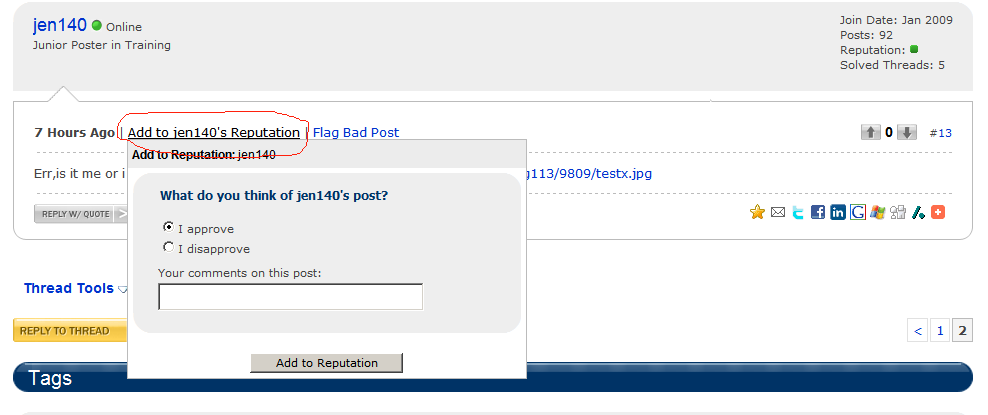
Is the reputaton added based on "up-votes" ? or is there any magic button hidden that i cant find ? =)
sknake
1,622
Senior Poster
Featured Poster
Its a magic button :)
jen140 Offline
Junior Poster in Training 0 #11 3 Hours Ago | Add to jen140's Reputation | Flag Bad Post
Is the reputaton added based on "up-votes" ? or is there any magic button hidden that i cant find ? =)
Its on the same line as the arrows but on the left side! Take care and post back if you have any other routing troubles
jen140
0
Junior Poster

jen140
commented:
thanks for help =)
+1
jen140
0
Junior Poster
lol =), done , ty again for help .
Be a part of the DaniWeb community
We're a friendly, industry-focused community of developers, IT pros, digital marketers, and technology enthusiasts meeting, networking, learning, and sharing knowledge.