954,168 Members — Technology Publication meets Social Media
Username:
Password:
Lost login information?
Have something to say? Contribute New Article Reply to this Article

Knoppix for Newbies!

Are you a windows user that wants to start fooling around with linux? I know a lot of people who are. But theres a few reasons why they aren't in linux learning.

The Windows user is afraid that partitioning his/her hard drive is going to screw something up. Maybe, they are afraid of "screwing up there windows."

Well, I would like to introduce a product for those people! Its called Knoppix, and its a Linux Live-CD. Meaning, download this one cd, burn it, and restart your computer with it in the drive. Boom! A full blown Linux system with KDE, GNOME, OpenOffice.Org, Mozilla, etc appear on the screen!

Most importantly, its not just for newbies! A great use is putting it on some old computer and running an apache web server!

For more information, including download mirrors, visit the Knoppix English Homepage, at http://www.knopper.net/knoppix/index-en.html

Tekmaven
Software Architect
Moderator
1,274 posts since Feb 2002
Reputation Points: 322
Solved Threads: 28
 

I have to admit, it seems like a cool idea. Especially to just do some quick stuff in Linux without even touching your hard drive.

But I can't see it being practical. Actually ... I'm a lil confused. It's a bootable cd? So *does* it touch your hard drive? I can't see running an operating system entirely off a CD.

cscgal
The Queen of DaniWeb
Administrator
19,421 posts since Feb 2002
Reputation Points: 1,474
Solved Threads: 229
 

It does not touch your hard drive in any way. If it does detect drives, it mounts them, but thats it. No data goes to your drive at all. God bless RAM Disks. I've used it a few times, and I have to admit its great. Espically in a certain school that has certain horrible extreme restrictions on computers. Just plop the cd in, restart, and there ya have it, a totally unrestricted UNIX machine (that can also circumvent the security in windows after a small little change).

Tekmaven
Software Architect
Moderator
1,274 posts since Feb 2002
Reputation Points: 322
Solved Threads: 28
 

knoppix is cool, not to mention its hdinstall script probably is the easiest way to get a debian system running.

Z28James
Light Poster
44 posts since Feb 2003
Reputation Points: 10
Solved Threads: 1
 

sounds VERY interesting... thanx!

aeinstein
Team Member - aka kaynine
Team Colleague
645 posts since May 2002
Reputation Points: 186
Solved Threads: 8
 

I'm cross-posting this, as it's germane to this thread as well...

Knoppix is a CD-bootable Linux distribution, so no installation is required. It includes Internet, graphics (The GIMP), office software (OpenOffice.org), games, and more. If you can access the BIOS to set it to boot from the CD, you're all set; if not, you can create a boot floppy and go from there. Although the hard drive icons appear on the desktop, the drives are not mounted until you either left-click on the icon or right-click and select Mount. Similarly, write-access is turned off by default, but can be turned on.

Knoppix is excellent for checking out Linux, but it can also be used as a rescue disk for Windows, as it has drive-imaging and partition-editing utilities. It's quite useful. I'm using it right now to post this message. The CD makes a good install-disc, as well.

It's free. The download links are available on the main site http://www.Knoppix.com and the unofficial support site is at http://www.Knoppix.net , which I frequent as Loper.

TallCool1
Practically a Posting Shark
Team Colleague
865 posts since May 2003
Reputation Points: 149
Solved Threads: 45
 

I've tried Knoppix and really like it -- haven't had any trouble with it except for rel 3.3 where my mouse wouldn't work, but it does in 3.2. Go figure.

So I was a bit adventurous when I found Gnoppix, which is a variation of Knoppix (uses Gnome). I downloaded the latest release, burned to a CD and ran it. No problems (my mouse worked) and I liked it until I came to the logout. I expected it to run through the shutdown script, but my screen became a jumble of horizontal lines and wasn't responding so I reset. Then my machine essentially became a 20 pound paperweight.

I only get the purple screen of non-compliance, nothing else. It seems like it's booting up, at least it sounds that way, but when I tried using a boot disk to try to work on it, it by passes the floppy drive (no LED light-up) although it does run through the CD drives. Could my bios be trashed? Also, would my problem also be complicated by a blown video card (nvidia tnt2) or a bad monitor? The system is a 750 MHz Athlon with windows 98 SE. If it is the bios, could I reset it?

I've used several live cd's in the past an never had any trouble like this at all. Any info, guidance, suggestion would be appreciated.

Mick

mickmten
Newbie Poster
1 post since Jan 2004
Reputation Points: 10
Solved Threads: 0
 

Knoppix is a great idea and works well. Slax-Live CD is another good one that I use at work and school. You do have to remember that these live distros will run slower on you machine than a hardrive install will. Check out this site for more:
http://www.distrowatch.com/dwres.php?resource=cd

One other note, make sure you burn it as an iso image so it will be bootable.

twilli227
Junior Poster in Training
59 posts since Dec 2003
Reputation Points: 56
Solved Threads: 1
 

Don't forget about gnoppix, which is basically Knoppix with a Gnome wm, as opposed to KDE.

http://www.gnoppix.org

There's also LindowsCD, which is the same thing as Knoppix & Gnoppix - a Linux distro that runs from the CD (Live CD), in this case, Lindows.

http://www.lindows.com

TheOgre
Posting Whiz
393 posts since Aug 2003
Reputation Points: 128
Solved Threads: 9
 

ive NEVER used linux and im now downloading knoppix (wow thats a big file) got an hour and a half to go is there anything i need to know before i burn and use the disc??

all info will be welcomed
thanks

drummerboy
Junior Poster
130 posts since Jan 2004
Reputation Points: 11
Solved Threads: 2
 

Yeah, make sure you just don't burn the CD as Data. The file you are downloading is an ISO file, and it needs to be handeled a special way.

If using Nero (6.x) go to Recorder -> Burn Image File and select the file.
If using Nero (5.x) go to File -> Burn Image File and select the file.

I'm pretty sure Easy CD Creator has the option under file, but I don't remember the exact name.

Tekmaven
Software Architect
Moderator
1,274 posts since Feb 2002
Reputation Points: 322
Solved Threads: 28
 

cheers TEKMAVEN i used nero 6 UE (good old KLITE) and checked out the knoppix site done as they said. and here i am posting this using knoppix.
First impressions are good i love the layout not sure why i have two browsers but im sure ill soon find out. Erm i dont think my firewall and AV have loaded is that a problem?? one prob im in USA time now and not UK tried a quick fix didnt work. I'll have to investigate further. the boot up page was great. felt like some old hacking film. lol :cheesy:
Now if i were to partition my hard drive to install knoppix what size partition would you suggest. and should i use a program such as partition magic or FDISK?? i definitely dont want to lose xp at this point.
Oh and i just sorted the time

Many thanks
nigel

drummerboy
Junior Poster
130 posts since Jan 2004
Reputation Points: 11
Solved Threads: 2
 

Gnoppix and Knoppix aren't the only ones out there either! Try these over at distrowatch.com!

Now remember, not all Live CD's can detect EVERY single bit of hardware out there. However, you can take the time to probe the right places and get the right things configured and WHAM! You've got yourself an inpenetrateable firewall? How? What is more secure than a READ ONLY CD Operating System? Most of the Live firewalls offer configuration saving on your floppy so if you detect an intrusion at all, reboot, and bewm...yer up and running again. Nothing is more secure than that...no one can write to your computer at all!

TKS
Posting Pro in Training
470 posts since Jan 2004
Reputation Points: 108
Solved Threads: 18
 

Fantastic "doo da do da doooo im loving it" this is a cool OS i always thought linux would look shitty i dont know why but i did. but it looks well cool. im now looking through the settings and a bit confused to what some of them are i.e python,tea cooker,and many more.
But if install anything or change any settings when i boot up they're all gonna go back to default wont they?? ;)

drummerboy
Junior Poster
130 posts since Jan 2004
Reputation Points: 11
Solved Threads: 2
 

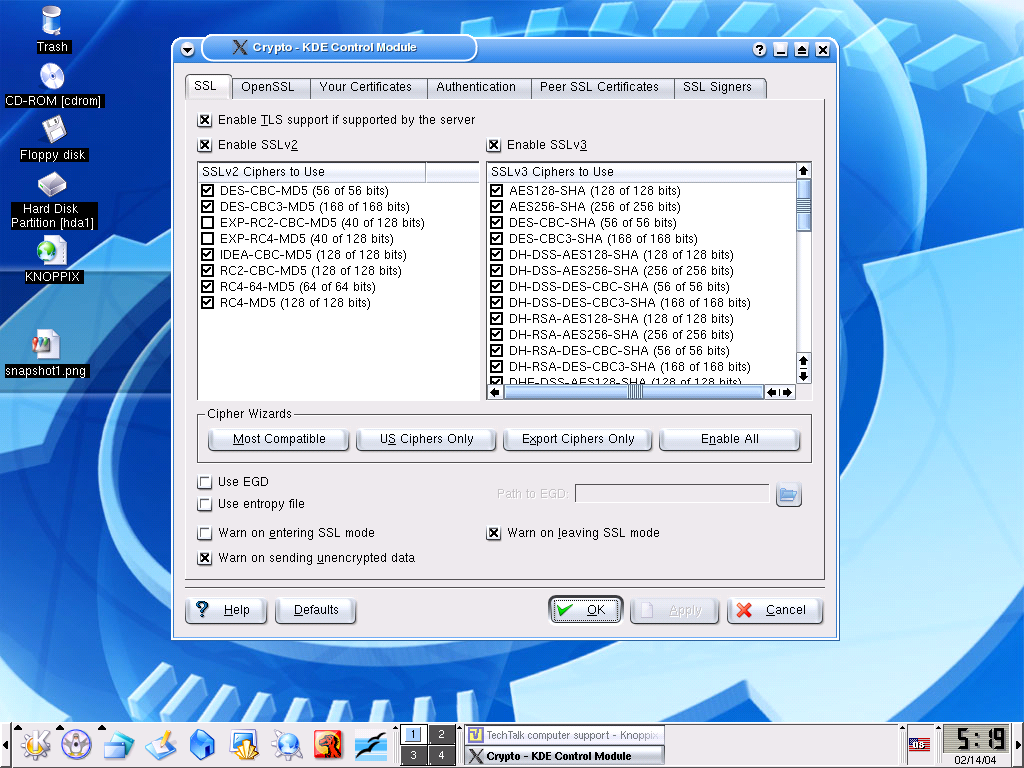
what the hell do i do with this to make me DSL secure? if i need to do anything!!
thanks again
Nigel :cheesy:

Attachments crypto.png 270.41KB
drummerboy
Junior Poster
130 posts since Jan 2004
Reputation Points: 11
Solved Threads: 2
 

drummerboy, welcome to the world of linux. Hope you have plenty of time on your hands to learn more. :cheesy:

This will become invaluable to you in finding info on linux:
http://www.google.com/linux

Here is more info for you:
http://www.google.com/linux?hl=en&lr=&ie=ISO-8859-1&q=tea+cooker&btnG=Google+Search
http://python.org/

twilli227
Junior Poster in Training
59 posts since Dec 2003
Reputation Points: 56
Solved Threads: 1
 
what the hell do i do with this to make my DSL secure? if i need to do anything!!


Until you install Knoppix to a hard drive, it's in RAM, so it goes away when you power-down. That's pretty secure. I used it that way myself for quite a while before installing it.

Once you install it to HD,GuardDog is about the easiest firewall to set up. It works well for me.

TallCool1
Practically a Posting Shark
Team Colleague
865 posts since May 2003
Reputation Points: 149
Solved Threads: 45
 

Thanks boys ive just bought a hdd off ebay im gonna stick that in my system and run linux from that.
and thanks twilli thats a really cool trick with google i never new that existed

drummerboy
Junior Poster
130 posts since Jan 2004
Reputation Points: 11
Solved Threads: 2
 

I've used Knoppix myself when my Windoze box wouldn't boot. It (and other CD-based Linux flavours) will let you see the whole hard drive and partitions, which is great if you need to copy stuff off it. I went for a whole week running just from the CD checking mail, visiting sites etc.

I've also used Mepis and Sidux both from a bootable CD.

If you do nothing else get an ISO copy of one of these and keep it handy for when your drive fails.

trudge
Junior Poster
178 posts since Sep 2007
Reputation Points: 18
Solved Threads: 20
 

>Windoze

what is that? a new operation system of some kind? a windows clone?

TheNNS
Nearly a Posting Virtuoso
1,467 posts since Jul 2006
Reputation Points: 175
Solved Threads: 15
 

This article has been dead for over three months

Post: Markdown Syntax: Formatting Help
You
View similar articles that have also been tagged: