954,135 Members — Technology Publication meets Social Media
Username:
Password:
Lost login information?
Have something to say? Contribute New Article Reply to this Article

No sound in Windows Media Player

Few days ago I had installed the latest driver for my sound-card (Creative VIBRA 128). From then on my WMP 7.1 is not producing any sound. I can see the videos but there's no sound. But my winamp, DivX player and quicktime are working fine. Then I uninstalled WMP 7.1 and installed the latest WMP 9. But still no sound. I don't understand what is wrong with my WMP.

By the way my OS is win98SE. Any suggestions?? :rolleyes:

Asif_NSU
Posting Whiz
353 posts since Apr 2004
Reputation Points: 113
Solved Threads: 3
 

Does this happen regardless of what format of audio file you're trying to play?

I know it's obvious, but have you checked all of the places where volume/mixer settings could be adjusted? Sometimes it's just a question of your sound input/output settings getting a glitch and muting itself.

DMR
Wombat At Large
Team Colleague
7,229 posts since Dec 2003
Reputation Points: 221
Solved Threads: 370
 

yes doesnt matter matter whether it is mp3, wma or asf my WMP doesnt produce any sound.

Asif_NSU
Posting Whiz
353 posts since Apr 2004
Reputation Points: 113
Solved Threads: 3
 

As I asked before- have you checked all of the possible programs/places where volume settings might be adjusted or affected? When you've got multiple sounds apps installed, they can sometimes interact with each other in strange ways. Settings can also get whacked when you upgrade drivers or the programs themselves; is there any documentation for the drivers on Creative's support site which might give some clues?

DMR
Wombat At Large
Team Colleague
7,229 posts since Dec 2003
Reputation Points: 221
Solved Threads: 370
 

Well, I am not familiar with any other way I can adjust my volume settings apart from the windows volume settings. I do not have multiple sound apps -- not to my knowledge. I can see videos in my WMP but without any kind of sound. But whenever I try playing Audio files i get the following message from WMP:

Windows Media Player cannot play the file because there is a problem with your sound device. There may not be a sound device installed on your computer, it may be in use by another program, or it may not be functioning properly.
From the error message My guess is that the problem is with the souncard not with the volume settings. My sound card is installed, it wasnt used by any other program at that time. But well ofcourse as the error message says the sound card may not function correctly. But if that so then how come my winamp, quicktime, real player work fine? Damn this computer thing never ever works properly!! :(

Asif_NSU
Posting Whiz
353 posts since Apr 2004
Reputation Points: 113
Solved Threads: 3
 

Well why didn't you tell us about the error in the first place?!?!? :mrgreen:

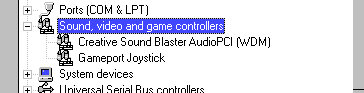
Right-click on My Computer, choose Proprties, and go to Device Manager. Are there any devices with a red X or yellow exclamation sign next to them? Expand the "Sound, video, and game controllers" section; what devices do you have listed there?

DMR
Wombat At Large
Team Colleague
7,229 posts since Dec 2003
Reputation Points: 221
Solved Threads: 370
 

No no exclamataion points, neither red nor yellow...

Attachments WMP.gif 2.12KB
Asif_NSU
Posting Whiz
353 posts since Apr 2004
Reputation Points: 113
Solved Threads: 3
 

Video volume level in sound properties?

feigned
Posting Whiz
311 posts since Oct 2003
Reputation Points: 107
Solved Threads: 4
 

I didnt see any "Video Volume level" in sound properties.I use win98SE.

Asif_NSU
Posting Whiz
353 posts since Apr 2004
Reputation Points: 113
Solved Threads: 3
 

Hi Guys, I am having the exact same problem as "Asif_NSU" and it looks like his problem was never solved.

My Windows Media Player (vers. 10) plays video, but NO SOUND. It doesn't matter what type of file or media I try to play, no sound ever comes out. Yet when I use any other application, sound works fine. e.g. QuickTime, Real Player, iTunes, WinAmp, etc.

I have upgraded all my drivers and they are fine. I tried uninstalling and re-installing WMP10 and that made no difference. All my audio settings are set to max volume and nothing is muted. I checked device manager and all drivers are installed correctly. No exclamation marks.

I am running Windows XP.

The problem started after i tried unsuccessfully to install a sound card onto my motherboard. It did not work so I went back to using the onboard soundcard om my motherboard and now have the above problems. What more can i do????

mdippa
Newbie Poster
4 posts since Jan 2006
Reputation Points: 10
Solved Threads: 0
 

Hi mdippa,

First of all- welcome to DaniWeb :)

We ask that members not tag their questions on to a thread previously started by another member (regardless of how similar your problem might seem). Not only does it divert the focus of the thread away from the original poster's problem, but it also makes it less likely that you yourself will get the individual attention that you need.

Please start your own thread and post your question there. When you do, please try to give us as much specific info as possible regarding the problem (exact error messages, system specs, etc.).

For a full description of our posting guidelines and general rules of conduct, please see this page:

http://www.daniweb.com/techtalkforums/faq.php?faq=daniweb_policies

Thanks for understanding.

DMR
Wombat At Large
Team Colleague
7,229 posts since Dec 2003
Reputation Points: 221
Solved Threads: 370
 

Due to the fact that the member who originally started this thread has not responded in well over 1 year, this thread is considered abandoned and has been closed.

In accordance with our posting rules, other members having similar problems should start their own threads and post their questions there. In order to help us help you most quickly, please include as much information about your problem as possible in your posts.

If the member who originally started this thread wishes to have the thread reopened, please send your request, including a link to this thread, to one of our moderators via email or Private Message.

Thank you.

DMR
Wombat At Large
Team Colleague
7,229 posts since Dec 2003
Reputation Points: 221
Solved Threads: 370
 

This article has been dead for over three months

Post: Markdown Syntax: Formatting Help
You
View similar articles that have also been tagged: