954,529 Members — Technology Publication meets Social Media
Username:
Password:
Lost login information?
Have something to say? Contribute New Article Reply to this Article

layout problam in android

Hi
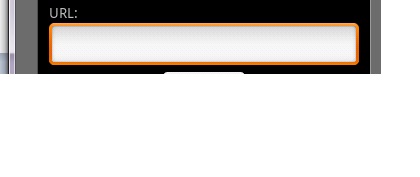
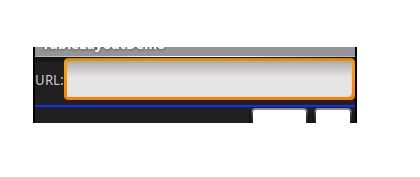
i try show layout like image 1 (textView and editText in same line) but my out put shown like image 2 ! i try with this code :

<?xml version="1.0" encoding="utf-8"?>
<LinearLayout 
    xmlns:android="http://schemas.android.com/apk/res/android"
	android:orientation="vertical" 
	android:layout_width="fill_parent"
	android:layout_height="wrap_content"
	android:padding="5px"
	>

	<TextView 
	    android:id="@+id/label"
        android:layout_width="wrap_content"
        android:layout_height="wrap_content"
        android:text="URL:"
        android:layout_alignBaseline="@+id/entry"
        android:layout_alignParentLeft="true"/>
        />
		
	<EditText 
	    android:id="@+id/entry"
        android:layout_width="fill_parent"
        android:layout_height="wrap_content"
        android:layout_toRightOf="@id/label"
        android:layout_alignParentTop="true"
		/>

	<Button 
	    android:id="@+id/button" 
	    android:layout_width="wrap_content"
		android:layout_height="wrap_content" 
		android:layout_gravity="center_horizontal"
		android:paddingRight="30px" 
		android:paddingLeft="30px" 
		android:text="Go..." 
		/>

</LinearLayout>


what should i do ?
thanks
Attachments 1.jpg 9.35KB 2.jpg 10.16KB
mahdi68
Junior Poster in Training
95 posts since Jun 2009
Reputation Points: 6
Solved Threads: 0
 

Hi mahdi68,
You need set the orientation of your linear layout to "horizontal" instead of vertical. i.e :

<?xml version="1.0" encoding="utf-8"?>
<LinearLayout 
    xmlns:android="http://schemas.android.com/apk/res/android"
	android:orientation="horizontal" 
	android:layout_width="fill_parent"
	android:layout_height="wrap_content"
	android:padding="5px"
	>

	<TextView 
	    android:id="@+id/label"
        android:layout_width="wrap_content"
        android:layout_height="wrap_content"
        android:text="URL:"
        android:layout_alignBaseline="@+id/entry"
        android:layout_alignParentLeft="true"/>
        />
		
	<EditText 
	    android:id="@+id/entry"
        android:layout_width="fill_parent"
        android:layout_height="wrap_content"
        android:layout_toRightOf="@id/label"
        android:layout_alignParentTop="true"
		/>

	<Button 
	    android:id="@+id/button" 
	    android:layout_width="wrap_content"
		android:layout_height="wrap_content" 
		android:layout_gravity="center_horizontal"
		android:paddingRight="30px" 
		android:paddingLeft="30px" 
		android:text="Go..." 
		/>

</LinearLayout>
shibby
Newbie Poster
14 posts since Mar 2009
Reputation Points: 16
Solved Threads: 4
 

This article has been dead for over three months

Post: Markdown Syntax: Formatting Help
You
View similar articles that have also been tagged: