954,515 Members — Technology Publication meets Social Media
Username:
Password:
Lost login information?
Have something to say? Contribute New Article Reply to this Article

Invoking Python scripts from command prompt

Hi, I find in all books and websites that in order to run a Python script from the command prompt, I have to run something like this

python example.py 1.3


whereexample.py script is provided with an argument of 1.3. However, it is not working for me in Windows 7 until I delete the python part, so that the command looks like:

example.py 1.3


I have already changed the path variable of Windows to include the Python directory. Why isn't thepython word necessary for me, even though it's mentioned everywhere? And why does it throw an error when I use the python word See the image to understand my problem.
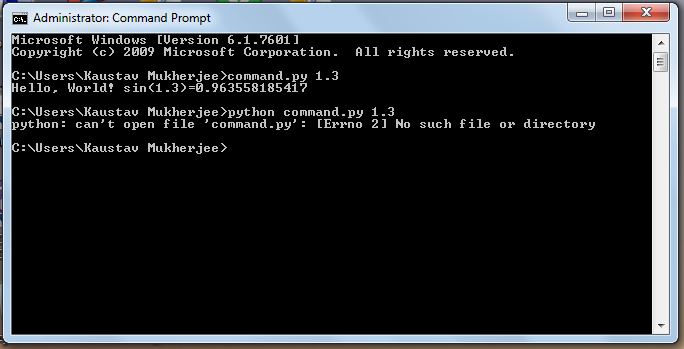
Attachments post-443266-13189679878819.png_.pagespeed_.ce_.GyPL-x2gUC_.png 39.32KB
Cupidvogel
Newbie Poster
22 posts since Sep 2011
Reputation Points: 10
Solved Threads: 0
 

Authors do not make this clear but there are two shell prompts involved- the Windows prompt and the Python prompt.

If you start with the Windows command shell prompt, then typing "python" will find the path to the python program and start it.
Once it has started, then you are in the python program's shell prompt and typing "python" has no meaning to it. It is expecting python commands, not Windows commands.

robert99x
Newbie Poster
12 posts since Mar 2011
Reputation Points: 10
Solved Threads: 1
 

python needs full path of argument or you must start it in the location of the file. Windows searches commands anywhere in the path when file is first in line.

pyTony
pyMod
Moderator
5,359 posts since Apr 2010
Reputation Points: 782
Solved Threads: 852
 

This article has been dead for over three months

Post: Markdown Syntax: Formatting Help
You
View similar articles that have also been tagged: