| | |
Connected to internet but no websites or other internet applications
![]() |
Hi, I am very new here, so I am not sure if it is the right place for my problem, but I will risk. I've already asked for help in a different section, but no one was able to answer my questions.
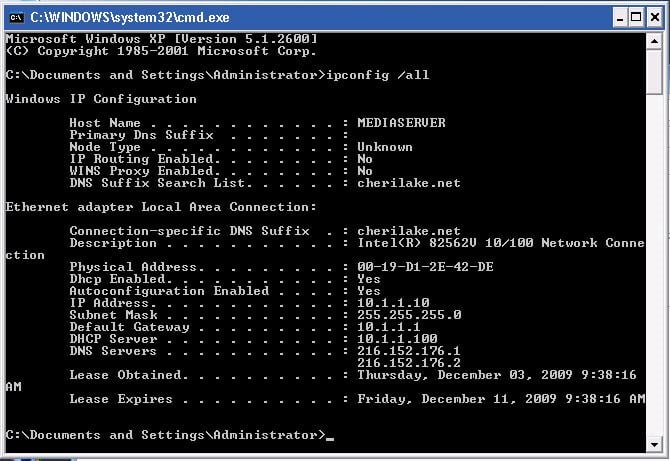
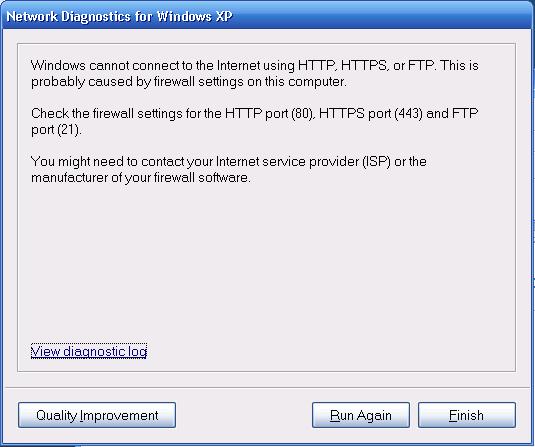
I am trying to connect to Internet using Tiscali Broadband,it says it's connected, the modem has two steady lights,but I am getting the DNS error when I am trying to open any websites in my browser (Internet Explorer 6.0) or when I am logging into MSN Live Messenger it reports that I am facing a DNS problem on my PC. I've pinged my IP address and my DNS servers, I asked my collegue to ping my IP and DNS externaly and it was successfull. I am unable to access any websites even using their IP addressess.
I've reinstalled the Tiscali Modem and rebooted the PC couple times. I am running out of ideas what could cause this problem. All my settings seem to be fine as it worked allright on Tuesday morning and I haven't changed anything. I also run a scan on the PC to check if there's any spyware but it didn't find anything.
I don't have any personal firewalls installed and the Windows firewall is currently turned off.
I would really appreciate your help as I am very very
concerned.
I am trying to connect to Internet using Tiscali Broadband,it says it's connected, the modem has two steady lights,but I am getting the DNS error when I am trying to open any websites in my browser (Internet Explorer 6.0) or when I am logging into MSN Live Messenger it reports that I am facing a DNS problem on my PC. I've pinged my IP address and my DNS servers, I asked my collegue to ping my IP and DNS externaly and it was successfull. I am unable to access any websites even using their IP addressess.
I've reinstalled the Tiscali Modem and rebooted the PC couple times. I am running out of ideas what could cause this problem. All my settings seem to be fine as it worked allright on Tuesday morning and I haven't changed anything. I also run a scan on the PC to check if there's any spyware but it didn't find anything.
I don't have any personal firewalls installed and the Windows firewall is currently turned off.
I would really appreciate your help as I am very very
concerned. Try this out then:
1. Click Start then Run and type in cmd then press Enter...this will bring up command prompt.
2. in command prompt type ipconfig /flushdns (you will get a message saying successfully flushed DNS)
3. type exit and try browsing again
If this does not work than do the following:
If this is Windows XP with SP2 then do the following:
1. Click on Start then run again and cmd should still be there press enter.
2. Type in (no quotes) "netsh winsock reset catalog" then press enter(in a few seconds you should get a message saying that system must be restarted)
3. Type exit then enter.
4. Click on Start then Turn Off Computer then click on restart then when system comes back up try browsing again.
If this is not a computer with SP2 let me know and I will post the instructions for Sp1.
1. Click Start then Run and type in cmd then press Enter...this will bring up command prompt.
2. in command prompt type ipconfig /flushdns (you will get a message saying successfully flushed DNS)
3. type exit and try browsing again
If this does not work than do the following:
If this is Windows XP with SP2 then do the following:
1. Click on Start then run again and cmd should still be there press enter.
2. Type in (no quotes) "netsh winsock reset catalog" then press enter(in a few seconds you should get a message saying that system must be restarted)
3. Type exit then enter.
4. Click on Start then Turn Off Computer then click on restart then when system comes back up try browsing again.
If this is not a computer with SP2 let me know and I will post the instructions for Sp1.
•
•
Join Date: Sep 2007
Posts: 1
Reputation:
Solved Threads: 0
Hello,
I am having the same difficulty. I am using Windows XP service pack 2, and I'm connecting through a Broadcom 440x 10/100 Integrated Controller.
I tried the above steps, and completed them successfully. However the problem was not fixed. I would appreciate any other suggestions though.
Thanks in advance.
I am having the same difficulty. I am using Windows XP service pack 2, and I'm connecting through a Broadcom 440x 10/100 Integrated Controller.
I tried the above steps, and completed them successfully. However the problem was not fixed. I would appreciate any other suggestions though.
Thanks in advance.
Last edited by devalera01; Sep 20th, 2007 at 7:50 pm.
•
•
Join Date: Jun 2009
Posts: 1
Reputation:
Solved Threads: 0
•
•
•
•
Try this out then:
1. Click Start then Run and type in cmd then press Enter...this will bring up command prompt.
2. in command prompt type ipconfig /flushdns (you will get a message saying successfully flushed DNS)
3. type exit and try browsing again
If this does not work than do the following:
If this is Windows XP with SP2 then do the following:
1. Click on Start then run again and cmd should still be there press enter.
2. Type in (no quotes) "netsh winsock reset catalog" then press enter(in a few seconds you should get a message saying that system must be restarted)
3. Type exit then enter.
4. Click on Start then Turn Off Computer then click on restart then when system comes back up try browsing again.
If this is not a computer with SP2 let me know and I will post the instructions for Sp1.
![]() |
Similar Threads
- I am connected to wireless, but I can't access any websites (Networking Hardware Configuration)
- 2 computers (win 98 & xp) connected with switch, no internet on win98 computer (Networking Hardware Configuration)
- Slow Internet (Web Browsers)
- ADSL(internet access) and USB modem on a Wireless network (Networking Hardware Configuration)
- Internet Explorer Favourites Problem (Web Browsers)
- illegal operation everytime i try to use the internet (Windows 95 / 98 / Me)
- Internet explorer problems (Web Browsers)
- can share files but no internet (Windows 95 / 98 / Me)
- Internet explorer error page (Web Browsers)
Other Threads in the Web Browsers Forum
- Previous Thread: Which Browse Fast
- Next Thread: Help saving a webpage for offline
| Thread Tools | Search this Thread |
aiim2009 andrewlippmann android aol apple awesomebar britain browser browserproblems browsers browsing budget bug bughunt censorship childabuse china chrome client code compuserve contest crash defect development email europe exploit explorer facebook fennec firefox flash gecko google government history ie7 ie8 internet internet.broadband internetexplorer internetexplorer8 internetusage iphone leak linux malware marshallmcluhan media memory microsoft mitmedialab mobile mobilebrowsers mosaic mozilla music netscape networking news newspapers newyork offline olympics onlinecommunities opensource opera opera.software patch plugins porn privacy problem safari seamonkey security sex silverlight social software surveys teenagers television testing thunderbird twitter u.s. uk update usenet utest video web webbrowser webdevelopment wikipedia windowslivemail worldrecord worldwideweb