954,228 Members — Technology Publication meets Social Media
Username:
Password:
Lost login information?
Have something to say? Contribute New Article Reply to this Article

Parition XP to dual boot ubuntu

Hey guys,

So i've been hearing all this hype about the new Ubunut 8.04 and i wanted to try it out. So i've treid the Live CD and i like it, very much. Now i want to dual boot XP and Hardy Heron.

Right so i need to resize my partition, so i've looked on the computer management in XP and found this:
[IMG]http://i170.photobucket.com/albums/u266/Moreton02/untitled.jpg[/IMG]
Now what the hell does this mean? I've got 4 partitions?
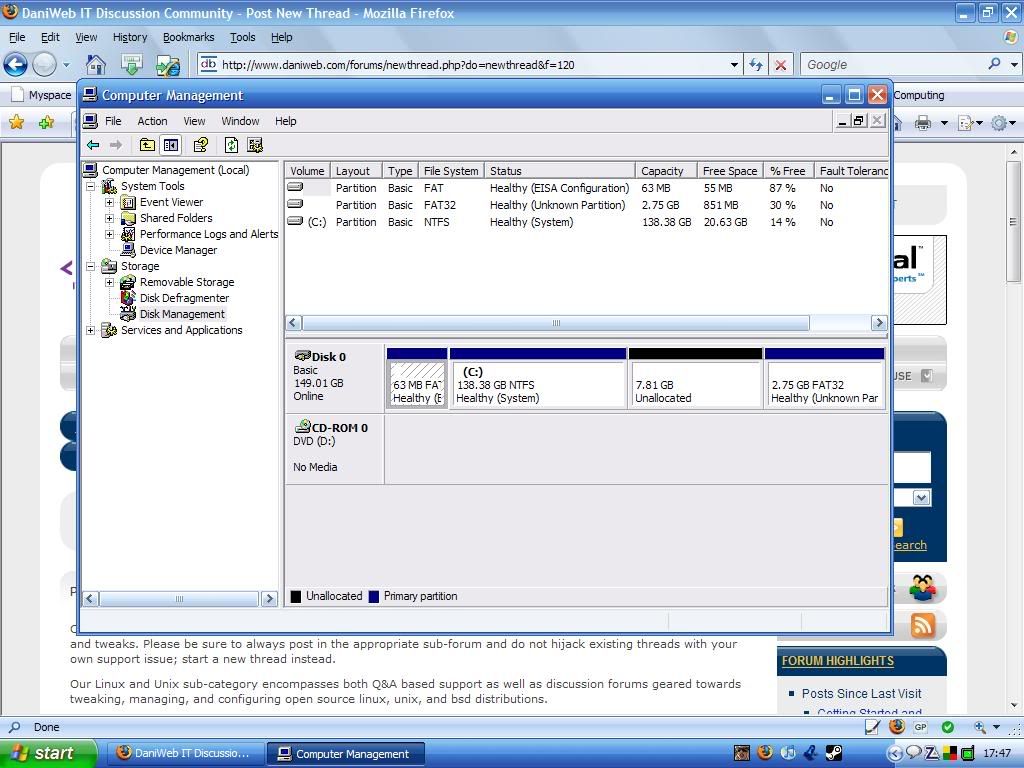
What is the 2.75 Gb of space that is unknown, how do i correct this?

Since i'm guessing that you can access all your XP files from ubuntu, i only need to create a partition big enough for the actual Ubuntu OS, and upgrades, not any files.

I've looked at the manual on the ubuntu website, and it explains that you can resize the existing partition, but i think i need to get the existing partition to use up this extra space, the 7.81Gb of unallocated space, and the 2.75 Gb of unknown space.

mortalex
Light Poster
30 posts since Oct 2007
Reputation Points: 10
Solved Threads: 0
 

DONT install ubuntu. Im guessing that partition is a hidden one which your manufacturer put there (dell, hp and ibm do this). from this partition you can reinstall windows if it ever gets corrupted etc... by pushing a button on bootup. MAny manufacturers include ONLY this and NO recovery cd-s, meaning that once you get rid of it, you are screwed when you need to reinstall windows. If this is the case, ONLY install after ensuring that you have valid, legal, working O/S install media in the form of something like CDs. Resizing / otherwise modifying the partition table generally breaks this feature, so if you need it, do not proceed.

jbennet
Moderator
Moderator
18,523 posts since Apr 2005
Reputation Points: 1,820
Solved Threads: 600
 

I've got a working XP CD that came with my computer, anyway would that space really need to be as large as 7Gb or 2Gb?

I think that the small partition, the 63Mb one is an important one, but no the bigger ones.

What do you reckon, do you think that i should try and get these random partitions to be added to the main XP one?

mortalex
Light Poster
30 posts since Oct 2007
Reputation Points: 10
Solved Threads: 0
 

When uncompressed, an xp system is about 3.5gb , then you have all the manufacturers own crap added onto it.

jbennet
Moderator
Moderator
18,523 posts since Apr 2005
Reputation Points: 1,820
Solved Threads: 600
 

well, if you have 7.81 GB of unallocated, ubuntu should see it and, in the installer, it should have a radio button that says "use largest amount of continuous free space" or something like that, it means the unallocated space. i agree with jbennet in that you shouldn't mess with the 2.75 GB of unknown space, 7 GB should be plenty for ubuntu, and if you run out of space, just save some stuff on your xp partition that aren't vital to the system.

Quargar
Newbie Poster
17 posts since Apr 2008
Reputation Points: 10
Solved Threads: 1
 

This article has been dead for over three months

Post: Markdown Syntax: Formatting Help
You
View similar articles that have also been tagged: