Hi,
In 4 days , my server hosting went non-functional due to critical low space in the / folder that finally i have to seek support to help delete the backups. Nothing works during those times like email, ssh, ftp, sites .. :(
The backups folder had 350GB of databackup and got some space deleting some backup archives by support. yet again, space went critically down in 4 days of previous down time.
Filesystem Size Used Avail Use% Mounted on
/dev/sdb3 450G 406G 26G 95% /
/dev/sdb1 99M 17M 78M 18% /boot
tmpfs 1.6G 0 1.6G 0% /dev/shm
/dev/sda1 459G 41G 395G 10% /home2
/usr/tmpDSK 9.5G 150M 8.9G 2% /tmp
The above was the data before i raised a ticket for support assistance.
On my query, there suggestion was the below:-
With the servers valid data being quite large, you may wish to limit the backup retention to a simple weekly backup, rather than including monthly and daily backups. This would limit the amount of space that the backups would take.
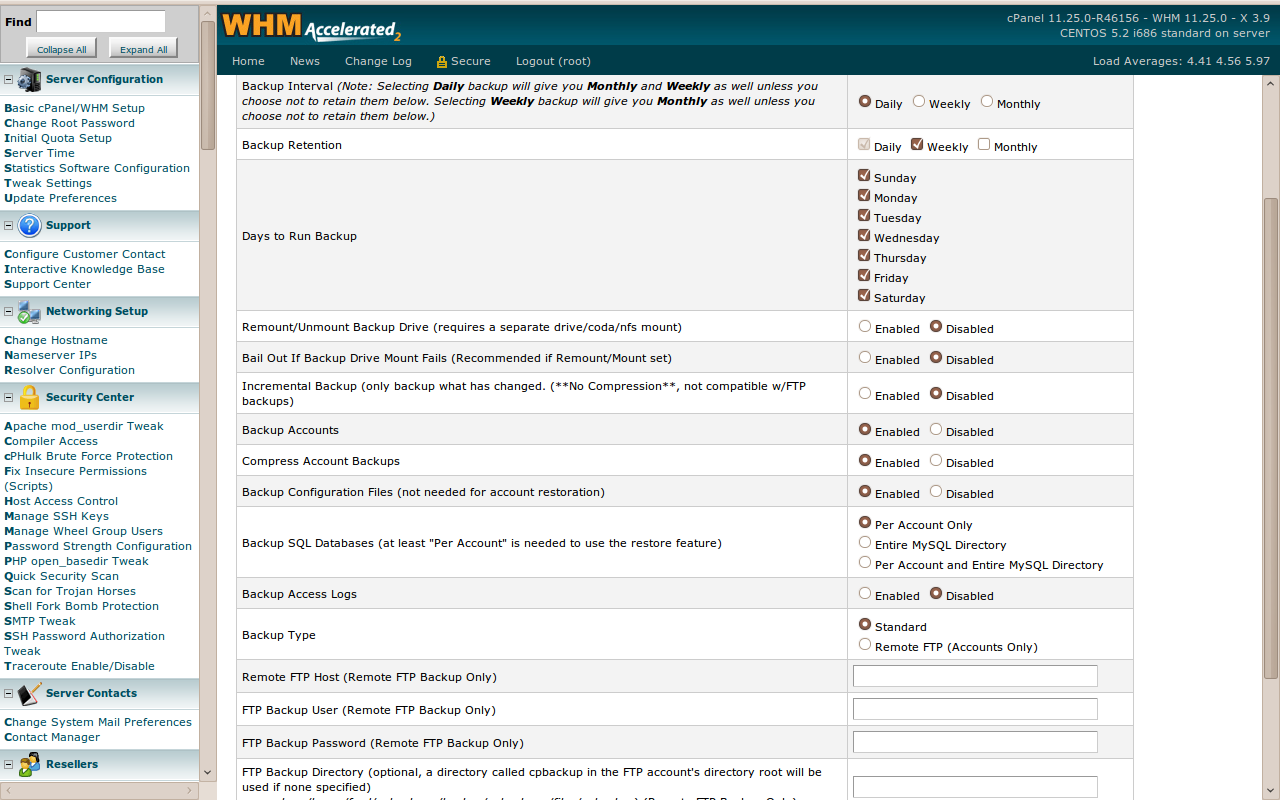
What should I do ? How should I configure the backup from the cpanel ? Should i do daily backups or weekly or monthly? I am not able to set daily backups and prefer only weekly retention.
how is this option "Incremental Backup (only backup what has changed. (**No Compression**, not compatible w/FTP backups)" ? Should I enable this ?
Please help me with suggestion.
Note: One site is critical and needs daily backups . rest is fine with weekly retentions.
Backup happens to folder /Backups folder. its not in home folder.
Regards,
Harish Balakrishnan Marar
A couple of question before I make a suggestion:
What are you actually backing up (which directories)?
What application do you use for the backup (tar, cpio, customer utility, etc.)?
You have 395GB free in /home2. If you data is all in the / directory and so are your backups and the filesystem crashes you would lose both. Why don't you backup to the /home2 partition? If /home2 fills up you would still have room in / so email and your web sites would continue to work.
A couple of question before I make a suggestion:
What are you actually backing up (which directories)?
What application do you use for the backup (tar, cpio, customer utility, etc.)?
You have 395GB free in /home2. If you data is all in the / directory and so are your backups and the filesystem crashes you would lose both. Why don't you backup to the /home2 partition? If /home2 fills up you would still have room in / so email and your web sites would continue to work.
Hi rch1231,
Thanks for the pointers. I have attached with this a screenshot of my cpanel for backup configuration. Right now the backup happens to/Backup folder which I think as per your suggestion should be in /home2/Backup. Hope i got this right.
what am i Backing up?
Server directories of staging projects and database backup.
Thanking you, I remain
Harish Balakrishnan Marar
Hello again,
Well looking at the configuration here is what I would do.
Recap:
SCSI Disk b partition 3 ==> /dev/sdb3 450G 406G 26G 95% /
SCSI Disk b Partition 2 ==> Probably Swap space.
SCSI Disk b Partition 1 ==> /dev/sdb1 99M 17M 78M 18% /boot
SCSI Disk a Partition 1 ==> /dev/sda1 459G 41G 395G 10% /home2
You have already used 41G on the sda1 partition which is more than the 26G you have available on sdb1.
You have two options depending on what is in /home2. The following steps would need to be done by the user root or with sudo.
OPTION 1: The quick fix.
1) Copy /Backup to /home2/Backup
cp -RP /Backup /home2/
or if you want to monitor the progress.
cp -RPv /Backup /home2/
2) Verify the copy got everything by confirming the directories use the same amount of space. If not find out what is different.
du -s /Backup
du -s /home2/Backup
3) Once you are SURE everything made it run a list command to check you are deleting the right directory then replace the ls with rm :
/bin/ls -R /Backup/*
/bin/rm -R /Backup/*
4) check available disk space
df
5) remove the old /Backup directory now that it is empty and create a link called /Backup that points to /home2/Backup. rmdir will only let you remove an empty directory.
rmdir /Backup
ln -s /home2/Backup /Backup
Option 2: The long term solution. This involves moving the files in /home2/ to a subdirectory (could be /home2/hold/) then move /Backup to /home2/Backup but afterward you umount /dev/sda1 as /home2 and remount it as /Backup and move the other files from the temporary subdirectory to a new directory created under / called home2.
1) Create directory to hold what is in /home2
mkdir -p /home2/hold
2) Run a script that will move the directories from /home2 to /home2/hold except for the directory /home2/hold that you just created.
for x in `/bin/ls /home2 | grep -v hold `
do
mv /home2/$x /home2/hold/$x
done
3) *****INSERT Quick Fix steps 1, 2, 3, 4 here.
4) Unmount the /dev/sda1 partition off of /home2 and mount it as /backup
umount /dev/sda1
mount /dev/sda1 /Backup
5) Remove the now empty /home2 dir and then move the "hold" directory back in place as /home2.
rmdir /home2
mv /Backup/hold /home2
6) Then edit the /etc/fstab file and change the mount point of /dev/sda1 from /home2 to /Backup so when the system reboots everything is in the right place.
If you would like some help let me know.....
Hi rch1231,
Thanks a lot for the patience and consideration and giving me such a detailed alternatives.
Wishing you a nice day, I remain
Harish Balakrishnan Marar