954,255 Members — Technology Publication meets Social Media
Username:
Password:
Lost login information?
Have something to say? Contribute New Article Reply to this Article

File edit view go tools actions help missing in Windows Live mail

I am trying a long distance help session with a friend who lost the file edit etc line in Outlook Express and now Windows Live has same problem. Any suggestions? IE 8, Win XP Home. Thanks

unitedwaykat
Newbie Poster
23 posts since Sep 2009
Reputation Points: 11
Solved Threads: 1
 

I am embarrased to say how simple this is to solve! I found it myself on a Mocrosoft Live Mail forum dated 2007. Merely hit the ALT key and the menu appears where it belongs.

unitedwaykat
Newbie Poster
23 posts since Sep 2009
Reputation Points: 11
Solved Threads: 1
 

Thank you for this! I just got the new Windows Live mail and couldn't figure out where that darn toolbar was and had tried and tried everything!! Then saw this and used the alt key and the toolbar appeared. I can't figure out how to "lock" it though - does anyone know? Also my Windows live mail doesn't look as good as the one's I see on the download page for it - no icons and nothing familiar - anyone know how to fix that? Thanks!!

Gracebegins
Newbie Poster
1 post since Dec 2009
Reputation Points: 10
Solved Threads: 0
 

A little update RE the previous post: I believe if you go to TOOLS on right side of page, click, scroll down to TOOLBARS and make sure there is a checkmark in front of Menu Bar, Command Bar, and lock the toolbars you may solve your problem.

unitedwaykat
Newbie Poster
23 posts since Sep 2009
Reputation Points: 11
Solved Threads: 1
 

is it file chooser is not a callable object in pygtk ?

krishnaskt
Newbie Poster
1 post since Jun 2010
Reputation Points: 10
Solved Threads: 0
 

I am a new Windows Live Mail user. I can't seem to find a way to get to "Tools", "Menus", "Options", etc. I need to change some settings, add a signature, etc. and have tried everything I can think of, including using the "Alt" key suggested previously. Help!

LDL88
Newbie Poster
1 post since Nov 2010
Reputation Points: 10
Solved Threads: 0
 

I want my old toolbar back (File,Edit,View,Favorites,Tools and Help). I tried this Alt key,but doesn't work for me. I have a new Dell Inspiron 17r Laptop with Windows 7 and Windows Live Mail. When I hit the Alt key all that happend was I got a bounch of little boxes with letters in them. What is up with this. Any suggestions?

Jim

Jyw1221
Newbie Poster
1 post since Apr 2011
Reputation Points: 10
Solved Threads: 0
 

On a Dell Vosrto running Win 7 and Live Mail, in Live Mail, the ALT brings up the little boxes, but not one for Tools. (Only the 1,2,3, F,H,O,V, & S - no T)
There is no little option to the top right where I can get a dropdown option to show Tools.

Ideas?

Thanks!

dgarrott
Newbie Poster
4 posts since May 2011
Reputation Points: 10
Solved Threads: 0
 

On a Dell Vosrto running Win 7 and Live Mail, in Live Mail, the ALT brings up the little boxes, but not one for Tools. (Only the 1,2,3, F,H,O,V, & S - no T) There is no little option to the top right where I can get a dropdown option to show Tools.

Ideas?

Thanks!


hi, you should have started your own thread,not tagged onto a old one , for best help. so if there was a tools icon ,what would you be looking in it for ,what is it you are wanting to do ,

caperjack
I hate 20 Questions
Team Colleague
13,069 posts since Aug 2003
Reputation Points: 1,064
Solved Threads: 812
 
hi, you should have started your own thread,not tagged onto a old one , for best help. so if there was a tools icon ,what would you be looking in it for ,what is it you are wanting to do ,


I want to 'turn on' images, and most advice is to use the tools icon.
Thanks!

dgarrott
Newbie Poster
4 posts since May 2011
Reputation Points: 10
Solved Threads: 0
 
I want to 'turn on' images, and most advice is to use the tools icon. Thanks!


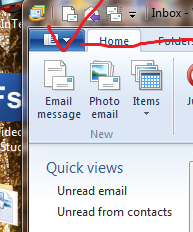
i don't see tools but if you click on the blue box shown in the attached file ,you will see options .then go mail and youll see what is most of what use to be in tools of outlook express, but i don't see turn on images,if you are talking about a signature image then it is there i think , as described in this link . http://www.timeatlas.com/email/general/create_image_signatures_in_windows_mail_or_live_mail

Attachments Capture.PNG 41.13KB
caperjack
I hate 20 Questions
Team Colleague
13,069 posts since Aug 2003
Reputation Points: 1,064
Solved Threads: 812
 
i don't see tools but if you click on the blue box shown in the attached file ,you will see options .then go mail and youll see what is most of what use to be in tools of outlook express, but i don't see turn on images,if you are talking about a signature image then it is there i think , as described in this link . http://www.timeatlas.com/email/general/create_image_signatures_in_windows_mail_or_live_mail


Thanks, Caperjack!

A lot of my emails have images and they all appear as empty boxes with the little red x's. I have turned on my signature and can click on the option in each email to view images, but it would be a lot easier to automatically turn on the images.

Doug

dgarrott
Newbie Poster
4 posts since May 2011
Reputation Points: 10
Solved Threads: 0
 

Thanks, Caperjack!

A lot of my emails have images and they all appear as empty boxes with the little red x's. I have turned on my signature and can click on the option in each email to view images, but it would be a lot easier to automatically turn on the images.

Doug


ok, i got it, mine works the exact same way .maybe just a new default way of doing it

caperjack
I hate 20 Questions
Team Colleague
13,069 posts since Aug 2003
Reputation Points: 1,064
Solved Threads: 812
 
ok, i got it, mine works the exact same way .maybe just a new default way of doing it


Thanks for trying!

dgarrott
Newbie Poster
4 posts since May 2011
Reputation Points: 10
Solved Threads: 0
 

your welcome

caperjack
I hate 20 Questions
Team Colleague
13,069 posts since Aug 2003
Reputation Points: 1,064
Solved Threads: 812
 

good news ,just found it .
Click the Tools menu,[that blue icon i showed in the image i added to other post ] click Options, and then click the saftey options.
security tab ,
download images .
uncheck the block images and other content in a html email.save and exit

apparently it default set to block images to avoid seeing images you might not like to see .

caperjack
I hate 20 Questions
Team Colleague
13,069 posts since Aug 2003
Reputation Points: 1,064
Solved Threads: 812
 

This question has already been solved

Post: Markdown Syntax: Formatting Help
You
View similar articles that have also been tagged: