954,262 Members — Technology Publication meets Social Media
Username:
Password:
Lost login information?
Have something to say? Contribute New Article Reply to this Article

microsoft excel

if calculate any thing like: 5/2 then the result show 2.5. here I want the result show is 3. I mean if it is over .5 then it show the ground figure not show decimal. if is 2.4 then it show 2. please any body help me. i did it like 2 by change the format but if i want to show it like 2.00 (with decimal place) then it not show.

abu taher
Practically a Posting Shark
845 posts since Jul 2008
Reputation Points: 14
Solved Threads: 78
 

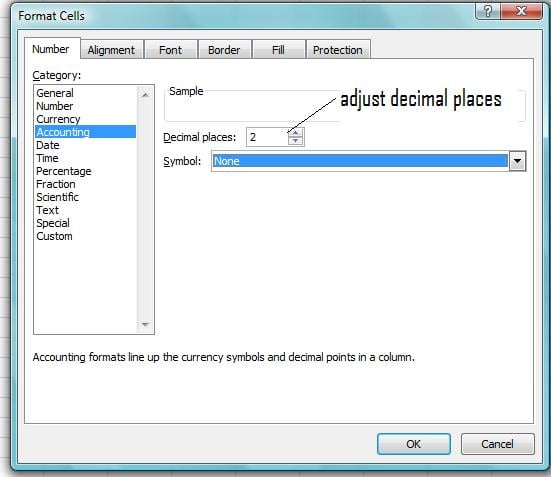
you want the cell to display in decimal places, try formatting the cell to accounting format.
if you're using office 2007 right click on a cell you to format then choose Format Cells on Number tab choose Accounting.

cguan_77
Nearly a Posting Virtuoso
1,317 posts since Apr 2007
Reputation Points: 19
Solved Threads: 115
 

I use office 2003. but in accounting there is no function like this.

abu taher
Practically a Posting Shark
845 posts since Jul 2008
Reputation Points: 14
Solved Threads: 78
 

Hi abutaher, check out this site to format a cell: http://www.ehow.com/how_11799_format-cell-numbers.html

cguan_77
Nearly a Posting Virtuoso
1,317 posts since Apr 2007
Reputation Points: 19
Solved Threads: 115
 

not like it. here it show round figure. like : 20,21,22. but I want 20.00, 21.00, 22.00. I mean it show with decimal.

abu taher
Practically a Posting Shark
845 posts since Jul 2008
Reputation Points: 14
Solved Threads: 78
 

check out the attachment

Attachments xxx.jpg 37.26KB
cguan_77
Nearly a Posting Virtuoso
1,317 posts since Apr 2007
Reputation Points: 19
Solved Threads: 115
 

as your suggestion I tried it. I write 20.60 and and it show 20.60. If I put decimal point = 0 then it show 21.

abu taher
Practically a Posting Shark
845 posts since Jul 2008
Reputation Points: 14
Solved Threads: 78
 
as your suggestion I tried it. I write 20.60 and and it show 20.60. If I put decimal point = 0 then it show 21.

try in cell a1 you type 2.43 in cell a2 type 2.48

then in cell b1 type this formula =round(a1,1)
then in cell b2 type this formula =round(a2,1)

check the difference... :)

cguan_77
Nearly a Posting Virtuoso
1,317 posts since Apr 2007
Reputation Points: 19
Solved Threads: 115
 

thanks . but you did the same thing. at 1st I did it manually by your attached picture. now you did it with formula. thanks again. but I want without decimal. is it possible?

abu taher
Practically a Posting Shark
845 posts since Jul 2008
Reputation Points: 14
Solved Threads: 78
 
thanks . but you did the same thing. at 1st I did it manually by your attached picture. now you did it with formula. thanks again. but I want without decimal. is it possible?


What specifically you mean by without decimal?
on your first post you were trying to accomplish to do a round off of decimal places. The round formula does it, but now you want without decimal.
Then just use the format cell then set decimal places to zero. then there would be no decimal.

cguan_77
Nearly a Posting Virtuoso
1,317 posts since Apr 2007
Reputation Points: 19
Solved Threads: 115
 

if I write =sum(a1/b1) and like: (5/2) the result show 2.50. now I want the result will show 3.00 not 3 or not 2.5. Is it possible?

abu taher
Practically a Posting Shark
845 posts since Jul 2008
Reputation Points: 14
Solved Threads: 78
 
if I write =sum(a1/b1) and like: (5/2) the result show 2.50. now I want the result will show 3.00 not 3 or not 2.5. Is it possible?


So basically if the decimal places is .5 to .9 you want it to convert to the neareast whole number?
and if the decimal places is .1 to .4 just display two zero's in decimal places?
is this what you want?

cguan_77
Nearly a Posting Virtuoso
1,317 posts since Apr 2007
Reputation Points: 19
Solved Threads: 115
 

You could use a custom format

0."00"

But I can't really understand why you would want to put two zeros after your decimal point while they aren't correct.

Notiz Me
Newbie Poster
4 posts since Apr 2010
Reputation Points: 10
Solved Threads: 1
 

You could use a custom format

0."00"

But I can't really understand why you would want to put two zeros after your decimal point while they aren't correct.


I make a salary sheet so I want a round figure without decimal. thanks.

abu taher
Practically a Posting Shark
845 posts since Jul 2008
Reputation Points: 14
Solved Threads: 78
 

Do pay attention that it is only the view that you're changing. The calculations you base on the cell are of course still using the values after the decimal point. If you didn't want that you would have to use round() and display two decimals, but that was already suggested, so I suppose you didn't want that ;) (edit: that's one bizarre smiley ... )

Notiz Me
Newbie Poster
4 posts since Apr 2010
Reputation Points: 10
Solved Threads: 1
 

This question has already been solved

Post: Markdown Syntax: Formatting Help
You
View similar articles that have also been tagged: