Any idea what might have contributed to the problem? That is, can you think of anything abnormal that happened just prior to the kb and mouse dying?
Does the keyboard work long enough to let you get into safe mode during the boot process? If so, you'd at least be able to access your data.
In the worst case, you could pull the hard drive and install it as a slave drive in some other system. At least that you'd be able to burn your data to CD/DVD or copy it to the Master hard drive temporarily.
DMR
Wombat At Large
7,229 posts since Dec 2003
Reputation Points: 221
Solved Threads: 370
Put another hard drive in it, load Windows onto that, and then and copy the files across?
Put the hard drive into a system with a CD-Burner and copy the files to CD?
Edit: oops, beaten to the post! I'll run away now.........
:o
Catweazle
Grandad
4,335 posts since Mar 2004
Reputation Points: 229
Solved Threads: 149
D-oh! Forgot to ask a rather important question:
Are the devices USB or are they ps/2?
DMR
Wombat At Large
7,229 posts since Dec 2003
Reputation Points: 221
Solved Threads: 370
If the partition you can't access is an NTFS partition that would explain Windows 98's inability to find it. You can, however, install utility programs which lett Windows 98 read NTFS partitions, and using one would allow you to copy the files across.
Try finding one in the results of this Google search
Catweazle
Grandad
4,335 posts since Mar 2004
Reputation Points: 229
Solved Threads: 149
If it's a Windows 2000 system drive, then it's highly likely you have an NTFS partition. Like with Windows XP, NTFS is the 'native' file system for Windows 2000
Catweazle
Grandad
4,335 posts since Mar 2004
Reputation Points: 229
Solved Threads: 149
Is the drive recognized when you go to the Computer Management->Disk Management window in your Administrative Tools folder?
DMR
Wombat At Large
7,229 posts since Dec 2003
Reputation Points: 221
Solved Threads: 370
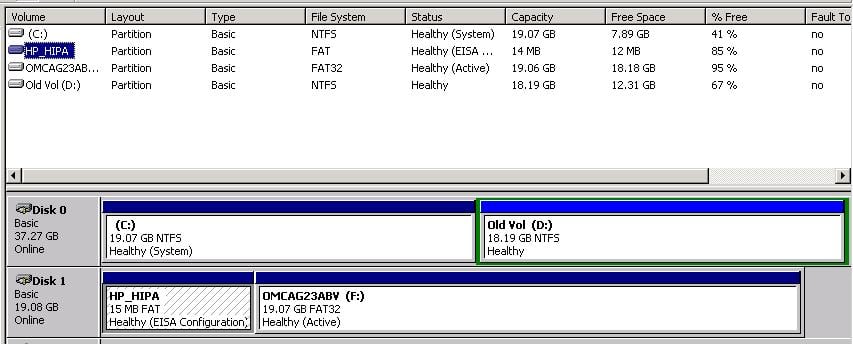
The second partition is a FAT, while the primary is a FAT32.
There's something about this that's stuck in the back of my brain, but I can't quite put my finger on it- how large is the second (FAT) partition, and is it a Primary or Logical partition?
DMR
Wombat At Large
7,229 posts since Dec 2003
Reputation Points: 221
Solved Threads: 370
That's a 'hidden' partition, created by the system manufacturer for the storage of utilities which operate at the system level. Forget about it. It's only 15Mb, which is bugger-all, and you'd need a low-level disk format utility to remove it.
Losing 15 megabytes from the drive isn't gonna hurt anything.
Catweazle
Grandad
4,335 posts since Mar 2004
Reputation Points: 229
Solved Threads: 149
That's a 'hidden' partition, created by the system manufacturer for the storage of utilities which operate at the system level.
Yup, that's exactly what it is. Specifically, it's an HP utility/diagnostics partition; as CW said, don't sweat it. (Any of the diagnostic tools in that partition can be downloaded from HP's support site in the very unlikely event that you would ever need them.)
DMR
Wombat At Large
7,229 posts since Dec 2003
Reputation Points: 221
Solved Threads: 370
If the keyboard on the win98 machine works when you run diagonist tools ,maybe you could boot with a windows boot disk and reload windows over itself ,this might fix the mouse keyboard problems in win98.
caperjack
I hate 20 Questions
13,069 posts since Aug 2003
Reputation Points: 1,064
Solved Threads: 812