954,219 Members — Technology Publication meets Social Media
Username:
Password:
Lost login information?
Have something to say? Contribute New Article Reply to this Article

Direct3D (out of memory) crash

when i play Command and Conquer 3 online, if i play it for more then 5minutes, my game crashes to this error:
[IMG]http://i13.photobucket.com/albums/a269/Masterg_/untitled-7.jpg[/IMG]
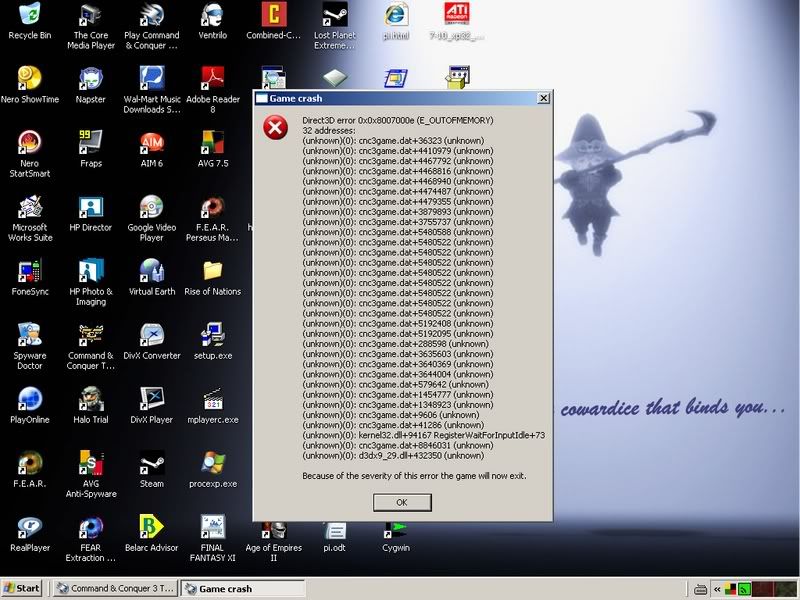
EA support does not know how to fix it, and all drivers for all my pc components are up to date, currently i am running:
[IMG]http://i13.photobucket.com/albums/a269/Masterg_/untitled2-1.jpg[/IMG]
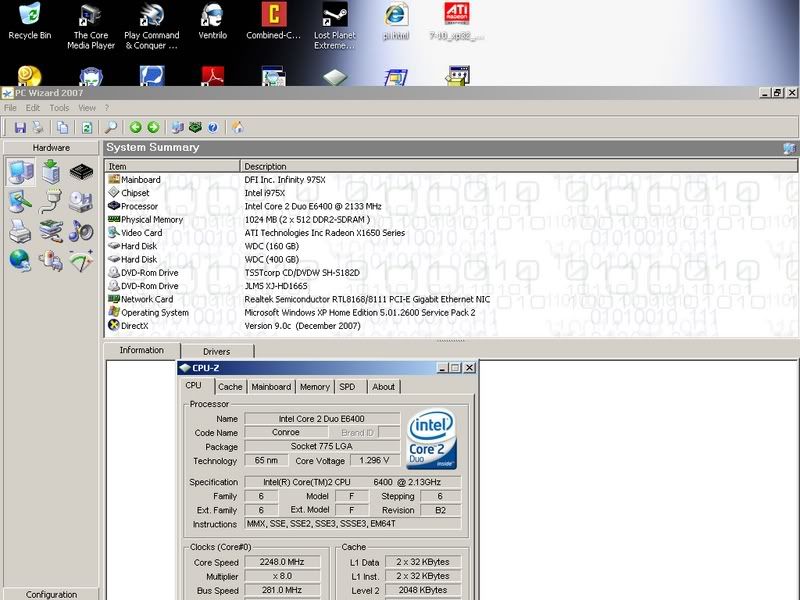
E6400 core 2 duo 2.13ghz
2x512 mb OCZ ram
2x512 mb ATI radeom 1600+1650
160gb WD cavier + 400gb WD cavier
dfi 975g/x motherboard

masterg
Newbie Poster
2 posts since Oct 2007
Reputation Points: 10
Solved Threads: 0
 

Noticed you are running direct-X 9 you might want to check to make sure C&C 3 doesnt require direct-x 10.
Go to your sys.information page and do a direct 3D test to see if it passes.if you know how i apologize in advance,if not go her start,all programs,asseccories,system tools,system iformation and clik.then clik on the tools tab and drop down to direct x diagnostic.open and wait for all sigs. to load.( bottom left)then test your direct draw and direct 3-D to see if they pass.
if so I sugest you check you virtual mem. on system info. main page and make sure you have at least 2 gigs and almost all that avalible. If this all looks good you probably need direct x10 because its the direct 3-D that is the initial error
Try start ,run,type msconfig and enter.go to start up and disable all then restart with this selective start up and nothing will run in the background to use up any mem.

but it sounds like a new game that may need 10

wyerleader
Newbie Poster
14 posts since Sep 2007
Reputation Points: 10
Solved Threads: 0
 

oh yea direct 3-D test is under your display tab....sorry

wyerleader
Newbie Poster
14 posts since Sep 2007
Reputation Points: 10
Solved Threads: 0
 

no, it wont be direct x 10, nothing uses it yet, in fact it'll still probably be another year and a bit before a game starts to use direct x 10. But I agree you should check directx diagnostics, there's an easier way, go to run and type dxdiag and it'll pull up the direct x diagnostics. I also noticed a kernel error in the picture you posted, not sure what caused that. Normally the kernel doesn't produce errors. Also it's not normally a good thing if the kernel is putting out errors. I can't think of what's causing the problem right now it's late, I just wanted to add this to the other guys post.

DarkRubicant
Light Poster
45 posts since Oct 2007
Reputation Points: 10
Solved Threads: 3
 

exactly the same problem, but i get a bit longer before it normally kicks me off, and sometimes it dosnt. it seems to be compleatly random when it does kick me off, and the error message normally changes size everytime i get it, sometimes a long list and sometimes only 5 or so items in the list of errors. tried maxing the virtual memory but it dosnt help. i have a 512 NVIDIA graphics card and 1GB RAM. please help someone.

Carebare47
Light Poster
34 posts since Nov 2006
Reputation Points: 10
Solved Threads: 0
 

I realise that this post is old, but I am now getting this error, - after changing my Graphics card from an ATI to an NVidea. My ATI worked very well, until it started to heat up due to age. I think I'll swap this one over for another ATI Radeon.
Ray K

Rayak45
Newbie Poster
1 post since Jul 2011
Reputation Points: 10
Solved Threads: 0
 

This article has been dead for over three months

Post: Markdown Syntax: Formatting Help
You
View similar articles that have also been tagged: