954,141 Members — Technology Publication meets Social Media
Username:
Password:
Lost login information?
Have something to say? Contribute New Article Reply to this Article

webserver port redirect?

I have a webserver that uses port 80 and the port cannot be changed.
is there a way to redirect another port to it?
or a program that can run on a pc that will redirect to the webserver?
my ISP blocks 80 of course, I have 4 webservers that all use port 80 and I
can't change that. they are stand alone units(not computers).

dvr
Junior Poster
199 posts since Sep 2003
Reputation Points: 10
Solved Threads: 4
 
is there a way to redirect another port to it?


Yesor a program that can run on a pc that will redirect to the webserver?
Yesmy ISP blocks 80 of course, I have 4 webservers that all use port 80 and I
can't change that. they are stand alone units(not computers).
The ISP blocking port 80 is strange, so I am assuming it is blocking incoming connections to port 80 on your public IP. Being that you have embedded webservers I'm assuming you don't know how to log in to the embedded devices, and change things.

To redirect another port to the embedded devices you will need to add a configurable router or computer between the devices and the Internet (If I have you topography correct). The easiest way for me would be a basic Linux installation, with a few iptables firewall rules. Should take me an hour.

If you have no Linux experience this might be a day's worth of work. Alternatively you can drop in a computer with MS Windows on it (if you want to go the less functional/expensive way). Unfortunately I have no experience with MS Windows firewall applications. It might take you a day just to decide on a firewall application :)

Belrog
Junior Poster in Training
76 posts since Nov 2007
Reputation Points: 11
Solved Threads: 4
 

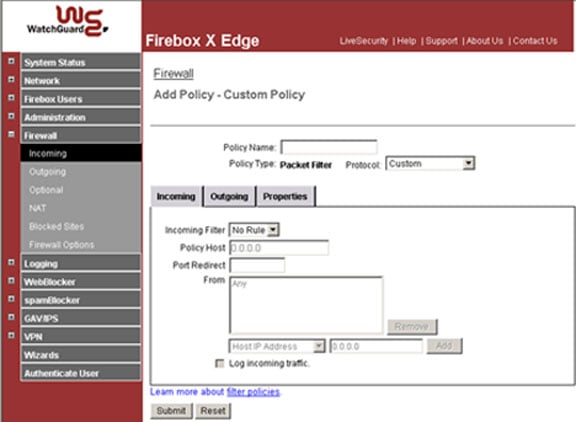
I have a firebox edge router, which I forward out other ports already.
I just can't figure out how to redirect say port 81 to the webserver which is port 80.

dvr
Junior Poster
199 posts since Sep 2003
Reputation Points: 10
Solved Threads: 4
 

can you put the port forwarding interface screenshot of your router here?

DimaYasny
Posting Virtuoso
Moderator
1,777 posts since Jan 2007
Reputation Points: 183
Solved Threads: 89
 

here is a screen shot of my firewall port forwarding

Attachments firewall.jpg 40.1KB
dvr
Junior Poster
199 posts since Sep 2003
Reputation Points: 10
Solved Threads: 4
 

this is probably the wrong interface
do you have anything that mentions virtual servers, port forwarding, redirection etc?

DimaYasny
Posting Virtuoso
Moderator
1,777 posts since Jan 2007
Reputation Points: 183
Solved Threads: 89
 

that is the port forwarding on the router.
thats where I have forwarded out all my other ports from.

dvr
Junior Poster
199 posts since Sep 2003
Reputation Points: 10
Solved Threads: 4
 
DimaYasny
Posting Virtuoso
Moderator
1,777 posts since Jan 2007
Reputation Points: 183
Solved Threads: 89
 
dvr
Junior Poster
199 posts since Sep 2003
Reputation Points: 10
Solved Threads: 4
 

couldn't find any proper documentation on the site. maybe you should try to call them for support

DimaYasny
Posting Virtuoso
Moderator
1,777 posts since Jan 2007
Reputation Points: 183
Solved Threads: 89
 

This article has been dead for over three months

Post: Markdown Syntax: Formatting Help
You