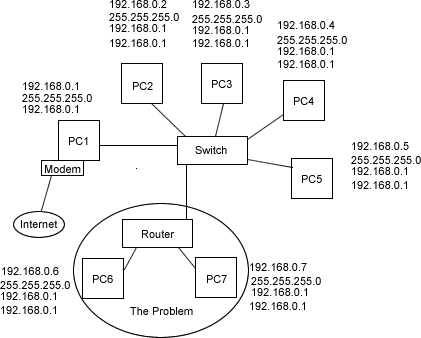
Hello, I'm having a problem. you see, I'm living in a house that has a internet conection thrue a computer(PC1) that has a ADSL modem. só this computer is linked to standard switch with 8 ports. until now thereś no problem.
the problem: I byed a new PC and a router NTech 4-port, so I could have internet on the two computers in my room(PC7 & PC8). but the router won't distribute internet or lan. :rolleyes:
I have this configuration:
PC1:
ip 192.168.0.1
submask 255.255.255.0
getway 192.168.0.1
PC7:
ip 192.168.0.1
submask 255.255.255.0
getway 192.168.0.1
DNS 192.168.0.1
PC8:
ip 192.168.0.1
submask 255.255.255.0
getway 192.168.0.1
DNS 192.168.0.1
I tryed to enter the router and change it's ip to some other ip and change the DNS of the PC7 and PC8 to that ip. :o Didn't work!
I attached a image to help out... :cheesy:
I don know what to do...