954,315 Members — Technology Publication meets Social Media
Username:
Password:
Lost login information?
Have something to say? Contribute New Article Reply to this Article

Cannot Connect to, Linksys' Web Based Utility, I need help

I am trying to activate DMZ on my computer. I have a Linksys router and I am on my house's network. However when I enter the Web adress for the Web Utility, which is "http://192.168.1.1", it says "Page Cannot be displayed", I need help!

m590
Newbie Poster
10 posts since Sep 2003
Reputation Points: 10
Solved Threads: 0
 

also my ip adress isnt 192.168.1.1 its something weird even though i have a linksys router

m590
Newbie Poster
10 posts since Sep 2003
Reputation Points: 10
Solved Threads: 0
 

192.168.1.1 isn't the ipaddress of your computer. It's the ip address of the router, itself (which has a built-in web server which serves the configuration settings pages). Not being able to access it might be a problem communicating with the router, or with your firewall settings.

cscgal
The Queen of DaniWeb
Administrator
19,421 posts since Feb 2002
Reputation Points: 1,474
Solved Threads: 229
 

i know its the routers ip and thats the problem, i can't acess the web configuration tool

m590
Newbie Poster
10 posts since Sep 2003
Reputation Points: 10
Solved Threads: 0
 

If your IP is something like 192.168.1.x where x is a number greater than one, then that means that your router's DHCP server has assigned your computer an IP address. If your IP is something like 167.x.x.x then that means that your computer cannot connect to the router nor find a DHCP server, so is assigning itself its own IP address. What IP are you getting? This will help troubleshoot whether your computer can see the router at all.

cscgal
The Queen of DaniWeb
Administrator
19,421 posts since Feb 2002
Reputation Points: 1,474
Solved Threads: 229
 

I see, my IP is 10.10.10.108, so you think its not seeing the router at all? Then how am i connected to the internet? I don't really understand. Please explain :)

m590
Newbie Poster
10 posts since Sep 2003
Reputation Points: 10
Solved Threads: 0
 

That's an awfully strange IP for a linksys router to be assigning - or for a computer to assign itself (IMO). Do you have any other nic cards or modems in the machine that might be handing out that ip?

cscgal
The Queen of DaniWeb
Administrator
19,421 posts since Feb 2002
Reputation Points: 1,474
Solved Threads: 229
 

No, the card is a wireless-G PCI Adapter card, it's the only one in my machine. And i have a surfboard modem ... :( please help

m590
Newbie Poster
10 posts since Sep 2003
Reputation Points: 10
Solved Threads: 0
 

You need to release the IP on your computer and reboot.....I've had that happen a few times over the years...a few reboots usually does the trick.

Xelfinn
Light Poster
37 posts since Aug 2003
Reputation Points: 14
Solved Threads: 1
 

"You need to release the IP on your computer"

What does that mean? You mean change it? To what? 192.168.1.x?

m590
Newbie Poster
10 posts since Sep 2003
Reputation Points: 10
Solved Threads: 0
 

"You need to release the IP on your computer"

What does that mean? You mean change it? To what? 192.168.1.x?


Assuming you have your linksys router set up as a DHCP server...meaning it assigns your networked computer an IP address. I would release (delete) the problem IP address from your computer by opening a command prompt and enteringipconfig /release . This will release the bad IP address from your network adapter....then I would reboot the computer in hope that the router will assign a valid IP address.

example: C:\Documents and Settings\Username> ipconfig /release

Xelfinn
Light Poster
37 posts since Aug 2003
Reputation Points: 14
Solved Threads: 1
 

I released my IP and when i restarted my IP went back to the same old one, I tried this 2 times. I think the problem is i have DHCP enabled, I need to disable this to activate DMZ, right..? please continue helping :)

m590
Newbie Poster
10 posts since Sep 2003
Reputation Points: 10
Solved Threads: 0
 

I've never set up a box as DMZ so I'm no expert on this.......what you may have to do is set up the IP on the computer. Under network connections, locate your network adapter. Right click the adapter and select Properties.then select the Internet Protocol (TCP/IP) and go into the properties there. Under the General tab you can designate the IP address...for example, 192.168.1.10. Set the router as the gateway...192.168.1.1 and use the default subnet mask, 255.255.255.0. If it doesn't work from there you can find the DNS servers from your linksys router status page. Also, make sure you designate the IP address that is to be your DMZ computer on the Linksys Router...192.168.1.10.

HTH

Xelfinn
Light Poster
37 posts since Aug 2003
Reputation Points: 14
Solved Threads: 1
 

Oh, and make sure the IP you choose for the DMZ doesn't fall withen the range of the DHCP server of the Router.

Xelfinn
Light Poster
37 posts since Aug 2003
Reputation Points: 14
Solved Threads: 1
 

I tried to change my ip to 192.168.1.10 and i put the default gate way as 192.168.1.1 etc... and restarted computer. It didt work. Plus even if it DID work i still can't acess the lynksys web utility page. :( :( :(FRUSTRATED:( :( :(

m590
Newbie Poster
10 posts since Sep 2003
Reputation Points: 10
Solved Threads: 0
 

Try asking your questions here: http://www.broadbandreports.com/forum/equip,16
There are a lot of people that use Linksys there who may be able to track your problem. Sorry I couldn't help....I thought all you needed to do was get the computer IP to show the same network as the router and you'd have access. Sorry I couldn't help more.

Xelfinn
Light Poster
37 posts since Aug 2003
Reputation Points: 14
Solved Threads: 1
 
And i have a surfboard modem ...

BINGO back up let me handle this 1

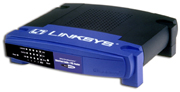
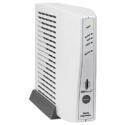
Fact: The Motorola SURFBOARD SB4100 (piece of crapp) (bottom left)
Fact: The Motorola has conflicting problems with this specific router model LINKSYS BEFSX41 But not the BEFSR41(bottom right)

Take your modem to your ISP and get they're newest model or buy a different type of modem and charge it to them

Attachments crappy_modem.jpeg 2.12KB befsr41.jpg 23.14KB
)BIG"B"Affleck
Master Poster
Banned
766 posts since Oct 2003
Reputation Points: 25
Solved Threads: 8
 

1st a quick jab: have u tried reading the manual? :-)

what's ur OS?

which linksys router?

aeinstein
Team Member - aka kaynine
Team Colleague
645 posts since May 2002
Reputation Points: 186
Solved Threads: 8
 

aeinstein
Id bet big money its this one LINKSYS BEFSX41 whats your guess

)BIG"B"Affleck
Master Poster
Banned
766 posts since Oct 2003
Reputation Points: 25
Solved Threads: 8
 

BINGO back up let me handle this 1

A) Fact: The Motorola SURFBOARD SB4100 (piece of crapp) http://www.pricegrabber.com/search_getprod.php/masterid=453180/search=motorola%20surfboard/ut=189e989383c2f39b

B) FACT: The Motorola has conflicting problems with this specific router model LINKSYS BEFSX41 But not the BEFSR41 http://www.linksys.com/products/product.asp?grid=23&prid=433

C) Take your modem to your ISP and get they're newest model or buy a different type of modem and charge it to them

A): link is to product info on seller's www; please post link supporting claim that sb4100 is PoS

B): links is to product info on mfgr's www; please post link suporting claim that sb4100 conflicts w/linksys befsx41

C): ROFLMBO!!! whew, at least u DO have a sense of humor

aeinstein
Team Member - aka kaynine
Team Colleague
645 posts since May 2002
Reputation Points: 186
Solved Threads: 8
 

This article has been dead for over three months

Post: Markdown Syntax: Formatting Help
You