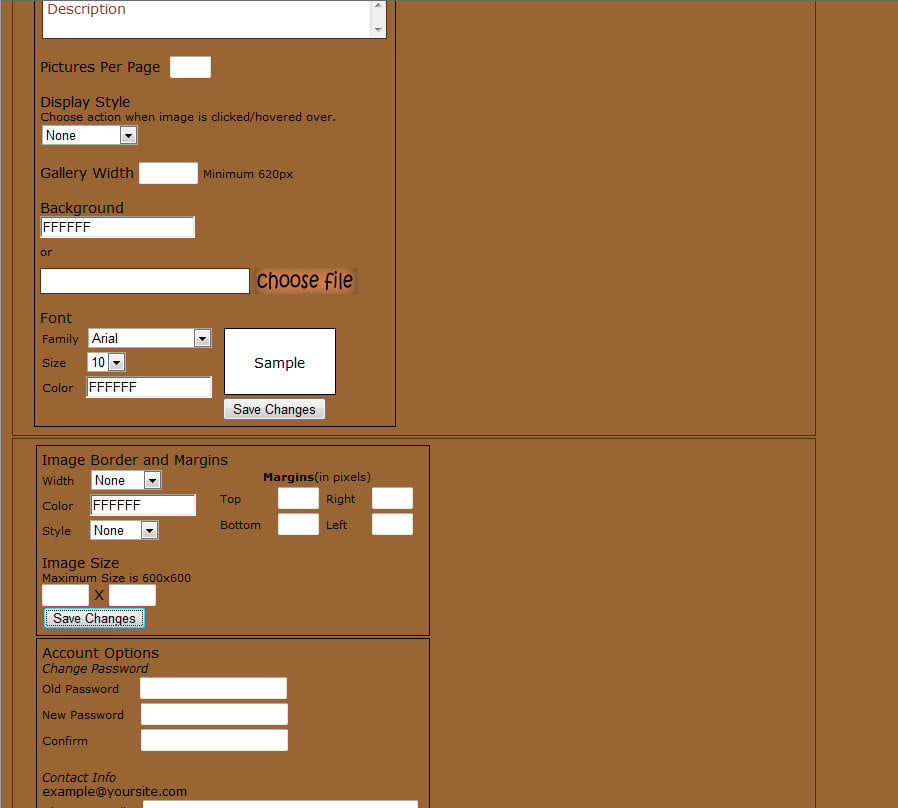
I have an options section for my editable gallery that displays fine in Chrome, FF, Safari, Opera, and even IE7. But not IE8 - which once again finds a way to make my life harder. Can anyone explain why this:
<td colspan="2" style="width: 800px;max-width: 800px; text-align: center;">
<img src="galleryopt.png" height="34px" width="187px" style="margin: 10px 20px; margin-right: 90%; float: left;clear: right;" alt="Gallery Options"/><br/>
<div style="width: 760px; margin: 5px 20px; text-align: left;" >
<form action="<?php echo $_SERVER['PHP_SELF']; ?>" method="post" name="options" enctype="multipart/form-data" id="options">
<div id="displayOpt" style="float: left;border: thin black solid;padding: 5px; width: 350px; ">
<input type="text" size="12" class="titleInput m2" value="Title"
onfocus="if(this.value == 'Title') {this.value = ''}"
onblur="if(this.value == '') {this.value = 'Title'}"/><br/>
<textarea rows="2" class="titleInput m2" id="gdescription"
onfocus="if (this.value == 'Description') {this.value = ''}"
onblur="if (this.value == '') {this.value = 'Description'}"
>Description</textarea><br/><hr/>
<label>Pictures Per Page</label>
<input name="picsPerPage" type="text" maxlength="3" size="1" onkeyup="fieldcheck(this)"/><br/><hr/>
<span>Display Style</span><br/>
<p class="sublabel">Choose action when image is clicked/hovered over.</p>
<select class="m2">
<option>None</option>
<option>Hover Image</option>
<option>Popup</option>
<option>Link</option>
</select>
<hr/>
<label for="gwidth">Gallery Width</label>
<input type="text" maxlength="4" size="4" value="" name="gwidth" id="gwidth" onkeyup="fieldcheck(this)"/>
<span class="sublabel">Minimum 620px</span><br/>
<hr/>
<label>Background</label><br/>
<input class="color1" name="gbg" id="gbg" onchange="var area=document.getElementById('testarea'); area.style.backgroundColor = '#' + this.value"/><br/>
<span class="sublabel" style="position:relative; top: 7px;">or</span>
<div class="upload1">
<br/>
<div class="fakefile">
<input type="text" name="fake_bgfile" id="fake_bgfile" class="fakefile1"/>
</div>
<input type="file" name="bgfile" id="bgfile" class="realfile" onchange="this.form.fake_bgfile.value = this.value"/>
</div>
<hr/>
<span>Font</span><br/>
<div id="font" style="width: 182px; float: left;">
<label for="gfont-family" class="sublabel m2">Family</label>
<select name="gfont_family" class="m2" id="gfont-family" onchange="var sample=document.getElementById('test'); sample.style.fontFamily = this.value">
<option style="font-family: Arial;">Arial</option>
<option style="font-family: Roman">Roman</option>
<option style="font-family: Verdana">Verdana</option>
<option style="font-family: 'Trebuchet MS'">'Trebuchet MS'</option>
<option style="font-family: 'Comic Sans MS'">'Comic Sans MS'</option>
<option style="font-family: Calibri">Calibri</option>
</select>
<br/>
<label for="gfont-size" class="sublabel m2">Size </label>
<select name="gfont_size" class="m2" id="gfont-size" onchange="var sample=document.getElementById('test'); sample.style.fontSize = this.value + 'px' ">
<option>10</option>
<option>11</option>
<option>12</option>
<option>13</option>
<option>14</option>
<option>15</option>
<option>16</option>
</select>
<br/>
<label for="gfont-color" class="sublabel m2">Color </label>
<input class="color1 m2" style="width: 120px;" id="gfont-color" name="gfont_color" onchange="var sample=document.getElementById('test'); sample.style.color = '#' + this.value"/>
</div>
<div class="optContainer m2 test" id="testarea" style="background-color: white;">
<div class="center">
<span id="test">Sample</span>
</div>
</div>
<input type="submit" name="saveGallery" value="Save Changes"/>
</div>
</form>
<div style="float: left; width: 382px;">
<div class="optContainer m2l" id="border" style="width: 382px;max-width: 382px;"/>
<form name="imgOpt" action="<?php echo $_SERVER['PHP_SELF']; ?>" method="post">
<span>Image Border and Margins</span>
<div style="float: left; width: 100%">
<div style="float: left; width: 170px;"/>
<label for="borderwidth" class="sublabel">Width</label>
<select name="borderwith" id="borderwidth" class="m2">
<option>None</option>
<option>Thin</option>
<option>Medium</option>
<option>Thick</option>
</select><br/>
<label for="bordercolor" class="sublabel">Color</label>
<input class="color1 m2" name="bordercolor" id="bordercolor" style="width: 100px"/><br/>
<label for="borderstyle" class="sublabel" style="margin-right: 12px;">Style</label>
<select class="m2" name="borderstyle">
<option>None</option>
<option>Solid</option>
<option>Dashed</option>
<option>Dotted</option>
<option>Groove</option>
<option>Ridge</option>
<option>Inset</option>
<option>Outset</option>
</select>
</div>
<div id="a" style="text-align:center;">
<p class="sublabel m2"><strong>Margins</strong>(in pixels)</p>
<label class="sublabel" for="mtop">Top </label>
<input type="text" name="mtop" maxlength="2" size="1" id="mtop" class="m2"
onkeyup="fieldcheck(this)"/>
<label class="sublabel" for="mright">Right</label>
<input type="text" name="mright" maxlength="2" size="1" id="mright" class="m2"
onkeyup="fieldcheck(this)"/><br/>
<label class="sublabel" for="mbottom">Bottom</label>
<input type="text" name="mbottom" maxlength="2" size="1" id="mbottom" class="m2"
onkeyup="fieldcheck(this)"/>
<label class="sublabel" for="mleft">Left </label>
<input type="text" name="mleft" maxlength="2" size="1" id="mleft" class="m2"
onkeyup="fieldcheck(this)"/>
</div><br/>
<div style="float:left; width: 100%;">
<label>Image Size</label>
<p class="sublabel">Maximum Size is 600x600</p>
<input type="text" maxlength="3" size="2" name="iwidth" onkeyup="fieldcheck(this)"/> X <input type="text" maxlength="3" size="2" name="iheight" onkeyup="fieldcheck(this)"/>
</div>
<input type="submit" name="saveGallery" value="Save Changes"/>
</form>
</div>
</div><br/>
<div class="optContainer m2" style="width: 382px; max-width: 382px;">
<span>Account Options</span><br/>
<span style="font-size: .85em;"><i>Change Password</i></span>
<div style="float: left;width: 100%">
<label class="sublabel" for="oldPass">Old Password </label>
<input id="oldPass" name="oldPass" size="20" type="password" class="m2"/><br/>
<label class="sublabel" for="newPass">New Password</label>
<input id="newPass" name="newPass" size="20" type="password" class="m2"/><br/>
<label class="sublabel" for="ConfirmPass">Confirm </label>
<input id="ConfirmPass" name="newPass" size="20" type="password" class="m2" /><br/><br/>
</div>
<div style="float: left; width: 100%;">
<span style="font-size: .85em"><i>Contact Info</i></span><br/>
<span style="font-size: .85em"><?php echo $email; ?>example@yoursite.com</span><br/>
<label class="sublabel" for="newEmail">Change E-mail</label>
<input id="newEmail" name="newEmail" size="40" type="text" class="m2" style="margin-bottom: 10px;"/>
</div>
<div style="float:left; width: 100%">
<span>Contact Administrator</span>
<form name="contactAdmin" action="<?php echo $_SERVER['PHP_SELF']; ?>" method="post">
<textarea rows="3" cols="55" class="titleInput m2"
onfocus="if(this.value == 'Message') {this.value = ''}"
onblur="if(this.value == '') {this.value ='Message'}"
>Message</textarea>
</form>
</div>
</div>
</td>
</tr>Causes what is in the attached image?