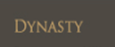
Does anyone have any clue what font this is?? I have been searching and found similar fonts but my client wants this exact font.
Thanks!!
Does anyone have any clue what font this is?? I have been searching and found similar fonts but my client wants this exact font.
Thanks!!
This thread is a good example of a common problem: an automatic font matcher can be fooled by low-contrast screenshots. pointed toward an identification resource and ultimately verified the face manually. Below are concise, practical steps to confirm a face and deliver it reliably when a client wants the exact match.
Prepare the sample first: crop tightly around the letters, increase contrast or invert the image to make glyph shapes clear, and remove overlays or textures. Run the cleaned image through an ID service such as WhatTheFont or Font Squirrel Matcherator to get candidates. If the text is live on a site, use browser devtools (Fonts/Computed panel) to see the served font-family and the actual font file. If you have source artwork or a PDF, open it in Illustrator or FontForge to read the embedded font name and metadata. When matching visually, compare distinguishing glyphs (single vs double-storey a, the shape of g, Q tail, serif bracketing, stroke contrast) — these features narrow candidates quickly.
If the client needs that face on the web, obtain the font file and a proper web license before embedding with @font-face (see MDN). When a licensed webfont is not available, pick a licensed substitute and document differences for the client. Useful tools and references: WhatTheFont, Font Squirrel Matcherator, MDN @font-face, FontForge.
— cereal 1,524Jump to Post
It didn't work because of the dark background, but I figured it out. As simple as Times New Roman!
We're a friendly, industry-focused community of developers, IT pros, digital marketers, and technology enthusiasts meeting, networking, learning, and sharing knowledge.