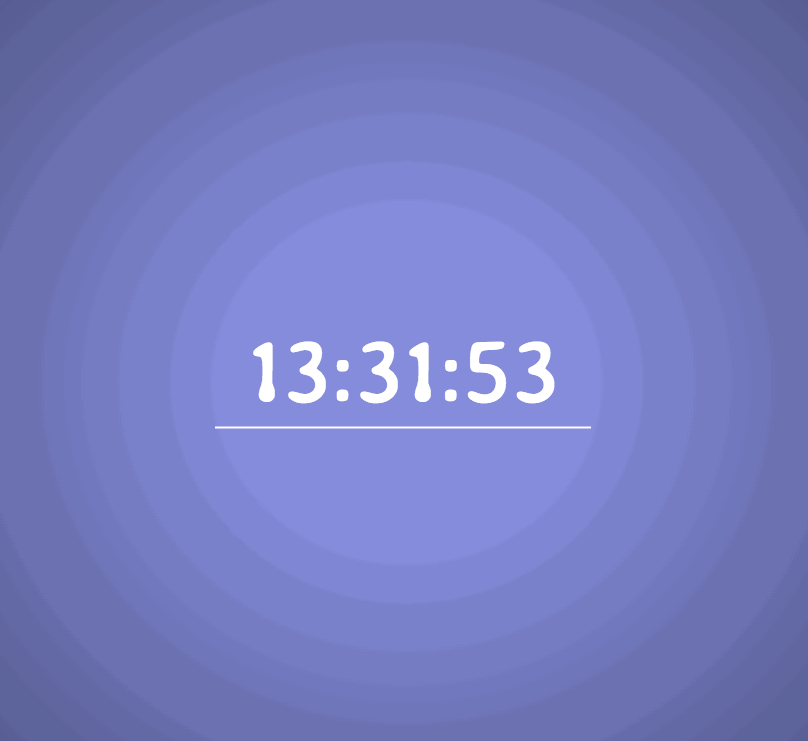
I would like the time of day to control color with the seconds to control gradience like in the pic

var clock, hour, min, sec, color;

function displayTime(){
clock=new Date();
hour=clock.getHours(),
min=clock.getMinutes(),
sec=clock.getSeconds();

//if single digit, add 0 to the left
if(hour<=9) hour='0'+hour;
if(min<=9) min='0'+min;
if(sec<=9) sec='0'+sec;


color='#'+hour+min+sec;
//colorText=color.split().join(":");


function changeClock() {
    document.getElementById("time").innerHTML=color;
}

function returnClock() {
    document.getElementById("time").innerHTML=""+hour+":"+min+":"+sec+"";
}


//function mouseOut() {
//    document.getElementById("time").innerHTML=""+hour+":"+min+":"+sec+"";
//}

//document.getElementById("time").addEventListener("mouseout", mouseOut);

//set background color
document.body.style.background.= color;
document.getElementById('time').innerHTML=""+hour+":"+min+":"+sec+"";

//document.getElementById("time").addEventListener("mouseout", returnClock);

document.getElementById("time").addEventListener("mouseover", changeClock);


//set interval
setInterval(displayTime,1000);

}


displayTime();
Dani AI

Generated

A quick summary of the thread: wants the clock to drive the page color with seconds controlling the radial gradience; already caught the syntax typo. Beyond that fix, the remaining work is (1) building a visually useful center color from the time, (2) creating a complementary outer stop, and (3) applying a CSS radial gradient rather than a plain background color.

Concatenating zero-padded hour/min/sec into #HHMMSS produces valid hex but only uses digits 0–9 (no A–F), which limits the color range. Mapping the clock to HSL or to full 0–255 RGB yields a much richer, smoother progression. HSL is convenient: let hours drive hue, minutes drive saturation, and seconds drive lightness (or use seconds to interpolate the gradient radius/stop).

Example (apply as a drop-in approach that updates at the start of each second):

function timeToHsl(h,m,s){
  var hue = Math.round((h/23) * 360);
  var sat = Math.round((m/59) * 50) + 40;    // 40-90%
  var light = Math.round((s/59) * 30) + 30;  // 30-60%
  return 'hsl(' + hue + ',' + sat + '%,' + light + '%)';
}

function applyClockGradient(){
  var now = new Date();
  var center = timeToHsl(now.getHours(), now.getMinutes(), now.getSeconds());
  var outerLight = Math.max(10, parseInt(center.match(/(\d+)%\)$/)[1], 10) - 20);
  var outer = center.replace(/(\d+)%\)$/, outerLight + '%)');
  document.body.style.backgroundImage = 'radial-gradient(circle at 50% 50%,' + center + ' 0%,' + outer + ' 100%)';
  document.getElementById('time').textContent =
    ('0' + now.getHours()).slice(-2) + ':' + ('0' + now.getMinutes()).slice(-2) + ':' + ('0' + now.getSeconds()).slice(-2);
  setTimeout(applyClockGradient, 1000 - now.getMilliseconds());
}

applyClockGradient();

Practical notes: prefer textContent over innerHTML; use backgroundImage so shorthand background elsewhere does not overwrite the gradient; replace mouseover/mouseout with mouseenter/mouseleave to avoid bubbling; add a small CSS transition: background 0.5s ease for smoother changes; throttle updates if performance becomes an issue. This keeps the core idea from the original posts but gives a fuller, more flexible gradient implementation.

Recommended Answers

All 2 Replies

in this line
document.body.style.background.= color;
you have error , you have dot after background just remove it.
document.body.style.background = color;

yeah i was testing out some methods and forgot to edit it back

Be a part of the DaniWeb community

We're a friendly, industry-focused community of developers, IT pros, digital marketers, and technology enthusiasts meeting, networking, learning, and sharing knowledge.