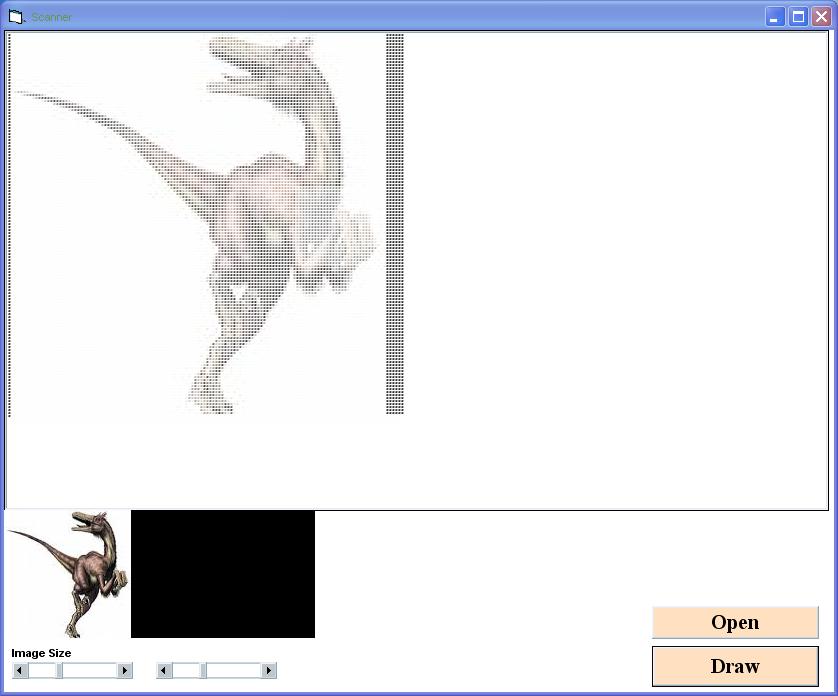
Scanner :Scanning image of a Picture control to a Rich Text Box

Vineeth K 0 Tallied Votes 356 Views Share

Hello friends i made a small program like a scanner it will scan an image file to a Rich Text Box.
My friend helped me in providing the code to access the pixels of an image.Hope you will like the code.

Try it ....

This need :

Reference files :

Visual Basic For Applications
Visual Basic runtime objects and procedures
Visual basic objects and procedures
OLE Automation

Add

1 - Rich Text Box - Rt1
2 - One Common Dialog Control named cmd
3 - 2 Command Buttons
4 - One Picture Box &
5 - 2 HScroll s

Try to make the Picture control Atuosize to false.
Private Declare Function GetPixel Lib "gdi32" (ByVal hdc As Long, ByVal X As Long, ByVal Y As Long) As Long
Dim drawtag As String
Function Pencil(col1 As Long) As Single
  Dim R As Single
  Dim G As Single
  Dim B As Single
  R = col1 And 255
  G = (col1 And 65280) \ 256&
  B = (col1 And 16711680) \ 65535
  Pencil = (R + B + G) / 765
End Function
Function Brush(col1 As Long) As Long
  Dim R As Single
  Dim G As Single
  Dim B As Single
  R = col1 And 255
  G = (col1 And 65280) \ 256&
  B = (col1 And 16711680) \ 65535
  Brush = RGB(R, G, B)
End Function

Private Sub Command1_Click()
On Error GoTo Err
Dim Ix, Iy As Integer
Dim col1 As Long
Dim col2 As Single
Dim col3 As String

rt1.SelFontName = "Lucida Console"
rt1.SelFontSize = 2
rt1.Text = vbNewLine
rt1.Enabled = False

For Iy = 1 To HScroll1.Value
For Ix = 1 To HScroll2.Value

col1 = GetPixel(Picture1.hdc, Ix, Iy)
col2 = Pencil(col1)
col3 = Mid(drawtag, Len(drawtag) - Int(col2 * (Len(drawtag) - 1)), 1)

rt1.SelStart = Len(rt1.Text) - 2
rt1.SelLength = 1
rt1.SelText = col3
rt1.SelStart = Len(rt1.Text) - 2
rt1.SelLength = 1
rt1.SelColor = Brush(Picture1.Point(Ix + 1, Iy))

Next
rt1.SelText = vbNewLine
DoEvents
Next
Err:
rt1.Enabled = True
End Sub
Private Sub Command2_Click()
On Error Resume Next
Dim filename As String
cmd.ShowOpen
filename = cmd.filename
Picture1.Picture = LoadPicture(filename)
End Sub
Private Sub Form_Load()
drawtag = "#"
End Sub

Dani AI

Generated

Nice, compact demo from — two points worth adding that make the output correct and a lot faster.

The first is a bug in the blue-channel extraction and some type issues. GetPixel returns a COLORREF where bytes are R (low), G, B (high). Use long integers and hex shifts so the blue byte is divided by 65536 (0x10000), not 65535. A corrected pair of helper functions:

Function BrightnessFromCOLORREF(col As Long) As Single
    Dim R As Long, G As Long, B As Long
    R = col And &HFF
    G = (col And &HFF00) \ &H100
    B = (col And &HFF0000) \ &H10000
    BrightnessFromCOLORREF = (R + G + B) / 765#
End Function

Function COLORREFtoVBColor(col As Long) As Long
    Dim R As Long, G As Long, B As Long
    R = col And &HFF
    G = (col And &HFF00) \ &H100
    B = (col And &HFF0000) \ &H10000
    COLORREFtoVBColor = RGB(R, G, B)
End Function

Performance: calling RichTextBox selection and color per pixel is very slow. Two practical alternatives:

  • Build an RTF string once: create a color table of unique colors, map pixels to color indexes, and emit text with \cfN tags. Then assign the whole RTF to rt1.TextRTF in one operation.
  • Or read pixels in bulk with GetDIBits/GetObject (DIB) instead of calling GetPixel per pixel; that gives a byte array you can iterate much faster.

Troubleshooting checklist (common pitfalls):

  • Coordinate origin: GetPixel is 0-based; some PictureBox helpers are 1-based — offset accordingly.
  • Ensure Picture1.ScaleMode = vbPixels and AutoRedraw = True when accessing hdc.
  • Move DoEvents out of the inner loop (or call it only once per row) to avoid huge slowdowns.
  • Use Option Explicit and Lon g/Integer types to avoid overflow and rounding errors.

This complements the original example and keeps the visual result accurate while improving speed for larger images (thanks to and for the enthusiasm in the thread).

pawaninfinite 0 Newbie Poster

why can't i found u earlier

Riju Thomas 0 Newbie Poster

excellent

Be a part of the DaniWeb community

We're a friendly, industry-focused community of developers, IT pros, digital marketers, and technology enthusiasts meeting, networking, learning, and sharing knowledge.