Rapid Application Development has come a long way since the early days of Delphi and Visual Basic in the mid 1990s. I remember those days well, as I immersed myself in Pascal development with the original Delphi back in 1995 and even wrote a couple of books about it. Delphi was created by Borland, and then, after Borland changed its name twice (first to Inprise, then back to Borland), Delphi was later moved to a new company spun off by Borland in 2006 called CodeGear. CodeGear was then bought by Embarcadero Technologies in 2008. Today Delphi and its descendants are produced by Embarcadero.
The modern descendant of Delphi is called Rad Studio XE, which was just announced today. It will encompass most of the incarnations of Delphi, including Delphi itself for Pascal development, C++Builder for C++ development, Delphi Prism for developing .NET and Mono software, and RadPHP for PHP development.
Although the product won't be available until mid-September, Embarcadero has released the first of three "sneak preview" videos to show off some of the product's features.
Among the new features are version control (through Subversion), new debugging features, code editor enhancements, and, perhaps the most interesting, rapid development through RadPHP.
Based on the video, it appears the Subversion integration is pretty good. The demo machine had a copy of TortoiseSVN installed and all set up. Inside RAD Studio, the project tree included menu options for checking a project into SVN, checking out files, committing changes, and all that good stuff you do in SVN. (It wasn't clear from the video whether TortoiseSVN was required, but I'm going to take an educated guess and say it's not, that RAD Studio XE has its own SVN integration.) The video also shows a nice "diff" tool that lets you compare files between versions; in fact, this diff tool is actually a popular third-party tool called Beyond Compare that's been integrated into the IDE itself.
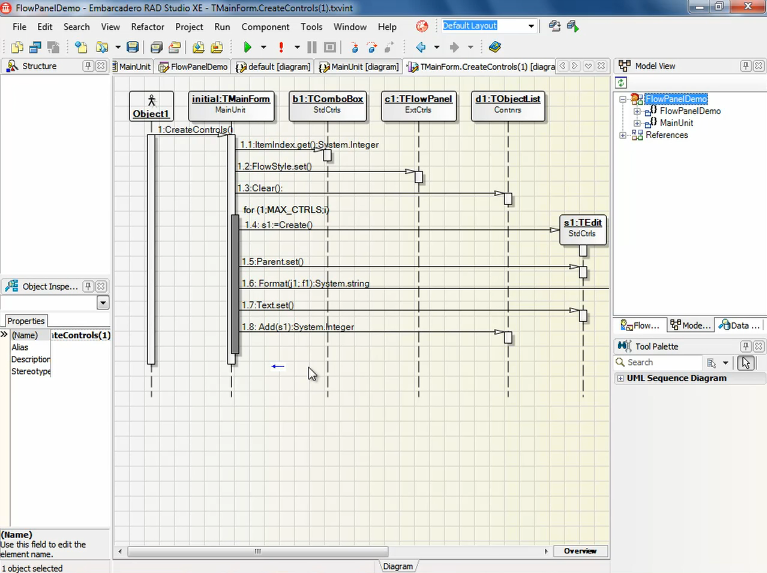
In the video they also previewed some interesting UML modeling tools. This one surprised me. In addition to some basic object modeling, they showed a cool feature where RAD Studio would reverse-engineer your code and then generate UML Sequence Diagrams right from your code, with lines of your code embedded right in the diagram. I don't know yet if it'll go the other way (you diagram, and some code gets generated, or least some starter code); we'll have to wait until the product is out to find out if that's the case.
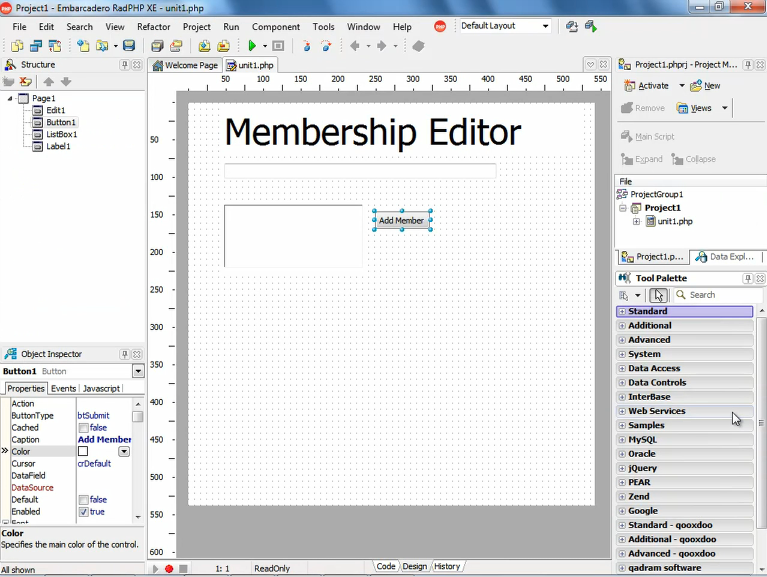
Here's a screen capture of the video demoing the UML Sequence Diagrams: And finally, the one that caught my attention the most was the RadPHP demo. This is essentially Delphi but with PHP as a back-end. But what looks intriguing is the way you get a complete layout editor where you can drop controls onto a web page, and add code to them, much like you can with ASP.NET in Visual Studio—except in this case, it's PHP and RAD Studio. If this lives up to the promise in the video, we'll probably see a lot more people using RAD Studio.
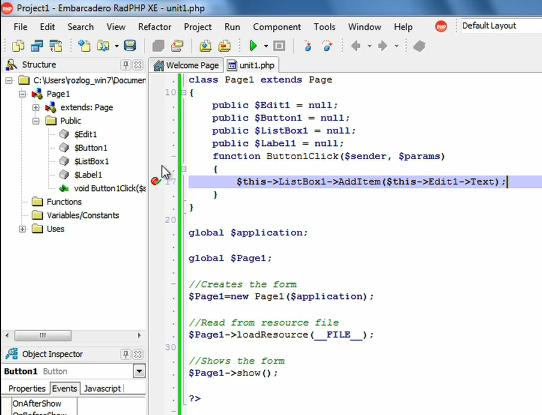
Here's a screen capture from the video of the designer for PHP. This looks sweet; you can drag and drop controls, and double-click them to add code, just as you can in regular Delphi and in Visual Studio: And then here's a capture of the debugger as the guy was debugging a server-side PHP function after a breakpoint was triggered: Delphi has come a long way, and changed a lot of owners, and for quite some time it seemed like it was sort of withering away with only a small devoted fan base, and few new people embracing it. But perhaps with this new version of RAD Studio, more people will give it a try. I left Delphi years ago and switched to Visual Studio. Perhaps I'll go back to Delphi in its current form of RAD Studio. I can't say for sure, but I'll certainly try it out.
For more information, visit .