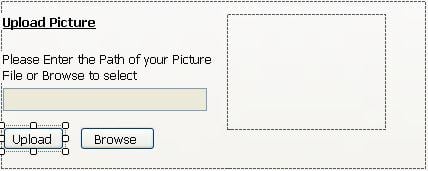
hi,

im building an app where im tryin to upload an image to my database through file upload dialog box. my problem is, when i select a file thru the Fileupload dialog and save the path to a string variable n try to save it, the app takes the connectionstring as the path of the it doesnt get saved in my database. i tried alot, bt when i select a file, the connectionstring gets changed.

what could be d possible reason for tht? im loadin the connection string on the same page n not in app.config file..

pl help me.

Dani AI

Generated

This thread looks like a WinForms OpenFileDialog workflow (not ASP.NET). The symptom described — a selected image path ending up in the app's connection string — usually comes from an accidental assignment or save to the same variable/setting that holds the connection string (for example writing the dialog FileName into an application setting or a form-level field named like the connection string). correctly flagged the web-vs-desktop difference earlier; the desktop pattern is to use OpenFileDialog and then copy or persist the chosen file in a controlled place rather than relying on its original absolute path.

Quick, practical ways to pinpoint the problem: set a breakpoint inside the Upload handler and step through while watching the dialog FileName, any TextBox values, and the connection-string variable or application setting. Use “Find in Files” for assignments to the connection-string identifier or any calls to Settings.Save/Configuration APIs. Also check control/event wiring (TextChanged, Click, etc.) for accidental assignments that run earlier or later than expected. ’s request for the relevant code was on target — the safest way to spot this is to observe the exact line that writes to the connection-string storage.

Recommended storage/workflow options (safe, long-lived): copy the chosen image into a dedicated application/images folder under a unique name (timestamp or GUID) and store a relative path in the database; or store the image bytes as a varbinary/blob column if portability is needed. Avoid storing absolute local paths (they break when the app moves machines). Discussion of pros/cons: .

Finally, move the connection string to configuration (app.config) and read it at runtime rather than mutating it in code; this prevents accidental overwrites. For the .NET pattern see ConfigurationManager.ConnectionStrings.

Recommended Answers

All 6 Replies

Please post the relevant code so we can see where the wires are getting crossed.

This is C# forum. Ask web related question in ASP.NET forum.
You need to create relative path of uploaded file.

string relpath="~/images/" + FileUpload1.FileName;
 string abspath=MapPath("~/images/" + FileUpload1.FileName);
 FileUpload1.SaveAs(abspath);
 string sql;
 sql=string.format("insert into tablename (filename,filepath) values ('{0}','{1}')",FileUpload1.FileName,relpath);
 .....

well..its a problem of C# only. we do have a file upload or say save file dialog box.

thanks for d code.i check and will let you knw if it works..

From the following text, i guess that you are working with web.

Fileupload dialog and save the path to a string variable n try to save it,

You have to use openFileDialog control. Isn't it?

this is my code on browse button

try
            {
                picpathdialog.Filter = "BMP(*.bmp)|*.bmp|JPEG(*.jpeg,*.jpg,*.jpe,*.jfif)|*.jpg|GIF(*.gif)|*.gif|PNG(*.png)|*.png|All Picture Files(*.jpeg,*.jpg,*.gif,*.png,*.bmp)|(*.jpg,*.bmp,*.gif,*.jpeg)";
                if (picpathdialog.ShowDialog() == DialogResult.OK)
                {
                        pictureBox1.ImageLocation = picpathdialog.FileName;
                }
            }
            catch (Exception error)
            {
                MessageBox.Show("In open file dialog box" + error.Message);
            }

n this is d code on upload button

pictureBox1.ImageLocation = txtpath.Text;

when i click on upload button, the connectionString gets replaced by the path of the image.

im also attachin the image to clarify the problem
please do let me knw where is d prob.

thank you..

Do not write such a code that could replace connectionstring Can I see the code of upload button?
Your code for upload button should be:

string relpath=picpathdialog.FileName;
 string sql;
 sql=string.format("insert into tablename (filepath) values ('{0}')",relpath);
 .....
Be a part of the DaniWeb community

We're a friendly, industry-focused community of developers, IT pros, digital marketers, and technology enthusiasts meeting, networking, learning, and sharing knowledge.