I created a form a long time ago (roughly 2 years ago) and I stumbled onto a problem. I know how to record a contact form input when it comes to them typing in whatever they have to say (such as their name) but how do I get it so that I collect the input from something such as a radio button/a selection?

Dani AI
Generated
Quick summary of what was blocking the form in this thread: the form was submitting with GET instead of POST, some inputs lacked a name attribute, a few missing semicolons caused parse errors, and mail/CSV code was using undefined or mismatched variables. Those points were spotted earlier by , , and — the fixes are small but each one will stop values from reaching PHP or being written/sent correctly.
Troubleshooting checklist (fast):
- Verify the form uses
method="post"(lowercase is conventional). - Give every control a
name(server-side uses$_POST['name']). Avoid usingvalue="email"as a placeholder — useplaceholderinstead. - Temporarily dump the incoming data and errors to confirm what arrives: enable errors and inspect
$_POST(or check$_SERVER['REQUEST_METHOD'] === 'POST') before sending mail or writing CSV. Printing the assembled HTML can reveal quoting/placement issues inside your table.
Mail and security notes:
- Never place raw user input in mail headers. Validate the sender with
filter_var(..., FILTER_VALIDATE_EMAIL)and strip CR/LF from any header fields to block header injection. Use a fixed From address from your domain and put the user email in Reply‑To after validation. For reliable delivery and easier debugging, consider a library (PHPMailer/SwiftMailer) and SMTP auth instead of rawmail(); use absolute URLs for images in HTML mail.
CSV and storage:
- Use
fputcsv()(it handles quoting/commas) and lock the file while writing to avoid races:
$fp = fopen('main_form.csv','a');
if ($fp) {
  flock($fp, LOCK_EX);
  fputcsv($fp, [$count, $today, $name, $email, $phone, $meeting_type, $time, $message]);
  flock($fp, LOCK_UN);
  fclose($fp);
}
Final checklist: match POST names to variables, fix any $first_name vs $name mismatches, close table cells when inserting values, and ensure all statements end with semicolons. These steps will make select/radio values, text inputs, emails and CSV rows behave predictably.
Recommended Answers
Jump to Post— imti321 35This code i think is good
if(isset($_POST['submit'])){
                    $name = $_POST['name'];
                    $email = $_POST["email"];
                    $phone = $_POST["phone"];
                    $meeting_type = $_POST["meeting_type"];
                    $time = $_POST["time"];
                    $message = $_POST["message"];
but what is this
$to      = 'email@gmail.com';
                    $subject = 'Contact Form Submission';
                    $v1 = "

                            <html>
                            <body>
                            <style> …
Jump to Post— imti321 35i have seen first time two times Action mentioned
<form action="post" id="nl-form" class="nl-form" action="../EMAIL.php">
and you have not mentioned method and on that place you have mentioned action.Just want to confirm is this is correct.?
Jump to Post— broj1 356@imti32: sorry, I meant method (as noted in the text of the post). Correct code is:
<form method="post" id="nl-form" class="nl-form" action="../EMAIL.php">Thanx for spotting, mate :-).
Jump to Post— Traevel 216@Traveal Sorry but i cant understand what you want to convey , Can you eloberate.
Just picked up where I left off yesterday, wasn't a response to something you said.
Jump to Post— JorgeM 958Just to add so you keep this in mind... You seem to have a lot of repetitive code on the page. You should consider using classes, creating objects, using subroutines, etc so you can reuse your code easily within your web application.
All 37 Replies
<M/> 170 Why so serious? Featured Poster
So far, i have something like this for my html:
I would like to schedule a(n)
                    <select>
                        <option value="1" selected>consultation</option>
                        <option value="2">appointment</option>
How do i get the value/input from that using php?
Sorry if this is a dumb question, i haven't wrote much php for the last year or so. (I can post all my php/html form if needed)
Edited by <M/>
<M/> 170 Why so serious? Featured Poster
Okay, so i am getting further with my form and I seem to get errors (error on line 17 when the form is submitted). Is there anything wrong with my form? Here is the code so far (php):
<?php
                    $name = $_POST["name"];
                    $email = $_POST["email"];
                    $phone = $_POST["phone"];
                    $meeting_type = $_POST["meeting_type"]
                    $time = $_POST["time"];
                    $message = $_POST["message"];
                    $to      = 'myemail@gmail.com';
                    $subject = 'Contact Form Submission';


                    $v1 = "
                            <html>
                            <body>
                            <style>
                                h1 {color:#000066;}
                                table {border:1px solid black; background: #e3f0ff;}
                            </style>
                            <h1>Hello, this form has been submitted!</h1>
                            <img src= 'logo.png' />
                            <table rules='all' style='border-color: #ffb300;' cellpadding='10' width='500px'>
                                <tr style='background: #ffb300;'><td><strong>First Name:</strong> </td>$name
                                <tr style='background: #fafafa;'><td><strong>Email:</strong> </td>$email
                                <tr style='background: #fafafa;'><td><strong>Phone:</strong> </td>$telephone
                                <tr style='background: #fafafa;'><td><strong>Reason for Contact:</strong> </td>$meeting_type
                                <tr style='background: #fafafa;'><td><strong>Best Time to Contact:</strong> </td>$time
                                <tr style='background: #fafafa;'><td><strong>Comments:</strong> </td>$message
                            </table>
                            </body>
                            </html> ";
                    $message = $v1;
                    $headers  = "From: $from\r\n";
                    $headers .= "Content-type: text/html\r\n";
                    mail($to, $subject, $message, $headers);
                    echo "Message has been sent..."; //Page RE DIRECT

//******************************************************************************************************************************//

                    $name = $_POST["name"];
                    $email = $_POST["email"];
                    $phone = $_POST["phone"];
                    $telephone = $_POST["telephone"];
                    $meeting_type = $_POST["meeting_type"]
                    $time = $_POST["time"];
                    $message = $_POST["message"];
                    $subject = 'Message Confirmed!';
                    $v1 = "
                            <html>
                            <body>
                            <style>
                                #disclosure {font-size: 8px; color: #333;}
                                h1 {color:#000066;}
                                table {border:1px solid black;}
                            </style>
                            <img src= 'logo.png' />
                            <table rules='all' style='border-color: #ffb300;' cellpadding='10' width='500px'>
                                <tr style='background: #ffb300;'><td><strong>Email Confirmation</strong>
                                <tr style='background: #fafafa;'><td>Hello <strong> $first_name</strong>, your message has been recieved! We will contact you shortly! <br><br>Best, <br>Me <br><br>Follow Us On:<br><a href='http://www.facebook.com'><img src='facebook_hover.png' width='18' height='18'></a><a href='http://twitter.com'><img src='twitter_hover.png' width='18' height='18'></a><a href='http://google.com'><img src='gplus_hover.png' width='18' height='18'></a><br><div id='disclosure' align='right'>©Don't worry about this part™ All Rights Reserved 2015 </div>
                            </table>
                            </body>
                            </html> ";
                    $message = $v1;
                    $headers  = "From: $from\r\n";
                    $headers .= "Content-type: text/html\r\n";
                    mail($email, $subject, $message, $headers);

                        $count= count(file("main_form.csv"));
                        $today = date("d M Y h:i A");
                        echo $today;


$cvsData = "\n" . $count . "," . $today . "," . $first_name . "," . $last_name . "," . $email . "," . $telephone . "," . $reason . "," . $time . "," . $comment;

$fp = fopen("main_form.csv", "a" );
if($fp){
    fwrite($fp, $cvsData);
    fclose($fp);
    }

?>
And here is the html i have atm:
<div class="main clearfix">
<form id="nl-form" class="nl-form" action="EMAIL.php">
My name is <input type="text" id="name" value="name" placeholder="your name" data-subline="Please input your <em>full name</em>."/>.
My email address is <input id="email" type="text" value="email" placeholder="your email" data-subline="Please input your email correctly."/> and my phone number is <input type="text" id="phone" value="phone" placeholder="your phone number" data-subline="Please input your phone number correctly."/>. I would like to schedule a(n)
<select id="meeting_type">
<option value="1" selected>consultation</option>
<option value="2">appointment</option>
</select>. I am contacting because <input type="text" value="message" placeholder="briefly explain how we can assist you" data-subline="Provide as much information as possible."/>.
The best time to contact me is
<select id="time">
<option value="3" selected>anytime</option>
<option value="4">in the morning</option>
<option value="5">in the afternoon</option>
<option value="6">in the evening</option>
</select>.
<div class="nl-submit-wrap">
<button class="nl-submit" type="submit">Send message</button>
</div>
<div class="nl-overlay"></div>
</form>
</div>
</div><!-- /container -->
<script src=".../js/nlform.js"></script>
<script>
var nlform = new NLForm( document.getElementById( 'nl-form' ) );
</script>

JorgeM 958 Problem Solver Team Colleague Featured Poster
Not being a PHP expert and looking at your code from my phone, I did notice you are missing some semicolons.
After the $meeting_type variables.
<M/> commented: I see it +0
<M/> 170 Why so serious? Featured Poster
You mean on line 22-27 of my php file?
JorgeM 958 Problem Solver Team Colleague Featured Poster
Maybe the line numbers aren't matching up... I mean 5 and 43
<M/> commented: Ah... that moment when i just figured out what you meant... +10
<M/> 170 Why so serious? Featured Poster
Hmm, i see the error on line 43 but idk about the error you see on line 5? I need a semicolon there?

Traevel 216 Light Poster
I think he means $meeting_type = $_POST["meeting_type"] as the 5th one that needs a semicolon at the end.
And I think you have to use the name attribute instead of the id for identifying the element. So if the name of the selection is meeting_type you would get 1, 2, 3 and so on in the $_POST['meeting_type'].
<M/> commented: Gracias +0
<M/> 170 Why so serious? Featured Poster
I think he means $meeting_type = $_POST["meeting_type"] as the 5th one that needs a semicolon at the end.
This is probably JorgeM right now thinking about me not being able to understand what he meant :P

And I think you have to use the name attribute instead of the id for identifying the element. So if the name of the selection is meeting_type you would get 1, 2, 3 and so on in the $_POST['meeting_type'].
I can't use both even if they have the same value? Like both id="dog" and name="dog"?
Traevel 216 Light Poster
They can have the same value, or be different, doesn't matter as long as you use the name for PHP's POST.
I read up a bit on it, and according to this post you can even store multiple checkboxes by giving them an array as a name. Like, if you wanted multiple timeslots they would all have the name time[] and you could collect them all in an array by using $times = $_POST['time'].
<M/> commented: Ahhhhh :P +10
<M/> 170 Why so serious? Featured Poster
Okay, i managed to get the form to send me a verification, which is good. Now a new problem i have is that the form inputs that get sent to me don't show up. It would show up as something like: name:_________ rather than something like name: bob. Also, the user who submitted the form does not get a copy of it, and i am not sure why that is.
The form looks like this atm: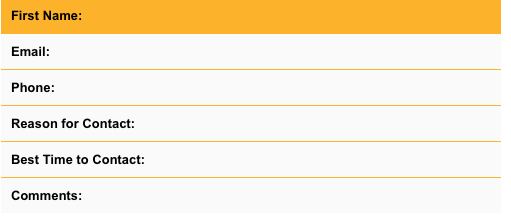
Traevel 216 Light Poster
Not printing the variables, weird. Not really sure as to why, but I did however stumble on something about the risk of inserting a mail address like that while looking for similar issues. Does $v1 contain all the variable information if you printed it to screen instead of mailing? If not you could wrap the $_POST's with isset's to make sure they are all set properly. At least you'll figure out which ones aren't correctly set, if any.
if(isset($_POST['name'])){
    $name = $_POST['name'];
}else{
    echo "ruh roh";
}
Edit:
Perhaps it's somewhere in those long strings, an unescaped quote in a variable or something. You could rewrite it using the heredoc syntax to avoid all the quoting and escaping, if all else fails.
Edited by Traevel because: heredoc addition
<M/> commented: hmm, interesting. +0
<M/> 170 Why so serious? Featured Poster
Could the issue possibly come from the fact that I use both id and value? Idk why i get a feeling that those 2 maybe a problem.
Does $v1 contain all the variable information if you printed it to screen instead of mailing?
I think so, i am not sure if i did it correctly (all my code, aside from my css is pasted above).
If not you could wrap the $_POST's with isset's to make sure they are all set properly.
Where would that go within my code?
Perhaps it's somewhere in those long strings, an unescaped quote in a variable or something.
Its possible, i do have a habit of making long strings... that well, fail :/
You could rewrite it using the heredoc syntax to avoid all the quoting and escaping, if all else fails.
I will look into the heredoc syntax
Traevel 216 Light Poster
I ran a quick test, but it seems that id and name can really be the same. If I run this test form (which posts to the same page):
    <?php
        if(isset($_POST['name'])){
            $name = $_POST['name'];
        }else{
            $name = "unknown";
        }
        echo "My name is $name";
    ?>

    <form action=<?php echo htmlspecialchars($_SERVER["PHP_SELF"]); ?> method="post">
        Name:
        <select id="name" name="name">
            <option value="aaa" selected>aaa</option>
            <option value="bbb">bbb</option>
            <option value="ccc">ccc</option>
        </select>
        <input type="submit">
    </form>
It will print My name is unknown if the variable is not set, if the user picks one of the names it will print My name is aaa (bbb, ccc).
The issets would go at the top, where you could still abort the script before sending mails and such.

Member #120589
I would second using heredoc syntax for long stretches of html in a php string.
Long names while descriptive are prone to typos.
Just wondering what IDE/Editor you're using as many errors should be highlighted.
Any user input should be tested for existence prior to assignment or you'll get an error (which may be surpressed depending on your settings).
The old chestnut of "name" and "id" in form fields can cause issues.
"name" is essential for traditional sending of form data, however you can get away with "id" if you're using Ajax (from the getElementById() or jQuery equivalent $('#...'). But this isn't really the end of it as with radiobuttons you have to make them have the same "name" to create a "group" as "id"s have to be unique. In addition "name"s can have an advantage in some circumstances when you want to collect array data, e.g.
<input name="trial[]" value="1" type="checkbox" />
<input name="trial[]" value="2" type="checkbox" />
<input name="trial[]" value="4" type="checkbox" />
<input name="trial[]" value="8" type="checkbox" />
You can use php array functions to deal with these easily. Particularly useful for bitwise operations and storage...
$trialTotal = (isset($_POST['trial'])) ? array_sum($_POST['trial']) : 0;
Edited by Member #120589
Traevel 216 Light Poster
all my code, aside from my css is pasted above
I pasted what you had in a test file, had it post to itself and indeed got some errors. Where you have things like id="email" type="text" value="email" you need to either add name="email" or change value to name if you haven't yet. But even if you did, there are two unknown variables in there $telephone on line 24 instead of $phone and $from instead of $email on line 32.
Also, you are printing the variables after the TD's which causes them to be printed outside of the table, above as it happens.
So all these
<td><strong>First Name:</strong> </td>$name
would need changing to get them to print inside the table.
But after that it prints over here.
I only tested up until the redirect line though and deleted the mail() lines, so beyond that I don't know.
Edited by Traevel because: typo's
<M/> 170 Why so serious? Featured Poster
Just wondering what IDE/Editor you're using as many errors should be highlighted.
Coda 2, its pretty fast and not as "laggy" as dreamweaver cc.
you need to either add name="email" or change value to name if you haven't yet.
I need to have name as well?
But even if you did, there are two unknown variables in there $telephone on line 24 instead of $phone and $from instead of $email on line 32.
Sorry, i was changing the variable names, just imagine that telephone is phone and email... is well, email. :P
, if i sent you a link of my page, would that help?
<M/> 170 Why so serious? Featured Poster
<td><strong>First Name:</strong> </td>$name
Yeah, those lines concern me. Idk if i am doing those correctly.
<M/> 170 Why so serious? Featured Poster
, i sent you a link to the page, idk if that will help
<M/> 170 Why so serious? Featured Poster
Here is an updated version of my code:
  <?php
                    $name = $_POST["name"];
                    $email = $_POST["email"];
                    $phone = $_POST["phone"];
                    $meeting_type = $_POST["meeting_type"];
                    $time = $_POST["time"];
                    $message = $_POST["message"];
                    $to      = 'email@gmail.com';
                    $subject = 'Contact Form Submission';

                    $v1 = "
                            <html>
                            <body>
                            <style>
                                h1 {color:#000066;}
                                table {border:1px solid black; background: #e3f0ff;}
                            </style>
                            <h1>Hello, this form has been submitted!</h1>
                            <img src= 'logo.png' />
                            <table rules='all' style='border-color: #ffb300;' cellpadding='10' width='500px'>
                                <tr style='background: #ffb300;'><td><strong>First Name:</strong> </td>$name
                                <tr style='background: #fafafa;'><td><strong>Email:</strong> </td>$email
                                <tr style='background: #fafafa;'><td><strong>Phone:</strong> </td>$phone
                                <tr style='background: #fafafa;'><td><strong>Reason for Contact:</strong> </td>$meeting_type
                                <tr style='background: #fafafa;'><td><strong>Best Time to Contact:</strong> </td>$time
                                <tr style='background: #fafafa;'><td><strong>Comments:</strong> </td>$message
                            </table>
                            </body>
                            </html> ";
                    $message = $v1;
                    $headers  = "From: $from\r\n";
                    $headers .= "Content-type: text/html\r\n";
                    mail($to, $subject, $message, $headers);
                    echo "Message has been sent..."; //Page RE DIRECT

//******************************************************************************************************************************//

                    $name = $_POST["name"];
                    $email = $_POST["email"];
                    $phone = $_POST["phone"];
                    $phone = $_POST["phone"];
                    $meeting_type = $_POST["meeting_type"];
                    $time = $_POST["time"];
                    $message = $_POST["message"];
                    $subject = 'Message Confirmed!';
                    $v1 = "
                            <html>
                            <body>
                            <style>
                                #disclosure {font-size: 8px; color: #333;}
                                h1 {color:#000066;}
                                table {border:1px solid black;}
                            </style>
                            <img src= 'logo.png' />
                            <table rules='all' style='border-color: #ffb300;' cellpadding='10' width='500px'>
                                <tr style='background: #ffb300;'><td><strong>Email Confirmation</strong>
                                <tr style='background: #fafafa;'><td>Hello <strong> $first_name</strong>, your message has been recieved! We will contact you shortly! <br><br>Best, <br>Me<br>An awesome person<br><br>Follow Us On:<br><a href='http://www.facebook.com'><img src='facebook_hover.png' width='18' height='18'></a><a href='http://twitter.com'><img src='twitter_hover.png' width='18' height='18'></a><a href='http://google.com'><img src='gplus_hover.png' width='18' height='18'></a><br><div id='disclosure' align='right'>©me™ All Rights Reserved 2014-2014 </div>
                            </table>
                            </body>
                            </html> ";
                    $message = $v1;
                    $headers  = "From: $from\r\n";
                    $headers .= "Content-type: text/html\r\n";
                    mail($email, $subject, $message, $headers);

                        $count= count(file("main_form.csv"));
                        $today = date("d M Y h:i A");
                        echo $today;


$cvsData = "\n" . $count . "," . $today . "," . $first_name . "," . $last_name . "," . $email . "," . $phone . "," . $reason . "," . $time . "," . $comment;

$fp = fopen("main_form.csv", "a" );
if($fp){
    fwrite($fp, $cvsData);
    fclose($fp);
    }

?>
HTML:
<link rel="stylesheet" type="text/css" href="../css/default.css" />
<link rel="stylesheet" type="text/css" href="../css/component.css" />
<script src="../js/modernizr.custom.js"></script>
<div class="main clearfix">
<form id="nl-form" class="nl-form" action="../EMAIL.php">
My name is <input type="text" id="name" value="name" name="name" placeholder="your name" data-subline="Please input your <em>full name</em>."/>.
My email address is <input id="email" name="email" type="text" value="email" placeholder="your email" data-subline="Please input your email correctly."/> and my phone number is <input type="text" name="phone" id="phone" value="phone" placeholder="your phone number" data-subline="Please input your phone number correctly."/>. I would like to schedule a(n)
<select id="meeting_type" name="meeting_type">
<option value="1" selected>consultation</option>
<option value="2">appointment</option>
</select>. I am contacting because <input type="text" name="message" value="message" placeholder="briefly explain how we can assist you" data-subline="Provide as much information as possible."/>.
The best time to contact me is
<select name="time" id="time">
<option value="3" selected>anytime</option>
<option value="4">in the morning</option>
<option value="5">in the afternoon</option>
<option value="6">in the evening</option>
</select>.
<div class="nl-submit-wrap">
<button class="nl-submit" type="submit">Send message</button>
</div>
<div class="nl-overlay"></div>
</form>
</div>
</div><!-- /container -->
<script src="../js/nlform.js"></script>
<script>
var nlform = new NLForm( document.getElementById( 'nl-form' ) );
</script>
I still don't get the inputs from the form after a few tweaks i made.
Edited by <M/>
<M/> 170 Why so serious? Featured Poster
Could the issue be coming from $v1? I removed the styling and just left it to just spit out the variables' values and apparently nothing shows. Either the inputs are not being collected or php is just really poorly done. Any suggestions/ideas?

broj1 356 Humble servant Featured Poster
I had a quick look at the code and the main error is that you are missing a method attribute in the form, so it defaults to GET, but you are using POST parameters. So change the form line to:
<form action="post" id="nl-form" class="nl-form" action="../EMAIL.php">
There are other errors too, like:
- if your document is of html5 type then you do not need to use / for closing tags of elements
- you can not use em tag within the input element, you can style the placeholder using css as shown
- the starting div for the container is missing
- some other missing variables but this might be due to some missing code in your post
<M/> commented: Thanks :) +0

imti321 35 Light Poster
What do you want to be shown on page i have worked a little bit on your code and i think i have reached to some concludion.
I dont understand your this code i strongly believe you have erred here.One thing is sure you miss} and that is the reason you dont see anything when you press submit.
$to      = 'email@gmail.com';
                    $subject = 'Contact Form Submission';
                    $v1 = "

                            <html>
                            <body>
                            <style>
                                h1 {color:#000066;}
                                table {border:1px solid black; background: #e3f0ff;}
                            </style>
                            <h1>Hello, this form has been submitted!</h1>
                            <img src= 'logo.png' />
                            <table rules='all' style='border-color: #ffb300;' cellpadding='10' width='500px'>
                                <tr style='background: #ffb300;'><td><strong>First Name:</strong> </td>$name
                                <tr style='background: #fafafa;'><td><strong>Email:</strong> </td>$email
                                <tr style='background: #fafafa;'><td><strong>Phone:</strong> </td>$phone
                                <tr style='background: #fafafa;'><td><strong>Reason for Contact:</strong> </td>$meeting_type
                                <tr style='background: #fafafa;'><td><strong>Best Time to Contact:</strong> </td>$time
                                <tr style='background: #fafafa;'><td><strong>Comments:</strong> </td>$message
                            </table>
                            </body>
                            </html> ";
                    $message = $v1;
<M/> commented: Thanks :) +0
imti321 35 Light Poster
This code i think is good
if(isset($_POST['submit'])){
                    $name = $_POST['name'];
                    $email = $_POST["email"];
                    $phone = $_POST["phone"];
                    $meeting_type = $_POST["meeting_type"];
                    $time = $_POST["time"];
                    $message = $_POST["message"];
but what is this
$to      = 'email@gmail.com';
                    $subject = 'Contact Form Submission';
                    $v1 = "

                            <html>
                            <body>
                            <style>
                                h1 {color:#000066;}
                                table {border:1px solid black; background: #e3f0ff;}
                            </style>
                            <h1>Hello, this form has been submitted!</h1>
                            <img src= 'logo.png' />
                            <table rules='all' style='border-color: #ffb300;' cellpadding='10' width='500px'>
                                <tr style='background: #ffb300;'><td><strong>First Name:</strong> </td>$name
                                <tr style='background: #fafafa;'><td><strong>Email:</strong> </td>$email
                                <tr style='background: #fafafa;'><td><strong>Phone:</strong> </td>$phone
                                <tr style='background: #fafafa;'><td><strong>Reason for Contact:</strong> </td>$meeting_type
                                <tr style='background: #fafafa;'><td><strong>Best Time to Contact:</strong> </td>$time
                                <tr style='background: #fafafa;'><td><strong>Comments:</strong> </td>$message
                            </table>
                            </body>
                            </html> ";
<M/> commented: This is the form that gets submitted +0
imti321 35 Light Poster
Try this one it is not a solution because i dont know what you want to see after submitting form but it will give you an idea.
<?php
if(isset($_POST['submit'])){
                    $name = $_POST['name'];
                    $email = $_POST["email"];
                    $phone = $_POST["phone"];
                    $meeting_type = $_POST["meeting_type"];
                    $time = $_POST["time"];
                    $message = $_POST["message"];
                    $to      = 'email@gmail.com';
                    $subject = 'Contact Form Submission';
                    $v1 = "

                            <html>
                            <body>
                            <style>
                                h1 {color:#000066;}
                                table {border:1px solid black; background: #e3f0ff;}
                            </style>
                            <h1>Hello, this form has been submitted!</h1>
                            <img src= 'logo.png' />
                            <table rules='all' style='border-color: #ffb300;' cellpadding='10' width='500px'>
                                <tr style='background: #ffb300;'><td><strong>First Name:</strong> </td>$name
                                <tr style='background: #fafafa;'><td><strong>Email:</strong> </td>$email
                                <tr style='background: #fafafa;'><td><strong>Phone:</strong> </td>$phone
                                <tr style='background: #fafafa;'><td><strong>Reason for Contact:</strong> </td>$meeting_type
                                <tr style='background: #fafafa;'><td><strong>Best Time to Contact:</strong> </td>$time
                                <tr style='background: #fafafa;'><td><strong>Comments:</strong> </td>$message
                            </table>
                            </body>
                            </html> ";
                    $message = $v1;
                    $headers  = "From: $from\r\n";
                    $headers .= "Content-type: text/html\r\n";
                    mail($to, $subject, $message, $headers);
}
                    echo "Message has been sent..."; //Page RE DIRECT

//*****************************************************************************************************************************

Echo "message sent";
?>
<M/> commented: Ah I see +10
imti321 35 Light Poster
Little changes i made to index
<?php
include "Email.php";
?>
<html>
<head>
<link rel="stylesheet" type="text/css" href="../css/default.css" />
<link rel="stylesheet" type="text/css" href="../css/component.css" />
<script src="../js/modernizr.custom.js"></script>
</head>
<body>
<div class="main clearfix">
<form action="../EMAIL.php" id="nl-form" class="nl-form" method="post" >
My name is <input type="text" id='name' name='name' placeholder='your name' data-subline="Please input your <em>full name</em>"/>.
My email address is <input id="email" name="email" type="text" value="email" placeholder="your email" data-subline="Please input your email correctly."/> and my phone number is <input type="text" name="phone" id="phone" value="phone" placeholder="your phone number" data-subline="Please input your phone number correctly."/>. I would like to schedule a(n)
<select id="meeting_type" name="meeting_type">
<option value="1" selected>consultation</option>
<option value="2">appointment</option>
</select>. I am contacting because <input type="text" name="message" value="message" placeholder="briefly explain how we can assist you" data-subline="Provide as much information as possible."/>.
The best time to contact me is
<select name="time" id="time">
<option value="3" selected>anytime</option>
<option value="4">in the morning</option>
<option value="5">in the afternoon</option>
<option value="6">in the evening</option>
</select>.
<div class="nl-submit-wrap">
<button class="nl-submit" type="submit" value="Submit"name="submit">Send message</button>
</div>
<div class="nl-overlay"></div>
</form>
</div>
</div><!-- /container -->
<body>
<script src="../js/nlform.js"></script>
<script>
var nlform = new NLForm( document.getElementById( 'nl-form' ) );
</script>
</html>
<M/> commented: Thanks :) +0
Traevel 216 Light Poster
@Traevel, i sent you a link to the page, idk if that will help
That is an interesting form layout, nice!
I took your updated code, after commenting out the mail and replacing with print (and self post again) it seems to work here, variables are correct although the second mail (as confirmation) has no variables in it except one that was wrong ($first_name instead of $name). When I run it I get the following result (fingers crossed for attachment to show up)
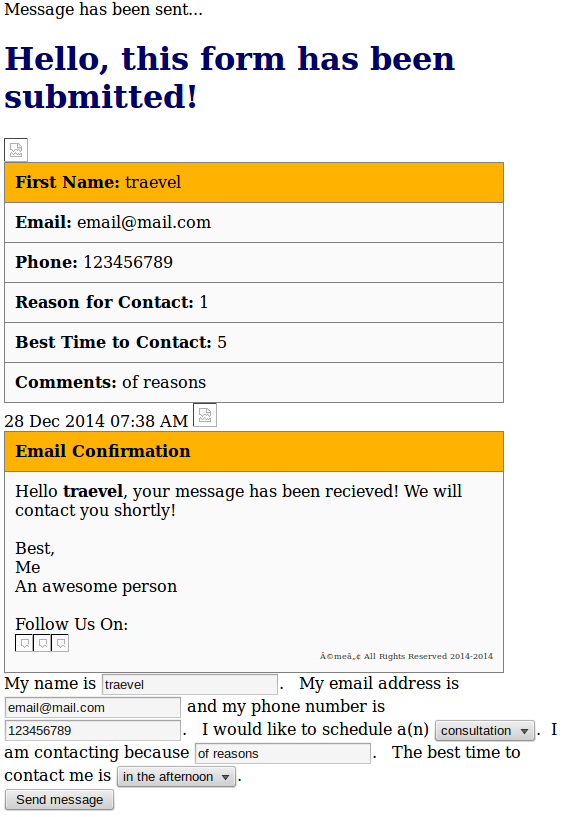
Here's the code, just uncomment the scripts and mail functions again.
<?php
$name = $_POST["name"];
$email = $_POST["email"];
$phone = $_POST["phone"];
$meeting_type = $_POST["meeting_type"];
$time = $_POST["time"];
$message = $_POST["message"];
$to = 'email@gmail.com';
$subject = 'Contact Form Submission';
$v1 = "
<html>
<body>
<style>
h1 {color:#000066;}
table {border:1px solid black; background: #e3f0ff;}
</style>
<h1>Hello, this form has been submitted!</h1>
<img src= 'logo.png' />
<table rules='all' style='border-color: #ffb300;' cellpadding='10' width='500px'>
<tr style='background: #ffb300;'><td><strong>First Name:</strong> $name</td>
<tr style='background: #fafafa;'><td><strong>Email:</strong> $email</td>
<tr style='background: #fafafa;'><td><strong>Phone:</strong> $phone</td>
<tr style='background: #fafafa;'><td><strong>Reason for Contact:</strong> $meeting_type</td>
<tr style='background: #fafafa;'><td><strong>Best Time to Contact:</strong> $time </td>
<tr style='background: #fafafa;'><td><strong>Comments:</strong> $message</td>
</table>
</body>
</html> ";
$message = $v1;
$headers = "From: $from\r\n";
$headers .= "Content-type: text/html\r\n";
//mail($to, $subject, $message, $headers);
echo "Message has been sent..."; //Page RE DIRECT
echo $v1;
//******************************************************************************************************************************//
$name = $_POST["name"];
$email = $_POST["email"];
$phone = $_POST["phone"];
$phone = $_POST["phone"];
$meeting_type = $_POST["meeting_type"];
$time = $_POST["time"];
$message = $_POST["message"];
$subject = 'Message Confirmed!';
$v1 = "
<html>
<body>
<style>
#disclosure {font-size: 8px; color: #333;}
h1 {color:#000066;}
table {border:1px solid black;}
</style>
<img src= 'logo.png' />
<table rules='all' style='border-color: #ffb300;' cellpadding='10' width='500px'>
<tr style='background: #ffb300;'><td><strong>Email Confirmation</strong>
<tr style='background: #fafafa;'><td>Hello <strong> $name</strong>, your message has been recieved! We will contact you shortly! <br><br>Best, <br>Me<br>An awesome person<br><br>Follow Us On:<br><a href='http://www.facebook.com'><img src='facebook_hover.png' width='18' height='18'></a><a href='http://twitter.com'><img src='twitter_hover.png' width='18' height='18'></a><a href='http://google.com'><img src='gplus_hover.png' width='18' height='18'></a><br><div id='disclosure' align='right'>©me™ All Rights Reserved 2014-2014 </div>
</table>
</body>
</html> ";
$message = $v1;
$headers = "From: $from\r\n";
$headers .= "Content-type: text/html\r\n";
// mail($email, $subject, $message, $headers);
// $count= count(file("main_form.csv"));
$today = date("d M Y h:i A");
echo $today;
echo $v1;
//$cvsData = "\n" . $count . "," . $today . "," . $first_name . "," . $last_name . "," . $email . "," . $phone . "," . $reason . "," . $time . "," . $comment;
// $fp = fopen("main_form.csv", "a" );
// if($fp){
// fwrite($fp, $cvsData);
// fclose($fp);
// }
?>
<link rel="stylesheet" type="text/css" href="../css/default.css" />
<link rel="stylesheet" type="text/css" href="../css/component.css" />
<script src="../js/modernizr.custom.js"></script>
<div class="main clearfix">
<form id="nl-form" class="nl-form" action=<?php echo htmlspecialchars($_SERVER["PHP_SELF"]);?> method="post">
My name is <input type="text" id="name" name="name" placeholder="your name" data-subline="Please input your <em>full name</em>."/>.
My email address is <input id="email" name="email" type="text" placeholder="your email" data-subline="Please input your email correctly."/> and my phone number is <input type="text" name="phone" id="phone" placeholder="your phone number" data-subline="Please input your phone number correctly."/>. I would like to schedule a(n)
<select id="meeting_type" name="meeting_type">
<option value="1" selected>consultation</option>
<option value="2">appointment</option>
</select>. I am contacting because <input type="text" name="message" placeholder="briefly explain how we can assist you" data-subline="Provide as much information as possible."/>.
The best time to contact me is
<select name="time" id="time">
<option value="3" selected>anytime</option>
<option value="4">in the morning</option>
<option value="5">in the afternoon</option>
<option value="6">in the evening</option>
</select>.
<div class="nl-submit-wrap">
<button class="nl-submit" type="submit">Send message</button>
</div>
<div class="nl-overlay"></div>
</form>
</div>
</div><!-- /container -->
<!--<script src="../js/nlform.js"></script>-->
<script>
// var nlform = new NLForm( document.getElementById( 'nl-form' ) );
</script>
<M/> commented: Thanks :) +0
imti321 35 Light Poster
@Traveal Sorry but i cant understand what you want to convey , Can you eloberate.
<M/> commented: Thanks :) +0
imti321 35 Light Poster
@Traveal Sorry but i cant understand what you want to convey , Can you eloberate.
<M/> commented: Thanks :) +0
imti321 35 Light Poster
i have seen first time two times Action mentioned
<form action="post" id="nl-form" class="nl-form" action="../EMAIL.php">
and you have not mentioned method and on that place you have mentioned action.Just want to confirm is this is correct.?
<M/> commented: Thanks :) +10
Be a part of the DaniWeb community
We're a friendly, industry-focused community of developers, IT pros, digital marketers, and technology enthusiasts meeting, networking, learning, and sharing knowledge.