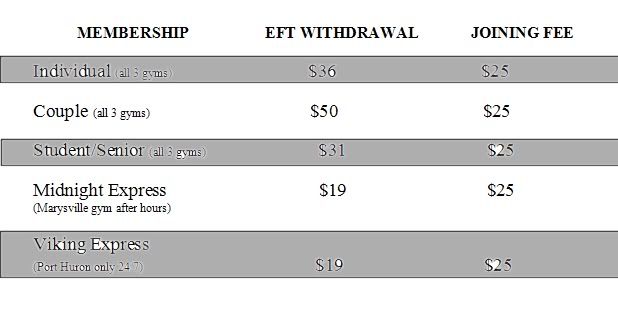
I am VERY new at this, and I need all the help I can get. I am trying to make a table that looks like this:


I am VERY new at this, and I need all the help I can get. I am trying to make a table that looks like this:

[IMG]http://i78.photobucket.com/albums/j108/l8org8or/HELP.jpg[/IMG]

I need the table width to be 563, and I want everything to be centered.

font size 14 and 9

Any help you can offer would be greatly appreciated.

I need the table width to be 563, and I want everything to be centered.

font size 14 and 9

Any help you can offer would be greatly appreciated.

Dani AI

Generated

A focused, modern fix that keeps the layout from the thread but corrects the markup and makes the small parenthetical notes easy to control.

had some malformed markup (an <h4> inside a table row and several stray <tr> tags). and were on the right track with header cells and class-based styling; the snippet below uses a semantic structure (<thead>/<tbody>, <th scope="col">), centers the table at 563px, sets header text to 14px, and makes the parenthetical phrases 9px via a dedicated class. This avoids deprecated attributes and inline <center> tags.

<style>
.table-563 { width:563px; margin:0 auto; border-collapse:collapse; font-family: Arial, sans-serif; }
.table-563 th { font-size:14px; padding:8px; text-align:center; background:#ddd; }
.table-563 td { padding:6px; text-align:center; font-size:12px; }
.table-563 .note { display:inline-block; font-size:9px; color:#333; margin-left:6px; }
</style>

<table class="table-563" role="table" aria-label="Membership fees">
  <thead>
    <tr>
      <th scope="col">Membership</th>
      <th scope="col">EFT Withdrawal</th>
      <th scope="col">Joining Fee</th>
    </tr>
  </thead>
  <tbody>
    <tr>
      <td>Individual <span class="note">(all 3 gyms)</span></td>
      <td>$36</td>
      <td>$25</td>
    </tr>
    <tr>
      <td>Couple <span class="note">(all 3 gyms)</span></td>
      <td>$50</td>
      <td>$25</td>
    </tr>
  </tbody>
</table>

Quick tips: remove extra or empty <tr> tags and ensure every <tr> is closed. If styles are stripped by a CMS, either place the CSS in the page head or inline the class styles as a last resort. 9px can be hard to read on many displays — 11px is a safer minimum for legibility and accessibility. Validate the final HTML with the W3C validator if layout still looks off.

Recommended Answers

All 6 Replies

Hi Mindy Sue,

You can learn how to use tables here

Good luck out there

Hi there,

Perhaps this might get you started.

<html>
<head>
	<title>Multicolor table</title>
	<style type="text/css">
		#sheet{
			width:563px;
			border-collapse:collapse;
			border:1px solid #000000;
		}
		#sheet .title{
			text-transform:uppercase;
			font-size:14pt;
			text-align:center;
		}
		#sheet th{
			padding:5px;
			background-color:#CDCDCD;
			border-top:1px solid #000000;
			border-bottom:1px solid #000000;
			text-align:center;
			font-weight:normal;
			font-size:9pt;
			width:33%;
		}
		#sheet td{
			padding:5px;
			background-color:#FFFFFF;
			text-align:center;
			font-size:9pt;
			width:33%;
		}
	</style>
</head>
<body>
	<table id="sheet">
		<tr>
			<td class="title">Membership</td>
			<td class="title">EFT Withdrawal</td>
			<td class="title">Joining fee</td>
		</tr>
		<tr>
			<th>Individual (all 3 gyms)</th>
			<th>$36</th>
			<th>$25</th>
		</tr>
		<tr>
			<td>Couple (all 3 gyms)</td>
			<td>$50</td>
			<td>$25</td>
		</tr>
		<tr>
			<th>Student / Senior (all 3 gyms)</th>
			<th>$31</th>
			<th>$25</th>
		</tr>
		<tr>
			<td>Midnight Express <br>(Marysville gym, after hours)</td>
			<td>$19</td>
			<td>$25</td>
		</tr>
		<tr>
			<th>Viking Express <br>(Port Huron only, 24/7)</th>
			<th>$19</th>
			<th>$25</th>
		</tr>
	</table>
</body>
</html>

Use <th>text here</th> for gray and <td>text here</td> for white colored backgrounds.

Good luck,

Traevel

Thank you! Ok, now I have my table almost the way I want it, but I don't know how to change the font size. I want the phrases "(all 3 gyms)" "(Marysville gym after hours)" and "(Port Huron only 24/7)" to be a smaller font size.

<table width="569" height="187" border="0">
          <tr>
            <h4>
              <th width="224" align="center">MEMBERSHIP</th>
              <th width="191" align="center">EFT WITHDRAWAL</th>
              <th width="134" align="center">JOINING FEE</th>
            </h4>
          <tr>        
          <tr>        
          <tr>        
          <tr>        
          <tr>        
          <tr>        
          <tr>        
          <tr>        
          <tr>        
          <tr>        
          <tr>        
          <tr>
            <th align="center"></th>
          </tr>
          <tr>
            <td align="center" bgcolor="#AEAEAE">Individual (all 3 gyms) </td>
            <td align="center" bgcolor="#AEAEAE">$36</td>
            <td align="center" bgcolor="#AEAEAE">$25</td>
          </tr>
          <tr>
            <td align="center">Couple (all 3 gyms)</td>
            <td align="center">$50</td>
            <td align="center">$25</td>
          </tr>
          <tr>
            <td align="center" bgcolor="#AEAEAE">Student/Senior (all 3 gyms)</td>
            <td align="center" bgcolor="#AEAEAE">$31</td>
            <td align="center" bgcolor="#AEAEAE">$25</td>
          </tr>
          <tr>
            <td align="center"><p>Midnight Express </p>
            <p>(Marysville gym after hours) </p></td>
            <td align="center">$19</td>
            <td align="center">$25</td>
          </tr>
          <tr>
            
          </tr>
  <td align="center" bgcolor="#AEAEAE"><p>Viking Express </p>
    <p>(Port Huron only 24/7)</p></td>
    <td align="center" bgcolor="#AEAEAE">$19</td>
    <td align="center" bgcolor="#AEAEAE">$25</td>
  </tr>
  <tr>
   
  </tr>
        </table>

Well, you could use <small>(all 3 gyms)</small> and adjust the size with CSS if you want the text to be even smaller. For example <small style="font-size:7pt;">(all 3 gyms)</small> And you might want to remove all but one of those <tr> tags, and add a closing </tr> after the </h4> (which isn't properly nested, but as long as the table looks the way you'd like it to, it probably won't be much of a problem)

Hope this helps,

Traevel

You are the best! I am still learning and this just got me one step further. Thank you!!

I am VERY new at this, and I need all the help I can get. I am trying to make a table that looks like this:


I am VERY new at this, and I need all the help I can get. I am trying to make a table that looks like this:

[IMG]http://i78.photobucket.com/albums/j108/l8org8or/HELP.jpg[/IMG]

I need the table width to be 563, and I want everything to be centered.

font size 14 and 9

Any help you can offer would be greatly appreciated.
I need the table width to be 563, and I want everything to be centered.

font size 14 and 9

Any help you can offer would be greatly appreciated.

Hi there - Let me know if this works - You can fiddle with the style sizes and so on... Just copy and paste it into a text editor and save it as a .html file.
- Keith

<html>

<head><title>table</title>

<style>
A.cellink0 { color: black; font-family: Times New Roman, Arial, Helvetica; FONT-SIZE: 14px; TEXT-DECORATION: none}
A.cellink1 { color: black; font-family: Arial, Helvetica; FONT-SIZE: 9px; TEXT-DECORATION: none}
</style>

</head>

<body>

<table width="563" border=0>
<!-- ROW 1 -->
<tr>
<td width= 40%><a class="cellink0"><center><b>MEMBERSHIP</b></center></a></td>
<td width= 30%><a class="cellink0"><center><b>EFT WITHDRAWAL</b></a></center></td>
<td width= 30%><a class="cellink0"><center><b>JOINING FEE</b></center></a></td>
</tr>

<!-- ROW 2 -->
<tr bgcolor="#aaaaaa">
<td width= 40%><a class="cellink0">Individual</a><a class="cellink1"> (all 3 gyms)</a></td>
<td width= 30%><a class="cellink0"><center>$36</center></a></td>
<td width= 30%><a class="cellink0"><center>$25</center></a>
</td>
</tr>

<!-- ROW 3 -->
<tr>
<td width= 40%><br><a class="cellink0">Couple</a><a class="cellink1"> (all 3 gyms)</a><br><br></td>
<td width= 30%><center><a class="cellink0">$50</a></center></td>
<td width= 30%><center><a class="cellink0">$25</a></center>
</td>
</tr>
<br /><br />

<!-- ROW 4 -->
<tr bgcolor="#aaaaaa">
<td width= 40%><a class="cellink0">Student / Senior</a><a class="cellink1"> (all 3 gyms)</a></td>
<td width= 30%><center><a class="cellink0">$31</a></center></td>
<td width= 30%><center><a class="cellink0">$25</a></center></td>
</tr>

<!-- ROW 5 -->
<tr>
<td width= 40%><br><a class="cellink0">Midnight Express</a><br /><a class="cellink1">(Marysville gym after hours)<br><br></a></td>
<td width= 30%><center><a class="cellink0">$19</a></center></td>
<td width= 30%><center><a class="cellink0">$25</a></center></td>
</tr>

<!-- ROW 6 -->
<tr bgcolor="#aaaaaa">
<td width= 40%><a class="cellink0">Vijing Express</a><br /><a class="cellink1">(Port Huron only 24:7)</a></td>
<td width= 30% valign="top"><center><a class="cellink0">$19</a></center></td>
<td width= 30% valign="top"><center><a class="cellink0">$25</a></center></td>
</tr>

</table>

</body>

</html>

Be a part of the DaniWeb community

We're a friendly, industry-focused community of developers, IT pros, digital marketers, and technology enthusiasts meeting, networking, learning, and sharing knowledge.