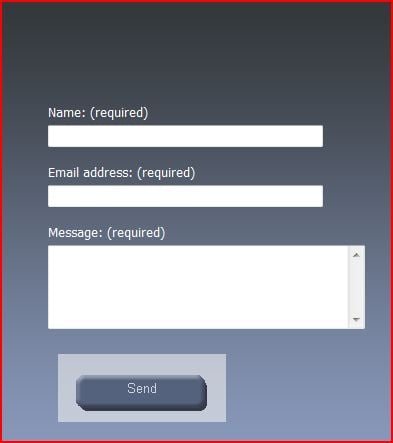
Hello everyone, I have a little dilemma. I have a css that controls a transparent gif and it works fine in FF, but in IE, I get a white border.

Below is my CSS for the button.

#sendbutton
{
 position: absolute;
 background: url(images/send_button97.gif) no-repeat;
 border:none;
 font-size: 13px;
 text-align: center;
 background-color:none;
 color:#FFFFFF;
 left: 680px;
 top: 480px;
 width: 168px;
 height: 68px;
 -moz-outline-style:none;
 -moz-focus-inner:none;
 filter:alpha(opacity=60);
 -moz-opacity:0.1;
 -khtml-opacity: 0.1;
  opacity: 1.0;
}

How do I correct the IE version?

Dani AI

Generated

Short diagnosis and why the white edge appeared

The symptom reported by (gif looks fine in Firefox, white “button face” in IE) usually means the form control’s native chrome is showing through because the control wasn’t fully restyled. correctly flagged the invalid background value used earlier — an ignored or wrong background declaration will leave the browser’s default button rendering in place. ’s PNG suggestion is relevant too: GIF uses single‑pixel transparency while PNG can provide smoother alpha; older IE versions behave differently with those formats, so the browser version matters (as asked).

Practical, robust alternatives

  • Use a native image submit when the button is purely graphical. Example:

    <input type="image" src="path/to/button-image.gif" alt="Send">

    This avoids the form-control chrome entirely (see input type=image - MDN).

  • Use a semantic button containing an image for better accessibility and styling control:

    <button type="submit" aria-label="Send">
      <img src="path/to/button-image.png" alt="">
    </button>

    That lets CSS fully control borders/backgrounds while preserving keyboard focus.

  • If keeping a styled submit, explicitly reset the control’s UI appearance (vendor appearance resets, no border, no default background) and test the :focus state rather than simply removing it — don’t break keyboard accessibility.

Debugging and final checks

Confirm standards mode (doctype), test in the exact IE version and modes (compatibility view can change behavior), and inspect computed styles in IE dev tools to see which background is active. If choosing PNG for smoother transparency, note historical IE differences in PNG alpha handling (see PNG alpha support details at Can I use). The thread outcome from shows the root cause was the control styling, not the GIF itself.

Recommended Answers

All 6 Replies

try checking each CSS attribute with the w3 and see which one is not compatible with IE.

and also, I really don't like the background-color: none;

check these guys, they are not very common:

-moz-outline-style:none;
-moz-focus-inner:none;
filter:alpha(opacity=60);
-moz-opacity:0.1;
-khtml-opacity: 0.1;
opacity: 1.0;

Member Avatar for Member #120589

Is this php? Perhaps you'd have better luck in the correct forum. Try web design/html and css. Sorry theighost - no disrespect - good advice.

Hi, If possible try to use PNG image instead of GIF, I think it would be helpful.

Is this php? Perhaps you'd have better luck in the correct forum. Try web design/html and css. Sorry theighost - no disrespect - good advice.

No disrespect taken :) I forgot this is php :P

What IE version?

(flagged to move)

Thanks all, but I solved my own problem with a little experimenting. The following solved my issue.

<input type="submit" id="sendbutton" name="submit" onfocus="blur()" value="Send" style="position: absolute; background-color:transparent" />

Be a part of the DaniWeb community

We're a friendly, industry-focused community of developers, IT pros, digital marketers, and technology enthusiasts meeting, networking, learning, and sharing knowledge.