hello
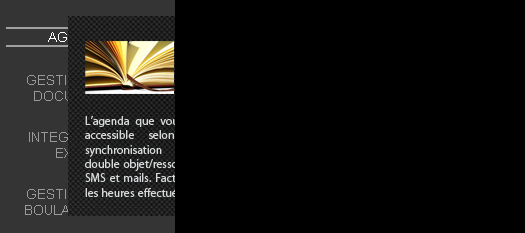
am currently facing a problem with the popup which appears when I hover on a link: (see 1st attachment) while it should have been as shown at design time (2nd attachment img)

For those familiar with drupal, the part which is shown in 1st attachment is from the left sidebar (which ends where the popup is clipped), while the black part will consist of content. But currently the popup itself is not completely shown and if I move it more to the right, it disappears completely (whereby it goes in the content section (right black part) but playing with its z-index does nothing for the popup

Here is the css which I've used, but may be I missed something...if anyone could help

reference code from http://www.dynamicdrive.com/style/csslibrary/item/css-popup-image-viewer/


.leftsidemenu {
width: 210px;
}

ul.leftmenucontent {
padding-left: 0;
text-align: center;
width: 210px;
}

ul.leftmenucontent li {
background-image: none;
margin: 0;
display: block;
padding-right: 45px;
margin: 22px 2px 22px 0; /*5px 2px 5px 0;*/
color: #999999;
font: 14px Arial, Helvetica, sans-serif;
}


ul.leftmenucontent li a {
display: block;
color: #999999;
font: 14px Arial, Helvetica, sans-serif;
text-decoration: none;
text-align: center;
position: relative;
}

ul.leftmenucontent li a:hover {
color: #ffffff;
border-top: 2px solid #9f9f9f;
border-bottom: 2px solid #9f9f9f;
display: block;
}


ul.leftmenucontent li a span {
position: absolute;
left: -1000px;
visibility: hidden;
text-decoration: none;
}

ul.leftmenucontent li a span img {
border-width: 0;
padding: 2px;
}

ul.leftmenucontent li a:hover span {
visibility: visible;
left: 60px;
text-decoration: none;
top: -15px;
}

Also just for info: my left sidebar is 210px, but the image in the popup is 250px, and I have to push it to the right by 210px to get the effect wanted, but in doing so it disappears completely, could this also be a problem, that is the image is going out of the sidebar?
Dani AI

Generated

Most likely cause: the preview element is being clipped by an ancestor (overflow not visible) or confined by a stacking context created on a parent (position/z-index, transform, opacity, etc.). That explains why changing the popup’s z-index on the popup itself had no effect — the popup can’t escape its parent’s clipping or stacking context. Use the browser inspector to walk up the DOM tree and look for any overflow other than visible, any position + z-index, or any transform/opacity on ancestors.

A quick CSS test that often reveals the problem is to temporarily allow children to escape the sidebar. If that fixes it without breaking layout, you can make the change. Example (use your real selectors):

/* temporary test only — replace selectors with your sidebar/popup names */
.sidebar-container { overflow: visible !important; }
.popup-preview { position: absolute; z-index: 9999; }

If changing container styles breaks layout or is not acceptable, the robust approach is to remove the popup from the sidebar’s DOM flow and place it at the document root when shown. On hover, clone (or move) the preview into document.body, compute the anchor’s page coordinates, and absolutely position the popup there. Example jQuery pattern:

$('.leftmenu a').hover(function () {
  var $src = $(this).find('.preview');
  if (!$src.length) return;
  var $clone = $src.clone().addClass('floating').appendTo(document.body);
  var rect = this.getBoundingClientRect();
  $clone.css({
    position: 'absolute',
    left: rect.left + window.pageXOffset + this.offsetWidth + 8 + 'px',
    top: rect.top + window.pageYOffset + 'px'
  });
}, function () {
  $('.floating').remove();
});

Notes: remove clones on mouseleave, handle focus/keyboard users, and test on small screens. More reading on overflow and stacking contexts is available from MDN: https://developer.mozilla.org/en-US/docs/Web/CSS/overflow and https://developer.mozilla.org/en-US/docs/Web/CSS/CSS_Positioning/Understanding_z_index. If decided not to pursue the original example, the body-appending method is the least invasive and will avoid clipping without altering sidebar layout.

in the end did not proceed as shown here :)

Be a part of the DaniWeb community

We're a friendly, industry-focused community of developers, IT pros, digital marketers, and technology enthusiasts meeting, networking, learning, and sharing knowledge.