Hello,

I am developing php web application. I have a form with the fields. All the fields are in a table. Now to create a suggestion box for a text field which has to give auto complete results, my css is ruining the complete page. I just started learning CSS and I am not a pro at it.

For the suggestion box I have created a div tag which is invisible and has some width etc.,
the following the table and a field in the form

<tr>
<td style='width: 150px'><label id = 'Label7'>Tags&nbsp<font color='red'><em>*</em></label></td>
<td><input name='tag' style='width: 150px' tabindex='7' type='text' onkeyup='showTags(this.value)'/>
<div id ='suggestionDiv'></div></td>
</tr>

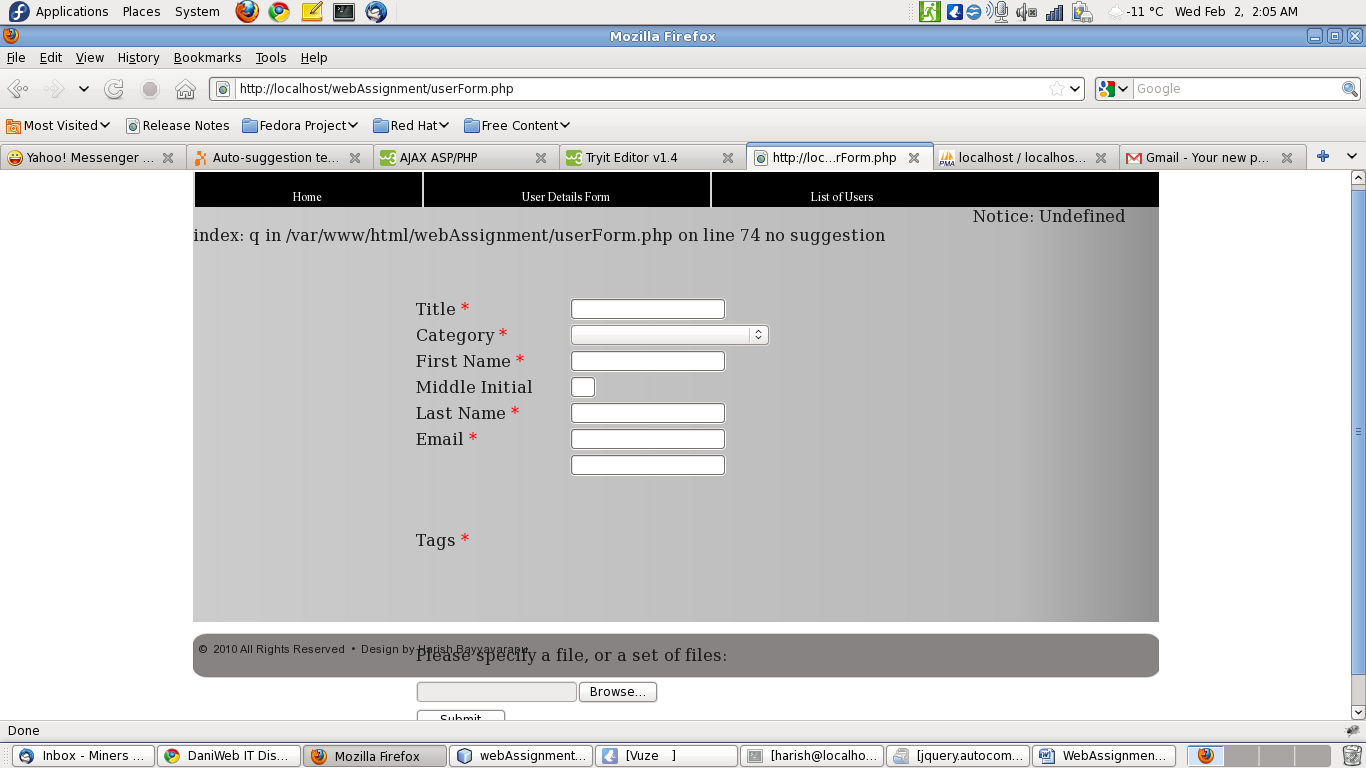
Keeping the div in the column expands the row and pushes the rest of the elements to the bottom of the page.
Keeping the div tag in a new row pushes the complete table to the bottom of the page. And my page container doesn't expand if the form size increases. I need some help with it.

Attached are is my css and the image file for clear picture of what I am saying. I need quick help from experts. I would appreciate your help.

Thanks
Dani AI

Generated

— the problem is that your suggestion div is part of the table flow, so it enlarges the row. was right that a raw <div> is block-level, but display:inline is a fragile fix. A cleaner, more reliable approach is to wrap the input in a positioned container and absolutely position the suggestion box so it overlays the table cell without changing layout.

Use a small wrapper around the input (or make the containing td position: relative) and style the popup as position: absolute. That keeps it out of the document flow, lets it overlap other content, and avoids pushing rows down. Also set a max-height + overflow-y: auto so long result lists don’t grow the page.

Example CSS:

.autocomplete { position: relative; display: inline-block; }

.autocomplete .suggestionDiv {
  position: absolute;
  top: 100%;
  left: 0;
  width: 100%;             /* match the input width */
  box-sizing: border-box;
  max-height: 200px;
  overflow-y: auto;
  background: #fff;
  border: 1px solid #ccc;
  z-index: 9999;
  display: none;           /* show when you have matches */
}

If you need to attach the popup to document.body (to avoid clipping by overflowed ancestors), compute the input position and size with getBoundingClientRect() and set the popup left/top/width accordingly:

function positionPopup(input, popup) {
  const r = input.getBoundingClientRect();
  popup.style.left = (r.left + window.pageXOffset) + 'px';
  popup.style.top  = (r.bottom + window.pageYOffset) + 'px';
  popup.style.width = r.width + 'px';
}

Troubleshooting: check for overflow:hidden or fixed heights on parent containers (they can clip or prevent expansion), and watch for transforms or positioned ancestors that create new stacking contexts (these can affect z-index). For reference on positioning and bounding rectangles, see MDN: position and Element.getBoundingClientRect().

First of all, in your code snippet on line 2 you're missing a closing 'font' tag </font> .

Second if I understood your problem correctly, the reason why this is happening is because a <div> is a 'block' element, which means that it will display as it's own line, as if as it were a 'block' pushing everything else away, try giving the <div> a style of display: inline; that should make it stay inline, and not push everything around...

Be a part of the DaniWeb community

We're a friendly, industry-focused community of developers, IT pros, digital marketers, and technology enthusiasts meeting, networking, learning, and sharing knowledge.