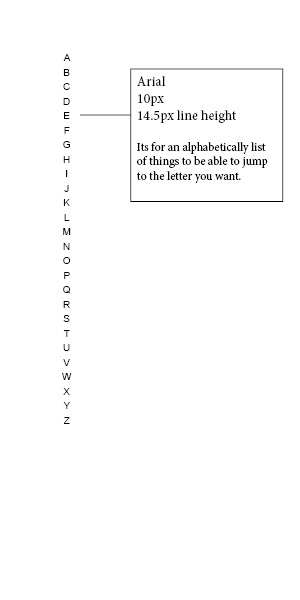
Whats the best way to do this?

Dani AI

Generated

Short answer: give each letter its own link inside a semantic list and add matching targets (or a JS filter). That fixes the problem you hit with one big anchor. , your instinct to split letters out is correct; ’s loop idea is the usual way to avoid typing 26 items, and ’s reminder to use list semantics is good for screen readers and keyboard users.

Example structure (semantic, accessible, easy to style):

<nav aria-label="Alphabetical index">
<ul class="alpha-list">
<li><a href="#A" aria-label="Jump to A">A</a></li>
<li><a href="#B" aria-label="Jump to B">B</a></li>
<!-- repeat or generate -->
</ul>
</nav>

Style the list inline and increase hit area for touch:

A simple client-side generator avoids repetition and works well if you do not want server-side loops:

Troubleshooting and best practices

  • Each letter link must point to a real target (an element with the matching id) or be handled by JS; otherwise the browser will jump to the top of the page.
  • Use a semantic list inside a nav so screen readers announce it properly. Consider aria-current="true" on the active letter.
  • Make targets and links large enough for touch (increase padding or use inline-block).
  • If you handle clicks in JavaScript (filtering a list), call event.preventDefault() and manage focus for keyboard users.

Further reading: the HTML5 nav element and ARIA attributes are documented on MDN for practical accessibility guidance (nav element, aria-current).

Recommended Answers

All 3 Replies

What i have right now is :

<div id="alphabetlist"> <a class="alphabetlist">A B C D E F G H I J K L M M O Q R S T U V W X Y Z </a></div>

And I know that is wrong, because I cant add anchors to each letter like this.

What I was thinking I should do is:

<div id="alphabetlist">
<div> <a class="alphabetlist">A </a></div>
<div> <a class="alphabetlist">B </a></div>
<div> <a class="alphabetlist">C </a></div>
</div>

And then add the anchors

Yes something like that. If you are using a PHP file you could create a loop, that should make it easier.

There are two real easy ways you can do this; utilizing CSS:

ol {
list-style-type: upper-alpha;
}

Or inline in your HTML (using the CSS method is the more appropriate way however):

<ol type="A">
<li>foo</li>
<li>bar</li>
</ol>
Be a part of the DaniWeb community

We're a friendly, industry-focused community of developers, IT pros, digital marketers, and technology enthusiasts meeting, networking, learning, and sharing knowledge.